2short AI Review: Turn Long Videos into Viral Shorts Fast
Overview & Purpose
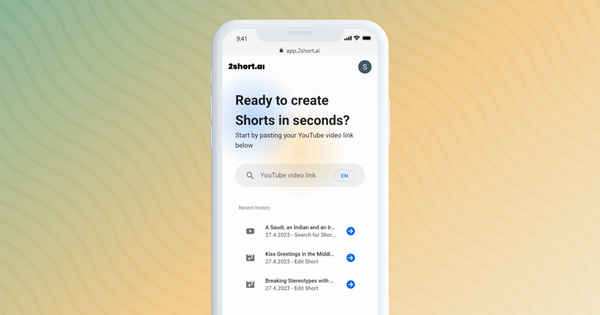
2short.ai is an AI-powered tool that automatically extracts the most engaging moments from long-form videos—primarily those with spoken dialogue and captions—and repurposes them into short, vertical (or other aspect-ratio) clips optimized for platforms like YouTube Shorts, TikTok, and Instagram Reels. Its primary use cases include growing audience reach by turning podcast episodes, educational lectures, commentary videos, product reviews, or motivational content into bite-sized highlights that drive views and subscribers faster, while dramatically reducing manual editing time so creators can focus on new content.
The target audience is content creators, YouTubers, podcasters, educators, social media marketers, and agencies who produce talking-head or speech-driven long-form videos and want to scale distribution across short-form platforms without hiring editors or spending hours in traditional software. It is less suited for purely visual or music-heavy content.
Key Features & Capabilities
Core functionality revolves around AI-driven video analysis: users import a public YouTube URL or Google Drive file, and the tool generates a transcript (leveraging existing captions), identifies high-engagement segments based on audio clarity, speaker energy, and emotional peaks, then outputs multiple ready-to-post shorts with automatic facial tracking to keep the active speaker centered.
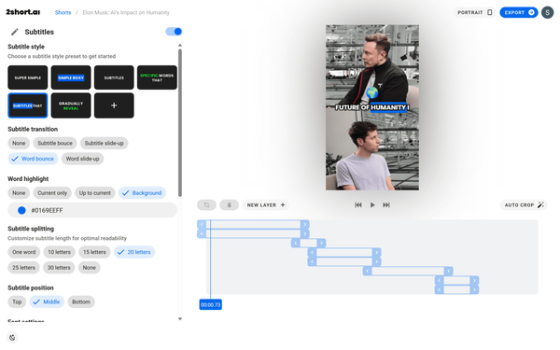
Standout features include one-click animated subtitles (with customizable styles, transitions, word highlighting, and positioning), support for vertical (9:16), square (1:1), and horizontal (16:9) aspect ratios, brand presets for logos/overlays/color schemes, advanced but lightweight cropping/trimming tools, and unlimited 1080p exports without watermarks on paid plans. It supports 26+ languages and prioritizes speaker-focused content.
Differentiators from competitors (such as Opus Clip or SendShort) are its emphasis on seamless facial tracking for clean speaker framing and fast, simple workflow for beginners, combined with server-side fast exports on higher tiers.
Limitations include heavy reliance on pre-existing captions or clear spoken audio (it struggles with accents, jargon, background noise, music videos, live performances, or visual-heavy content without dialogue), basic editing depth (no multi-track timelines, transitions, B-roll, or advanced effects), occasional suboptimal clip selection requiring manual review, and no 4K support.
User Experience
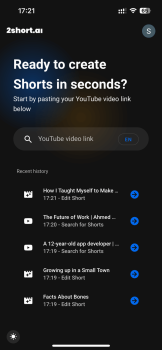
2short.ai boasts a clean, modern, web-based interface that is highly intuitive with a shallow learning curve—most users can go from pasting a link to exporting clips in minutes. The dashboard presents generated shorts in a simple timeline view with preview thumbnails, making selection and editing straightforward even for non-technical creators.
The editor screen offers quick toggles for subtitles, auto-crop, brand presets, and aspect ratios without overwhelming options.
Ease of use scores consistently high (around 4.5–9.1/10 across reviews). Documentation is light but includes an FAQ and email support ([email protected]); higher-tier plans get priority and beta access. No extensive knowledge base or video tutorials are hosted on-site, though community YouTube walkthroughs are abundant. Some users note minor friction with free-plan export limits and the need for occasional manual subtitle tweaks.
Performance & Reliability
Processing is fast—AI analysis and clip generation typically complete in minutes, with paid plans offering server-side fast exports (3–10 seconds for 1080p files). Export quality is crisp with accurate colors and well-timed captions, though not 4K.
Common complaints include AI occasionally selecting clips that lack narrative punch or emotional impact, jittery facial tracking in multi-speaker or dynamic scenes, and caption timing issues with heavy accents or overlapping speech (requiring light manual fixes). It performs best on solo talking-head or podcast-style videos and less reliably on complex visuals. No major outages or privacy scandals reported as of April 2026; the tool is based in Anguilla with standard data handling.
Pricing & Value
2short.ai uses a usage-based freemium model centered on monthly AI video analysis minutes/hours:
- Starter: Free – 30 minutes of analysis, full features, but limited exports of pre-generated clips.
- Lite: $9.90/month – 5 hours analysis, 60 minutes fast exports, ad-free.
- Pro: $19.90/month (most popular) – 15 hours analysis, unlimited fast exports.
- Premium: $49.90/month – 50 hours analysis, priority support, beta features.
All plans allow unlimited high-quality 1080p exports without watermarks once clips are generated. Value is strong for moderate-to-high-volume creators needing quick repurposing (time savings often outweigh the low cost), especially compared to hiring editors or using more expensive all-in-one tools. However, heavy users may find analysis limits restrictive, and those needing advanced editing might prefer pricier alternatives with deeper customization.
Practical Tutorial
A common task is converting a long YouTube podcast episode into multiple engaging Shorts. Here is a step-by-step walkthrough based on the official workflow (tested in reviews as of April 2026):
-
Visit 2short.ai and sign up/log in with Google or email (free account works for initial testing).
-
On the dashboard, paste a public YouTube video URL (ideally one with auto-generated or manual captions for best results) or import directly from Google Drive.
-
Click to start processing. The AI analyzes the video, generates a transcript, and automatically creates multiple short clip options (typically 15–60 seconds each) highlighting engaging moments.
-
Review the list of generated clips with previews. Select the ones you like (or regenerate for more options).
-
Enter the editor: Toggle animated subtitles (choose style like “Subtitles That” or “Word Bounce,” adjust color/position/splitting for readability), refine auto-crop if needed, apply brand presets (logo, colors), and choose aspect ratio (e.g., 9:16 for vertical Shorts).
-
Make minor trims or caption corrections directly in the timeline view.
-
Click Export—choose 1080p quality and download instantly (faster on paid plans). Upload directly to your social channels.
For a visual demonstration, see official-style tutorials such as “2Short.ai Tutorial: Convert Long YouTube Videos into Viral Shorts” on YouTube. Real example: Processing a 45-minute Elon Musk interview typically yields 8–15 high-quality Shorts with centered speaker framing and bouncing subtitles in under 5 minutes of active work.
Final Verdict
Overall rating: 4.3/5 (averaged from hands-on tests and aggregated reviews showing strong ease-of-use and speed scores offset by editing limitations).
Content creators, podcasters, educators, and marketers producing speech-driven long-form videos should use this tool because it delivers fast, professional-looking shorts with minimal effort, excellent facial tracking, and animated captions that boost engagement—perfect for scaling reach across platforms on a budget.
Avoid it if you need advanced multi-layer editing, work with visual-heavy or music-centric content, require perfect AI accuracy without any manual tweaks, or want unlimited free processing.
One-sentence recommendation: 2short.ai is an excellent time-saving AI companion for creators who want to repurpose talking-head videos into viral shorts effortlessly—try the free tier today with coupon HEY10 for ongoing savings.