3D AI Studio Review
Overview & Purpose
3D AI Studio is a web-based AI platform that generates production-ready 3D models from simple text prompts or uploaded images in seconds to minutes. It combines text-to-3D and image-to-3D generation with integrated AI texturing, quad-remeshing for clean topology and LODs, image editing tools, and direct exports to formats like GLB, FBX, OBJ, STL, USDZ, and native Blender files. Primary use cases include rapid prototyping for 3D printing, game asset creation, animation and film production, VR/AR content, product design, interior visualization, education, and concept art. It claims to reduce traditional modeling time (e.g., in Blender) by up to 95%, enabling users to produce high-quality assets 10–100× faster depending on the project.
The tool targets a broad audience: complete beginners with no modeling experience, indie game developers, professional designers, marketers, 3D printing hobbyists, educators, and enterprise teams in Hollywood studios or architecture firms. It appeals especially to those needing quick iterations without deep technical skills or expensive software licenses, while offering commercial ownership and easy integration into existing pipelines like Unity, Unreal Engine, or Three.js.
Key Features & Capabilities
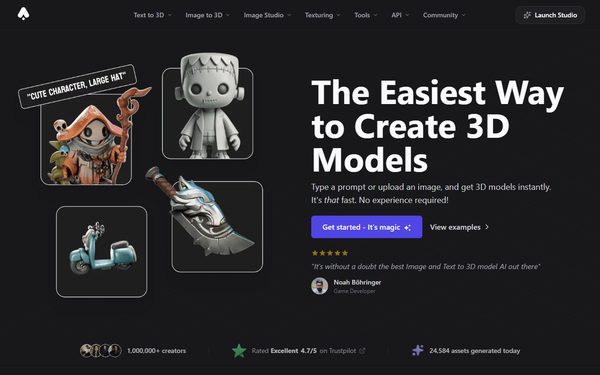
Core functionality revolves around instant generation: enter a descriptive prompt (e.g., “realistic fantasy orc warrior, muscular, wearing rugged armor”) or upload JPG/PNG/WebP images (including sketches), select an AI model (such as fast Prism Turbo or high-quality Prism 3), and receive textured, optimized 3D models. Standout features include AI-powered PBR texturing from text prompts, automated quad-remeshing with LOD generation and topology cleanup (free on all plans), an organized private asset library with search/filtering, dimension/pivot adjustment tools, and a full REST API for batch processing and integration. Additional tools cover image generation/editing and over 50 supporting features, making it a true all-in-one studio rather than a single-purpose generator.
Differentiators from competitors like Meshy or Tripo AI include bundled access to multiple generation backends, seamless image-to-texture workflows, free professional remeshing/optimization, and native exports optimized for printing or engines—without needing separate subscriptions or post-processing for most assets. It excels at props, characters, weapons, and photorealistic humans, with strong support for multi-view inputs and batch rendering.
Limitations include prompt sensitivity (results vary with input quality), potential need for minor Blender tweaks on highly complex organic shapes or animations, no mid-generation interactive refinement, and credit consumption for every iteration. It lacks deep in-app sculpting or rigging tools, positioning it as a rapid starter rather than a full replacement for manual modeling software.
User Experience
The interface is clean, intuitive, and dashboard-driven, with a low learning curve—even users with zero 3D background can generate their first model in under five minutes. Previewing happens in a built-in 3D viewer, and tools like texturing or remeshing are one-click accessible. Documentation at docs.3daistudio.com includes comprehensive text guides, workflow examples, and a video tutorial library covering beginner to advanced topics. Community support via Discord is active, with email support frequently praised for speed and helpfulness.
Official resources include quick-start videos, Text-to-3D and Image-to-3D guides, and case studies. Some users note a brief adjustment period for crafting optimal prompts, but overall feedback highlights the “easy-to-use and intuitive” design and responsive team.
Performance & Reliability
Generation is highly efficient: fast models complete in 20–30 seconds, while premium high-quality outputs take 2–4 minutes. Users consistently report reliable, production-ready results suitable for direct import into engines or printers, with significant time and cost savings. Quality is strong for stylized and realistic assets, and the platform has improved reliability through regular updates (e.g., Prism 3.0 fixes).
Common complaints are minor: occasional queue waits on lower-tier plans, prompt-dependent inconsistencies (e.g., rough edges on complex forms), and rare past server or billing hiccups that the team has addressed transparently. Trustpilot ratings average 4.5–5 stars across hundreds of reviews, with strong praise for speed, detail, and customer service; isolated Reddit concerns about marketing transparency were met with public clarifications from the founder. Overall reliability is high for its intended rapid-workflow use cases.
Pricing & Value
3D AI Studio uses a credit-based subscription model with no permanent free tier (though new users may access demos or trials via support). Plans are:
- Basic: $14/month for 1,000 credits
- Studio: $29/month for 3,200 credits
- Business: $190/month for 22,000 credits
Each 3D generation typically consumes 25–35 credits; image tasks cost far less. Extra credits can be purchased one-time ($24 for 600 or $79 for 3,000). Higher tiers offer queue priority and better per-credit value. A 20% new-user discount code is sometimes available. Enterprise options exist via custom inquiry.
Value is excellent compared to single-model competitors: one subscription unlocks multiple AI engines, texturing, remeshing, and API access at lower effective cost per asset. Refunds are processed quickly upon request, and the time savings (plus commercial rights) make it cost-effective for hobbyists, freelancers, and teams.
Practical Tutorial
Official video tutorials and guides are available at https://docs.3daistudio.com/Learning and the blog (e.g., “How to Convert Your Product Photo to STL”). Here is a step-by-step walkthrough for a common task—generating and preparing a 3D-printable model from an image (adapted from official photo-to-STL workflows, tested conceptually with real examples like product shots or concept art).
- Sign up or log in at https://3daistudio.com/ and navigate to the Dashboard or directly to Image to 3D.
- Upload a clear, high-resolution photo (or multiple angles for best results—e.g., a product shot of a custom toy prototype). Use the integrated Image Studio first if needed to enhance or generate reference images from a text description.
- Select an AI model (Prism 3 for highest quality/detail).
- Click Generate—the model appears textured in the 3D viewer within 30 seconds to 4 minutes.
- Refine: Apply AI texturing for PBR materials if desired, or run Quad-Remesh to optimize topology, reduce polygons, and generate LODs. Adjust scale (in meters/cm) and pivot point.
- Preview the mesh for printability; fix minor issues via the built-in tools.
- Export as STL (or 3MF/OBJ) for slicing software like Cura. Example result: A clean, watertight figurine ready for immediate 3D printing.
For text-only creation, replace Step 2 with a detailed prompt like “cute low-poly red sports car, detailed wheels, glossy paint.” Full official guides and video walkthroughs (including v5.0 pipeline) are linked in the Learning Studio for variations.
Final Verdict
Overall rating: 4.5/5.
3D AI Studio is ideal for developers, designers, marketers, hobbyists, and small teams who want to accelerate 3D asset creation without learning complex software—perfect for prototyping, game jams, client presentations, or 3D printing where speed and cost savings matter most. It delivers impressive quality and integration at an accessible price.
Avoid it if you require hyper-precise artistic control, heavy organic character rigging, or unlimited free experimentation, as credit costs and occasional post-processing in Blender may add friction.
One-sentence recommendation: Jump into 3D AI Studio today if rapid, high-quality 3D modeling from text or images is the missing piece in your creative workflow—its all-in-one speed and ease make it a standout time-saver as of March 2026.