ActionFlows Review: The Ultimate No-Code AI Automation Tool
Overview & Purpose
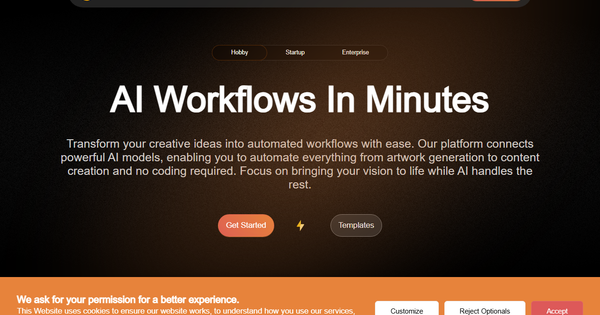
ActionFlows AI is a no-code workflow automation platform that lets users build sophisticated AI-powered processes through an intuitive drag-and-drop interface. It connects language models, image generation, video enhancement, speech processing, and agentic AI systems into customizable flows that automate repetitive tasks such as content creation, data processing, customer communications, and business operations. Primary use cases include generating social media posts, creating smart email replies and summaries, building auto-reply chatbots, performing lead scoring, and conducting resume or job screening.
The platform targets a broad audience: individuals, non-technical professionals (marketers, product managers, HR teams, analysts, and founders), startups seeking quick AI automations, and enterprises needing scalable, secure solutions. It eliminates coding barriers, making advanced AI accessible to anyone who can visualize a process, while still offering enterprise-grade features like private models and API deployment.
Key Features & Capabilities
Core functionality revolves around a visual canvas where users drag nodes for triggers, AI models, logic branches, data transformations, and outputs, then connect them into executable workflows. Users can chain multiple models (OpenAI, Anthropic, Mistral, Hugging Face, Amazon Bedrock, and more), incorporate multimodal capabilities (text, image, video, speech), add decision logic, and deploy instantly to the cloud. Built-in advanced scheduling (including CRON expressions) and triggers eliminate the need for external tools, while API endpoints allow seamless integration into existing apps. Additional capabilities include creating shareable “Landings” (branded preview pages), MCP servers for internal system connections, and fine-tuned private AI models with full privacy controls.
Standout features that differentiate ActionFlows from competitors like Zapier, n8n, or Make include intelligent model routing for cost optimization (e.g., dynamically selecting cheaper models per task), full support for custom/private models without vendor lock-in, native multimodal and agentic orchestration, and enterprise-ready infrastructure with real-time collaboration and version control. Templates provide ready-made starting points across industries (finance, legal, marketing, HR), and workflows can be exposed via secure APIs or scheduled automatically.
Limitations include a relatively early-stage ecosystem with fewer pre-built third-party app integrations than mature automation giants, opaque public pricing details, and limited third-party documentation or community resources. Complex enterprise-scale deployments may still require iteration and testing, and external AI API costs (e.g., OpenAI tokens) apply separately.
User Experience
ActionFlows earns high marks for accessibility with its clean, visual drag-and-drop builder that requires zero coding experience. Users simply add nodes, configure inputs/outputs, insert decision branches, and test in real time—ideal for rapid prototyping. The learning curve is gentle for beginners thanks to a library of templates with built-in customization guides, guided wizards, and real-time preview functionality. Onboarding feels straightforward for product managers, marketers, and operations teams, though power users may spend additional time mastering advanced branching or MCP integrations.
The interface is described as seamless and user-friendly, focusing on modularity and iteration rather than overwhelming options. Documentation exists via the site and blog (covering topics like multimodal agents, RAG systems, and fine-tuning), but remains somewhat developer-oriented and limited in beginner walkthroughs. Support resources appear to be email/in-app or self-service; no extensive public knowledge base or video academy was prominently featured as of research.
Performance & Reliability
Workflows deploy to scalable cloud infrastructure and execute efficiently, with built-in logging, error handling, and real-time testing helping users catch issues quickly. Scheduling and API triggers run reliably without external dependencies, and model routing reportedly delivers significant cost savings. No widespread performance complaints or downtime reports surfaced in available sources—likely because the tool is still emerging and user volume remains modest.
Common issues noted in early-stage tools (such as occasional node configuration tweaks for new model integrations) are acknowledged in founder communications, but no major reliability red flags appear in public feedback. Scalability claims target enterprise use, though large-scale production proof is still building.
Pricing & Value
ActionFlows operates on a freemium model with three tiers: Hobby (free or limited entry for individuals), Startup (mid-tier for growing teams), and Enterprise (full-featured with advanced security, collaboration, and support). Exact monthly/annual pricing and credit limits are not publicly listed on the site and require signup or sales contact for full details; overages for AI usage follow underlying model providers.
Value is strong for teams wanting AI-centric automation without developer overhead: the no-code approach plus model optimization can replace hours of manual work or expensive custom development. Compared with Zapier (broader app integrations but less native AI depth) or n8n (self-hosted but steeper curve), ActionFlows excels in multimodal/agentic AI accessibility and privacy controls. Early users gain cost efficiencies through smart routing, making it a compelling choice for AI-heavy workflows despite the need to inquire about exact plan costs.
Practical Tutorial
Official templates include step-by-step customization guides (visit https://actionflows.ai/templates). Below is a complete, real-world walkthrough for a common task: Automate Social Media Content Generation (based directly on the platform’s “Social Media Posts” template and builder capabilities).
-
Sign up and create a new workflow — Go to actionflows.ai, create a free Hobby account if needed, and click “New ActionFlow” in the dashboard. Name it “Daily Social Media Generator.”
-
Add a trigger — Drag a Schedule node (or Webhook for manual triggers). Set it to run daily at 8 AM using simple or CRON scheduling.
-
Connect input data — Add an Input node for topic/keywords (e.g., “AI workflow tools 2026”) or pull from a Google Sheet/CSV via integration.
-
Add core AI generation — Drag an LLM node (choose Claude or GPT model). Configure prompt: “Generate 5 engaging LinkedIn + Twitter posts about [topic]. Include hashtags and call-to-action.” Connect previous input.
-
Enhance with multimodal (optional) — Drag an Image Generation node (e.g., via DALL·E or Stable Diffusion integration). Prompt it to create matching visuals from the text output. Add a Branch node for “if sentiment positive, generate image.”
-
Add logic and outputs — Insert decision branches (e.g., length check or approval step). Connect to Output nodes: email summary, post to social API (Twitter/LinkedIn via native or custom API), or save to Notion/Google Drive.
-
Test and iterate — Click “Preview/Test” to run with sample data. Review logs, adjust prompts or branches in real time.
-
Deploy and monitor — Publish the workflow. It runs automatically on schedule. Create a Landing page to share the live demo with your team. Monitor executions via dashboard analytics.
The entire process typically takes 15–30 minutes. Duplicate the official “Social Media Posts” template for a head start and customize further. For advanced variations (e.g., adding speech synthesis), explore the blog posts on agentic workflows.
Final Verdict
Overall rating: 4.2 / 5 — A highly promising tool that genuinely democratizes sophisticated AI automation.
Who should use this tool: Non-technical marketers, HR professionals, startup founders, and operations teams who want to chain powerful AI models into reusable automations without hiring developers or learning complex tools—especially those prioritizing privacy, multimodal capabilities, and built-in scheduling.
Who should avoid this tool: Organizations needing hundreds of pre-built SaaS integrations out of the box (consider Zapier/Make instead) or those requiring battle-tested enterprise SLAs and extensive public case studies at massive scale (wait for further maturity).
One-sentence recommendation: If you’re ready to turn AI ideas into automated workflows in minutes rather than months, ActionFlows AI is one of the most accessible and powerful no-code options available today—start with the free tier and a template to see the magic instantly.