Adori Labs Review: Turn Blog Posts into Pro Videos Instantly
Overview & Purpose

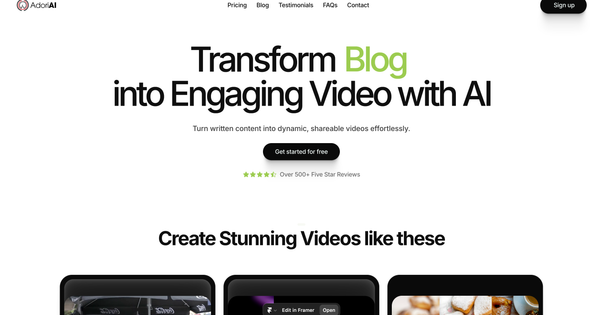
Adori Labs (operating as AdoriAI at adoriai.com) is an AI-powered platform that transforms blog posts, articles, and web content into professional videos. Users simply paste a blog URL, and the tool automatically extracts key elements like headlines, summaries, and relevant visuals before generating a complete video with voiceovers, captions, and synced media. Primary use cases include content repurposing for YouTube, social media platforms (such as Instagram Reels, TikTok, and LinkedIn), SEO enhancement to boost search rankings, and expanding audience reach through engaging video formats that drive higher retention and shares compared to text alone. It also supports turning podcasts or scripts into videos for marketing, training, or compliance purposes in sectors like finance and hospitality.
The target audience primarily includes content marketers, bloggers, social media managers, e-commerce owners, tech startup founders, and small-to-medium businesses without dedicated video production teams. It appeals to anyone needing quick, scalable video content from existing written material to improve engagement and monetization potential, rather than developers or graphic designers requiring advanced custom coding or effects. Research conducted as of March 14, 2026.

Key Features & Capabilities
Core functionality revolves around one-click blog-to-video conversion: AI analyzes the URL to generate a script summary, auto-creates scenes with contextual visuals from a 100-million-item copyright-free media library (photos, videos, and music), adds lifelike voiceovers from over 40 options across age groups and accents (supporting 9+ languages), and applies perfectly timed, editable captions with pre-built templates. A built-in live video editor enables real-time scene switching, animations, previews, and custom tweaks without leaving the platform. Additional capabilities include SEO-optimized titles/descriptions, direct publishing to YouTube and other social channels, and brand-aligned customizations.
Standout features differentiating it from competitors (such as Pictory or InVideo AI) include seamless URL-based auto-extraction and summarization for blogs specifically, the massive integrated asset library that feels like an on-demand production crew, and a unified all-in-one workflow with zero-delay live editing—no need to switch between multiple tools. It also emphasizes speed, claiming videos process dramatically faster than manual methods.
Limitations include tiered restrictions on video/script length (typically 1-5 minutes depending on plan), number of projects/exports per month, and resolution (720p on lower tiers, 1080p on Premium). AI-generated visuals or voice sync may occasionally show minor artifacts (e.g., awkward transitions or imperfect matches), requiring manual edits. Missing features for some users: no deep integration with advanced editing software like Adobe Premiere, limited support for very long-form content or complex multi-language dubbing beyond base offerings, and no native collaboration tools on entry-level plans.

User Experience
The interface is highly intuitive with a clean, modern design focused on simplicity—most users can start creating without prior video experience or technical skills. The learning curve is minimal: the process relies on guided prompts and AI automation, making it accessible even for non-creatives. Real-time previews and drag-and-drop elements in the editor contribute to a smooth workflow.
Documentation and support resources are solid, including a comprehensive help center with tutorials, FAQs, user guides, and a dedicated blog featuring practical tips (e.g., "The 2025 Playbook: 10 AI-Powered Tips to Boost Your Marketing"). 24/7 customer support is available via live chat, email, and phone. User feedback highlights the "few-clicks" ease, though some note that initial customization steps benefit from the provided templates to avoid trial-and-error.
Performance & Reliability
Video generation is efficient and fast, often completing in minutes rather than hours, with automated processing handling extraction, visuals, and syncing reliably for most standard blog lengths. Users report noticeable boosts in engagement metrics, such as higher YouTube views and social shares, thanks to professional output quality and SEO features. The platform handles thousands of videos for businesses without reported downtime in available data.
Known issues or common complaints are limited due to the tool's relatively niche user base. Sparse reviews mention occasional needs for post-generation tweaks to fix AI inconsistencies (e.g., visual-text mismatches), but no widespread reliability problems like crashes, poor audio quality, or publishing failures. Testimonials consistently praise consistency for content marketing, with overall positive sentiment on Trustpilot (4.2/5 from available reviews).
Pricing & Value
Adori Labs offers a freemium model with a low-entry Starter option ($5 one-time for 3 limited projects, 1 export, 1-minute scripts at 720p). The Basic plan is $15 per month (10 projects, 15 exports, up to 3-minute scripts), while Premium runs at $45 per month (20 projects, 30 exports, 5-minute scripts, 1080p resolution, advanced AI options, and team features). Annual billing saves 20%, and enterprise custom pricing is available. All plans include core AI tools, YouTube auto-publishing, and no watermark on paid tiers; metered add-ons exist for extra usage.
The value proposition is strong for occasional or mid-volume users seeking time savings on content repurposing—far more affordable and specialized than hiring videographers or using broader suites like full video editors. Compared to alternatives, it excels in blog-specific automation at a competitive entry price, though heavier users may find export limits restrictive without upgrading. Free trial elements (via Starter) allow testing without commitment, delivering solid ROI through increased reach for marketers.
Practical Tutorial
A common task is converting a blog post into a YouTube-ready video. Adori Labs provides an official step-by-step guide on its blog (e.g., at adoriai.com/blog/turn-your-articles-into-videos-a-step-by-step-guide), which aligns with the URL-to-Video workflow. Here's a practical walkthrough using a real example: repurposing a sample marketing blog titled "10 AI Tips for 2026" from a hypothetical site.
- Sign up for a free account or Starter plan on adoriai.com (no credit card required initially).
- Navigate to the URL-to-Video or Blog Converter tool in the dashboard.
- Paste the full blog URL (e.g., example.com/ai-tips-2026) and click "Generate." The AI instantly extracts headlines, summarizes key points into a script, and auto-creates 8-10 scenes with relevant images or video clips from the 100M+ library.
- Select a voiceover: Browse 40+ options (e.g., choose a professional male voice in English with neutral accent) and preview the narration synced to the script.
- Customize in the live editor: Edit captions for timing/readability, swap visuals if needed (e.g., replace a stock image with a branded one), apply animations or templates, and adjust transitions for a polished flow. Add SEO-optimized title like "AI Marketing Tips 2026 | Boost Your Strategy Now" and description.
- Preview the full video in real-time, then generate the final MP4 (typically under 3 minutes for Basic plan).
- Download or publish directly to YouTube with one click, where auto-generated thumbnails and tags enhance visibility.
This process takes 5-15 minutes end-to-end. For best results, use well-structured blogs with clear sections. Official tutorials in the help center expand on advanced editing or multi-platform publishing.
Final Verdict
Overall rating: 4.3/5. Adori Labs excels as an efficient, user-friendly tool for content marketers and bloggers who want to quickly repurpose written articles into high-engagement videos without video production expertise—its automation, asset library, and SEO features deliver real value for expanding reach on YouTube and social platforms. Those who should avoid it include professional videographers needing unlimited exports, ultra-long-form content, or pixel-perfect custom control, as well as budget-conscious users who might outgrow the tiered limits quickly without frequent upgrades.
AdoriAI by Adori Labs is a worthwhile investment for efficient blog-to-video marketing in 2026—start with the Starter plan to see the engagement boost firsthand.