AgentVoice Review: Automate Calls and Workflows with AI Agents
Overview & Purpose

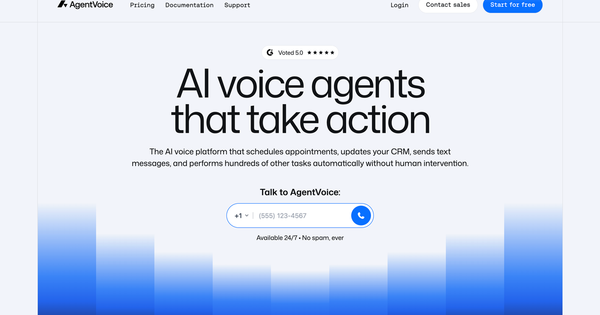
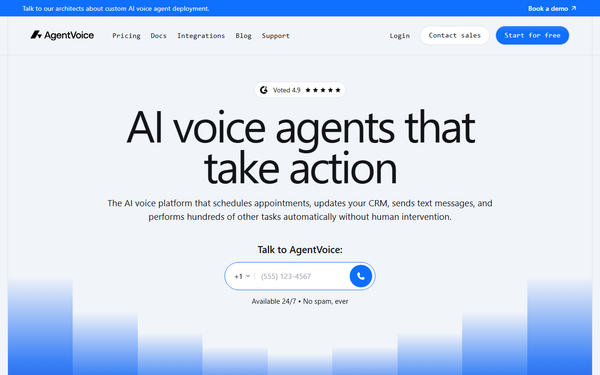
AgentVoice is an AI-powered platform for building and deploying voice agents that handle both inbound and outbound phone calls while performing real-world actions, such as qualifying leads, booking appointments, updating CRMs, sending follow-up texts, and managing workflows. Unlike basic voice bots that only converse, these agents integrate directly with business tools to execute tasks autonomously during or after calls, operating 24/7 without spam or human intervention. Primary use cases include lead qualification and appointment scheduling for sales teams, customer support routing and ticket updates, outbound campaigns for follow-ups or reminders, and intelligent call handling for agencies or service-based businesses like home services or clinics.
The target audience spans solo entrepreneurs and small businesses seeking quick automation without developers, mid-market operations teams needing scalable workflows, marketers running outbound campaigns, and large enterprises requiring custom integrations and SLAs. It suits non-technical users (founders, marketers, support staff) through its no-code interface while offering API access for developers.
Research for this review was conducted in March 2026 using the official website, pricing page, documentation, G2 reviews, Capterra listings, Reddit discussions, and comparison articles.
Key Features & Capabilities
Core functionality revolves around no-code agent builders that combine large language models (LLMs), advanced speech-to-text/text-to-speech (via integrations like ElevenLabs or OpenAI), and real-time tool calling. Agents maintain context-aware memory across interactions, handle interruptions and background noise with sub-second latency, and support pre-, in-, and post-call actions like CRM syncing or calendar bookings.
Standout features include:
- Action-oriented workflows: Agents don't just respond—they book meetings, update records, or trigger automations using native integrations with HubSpot, Salesforce, Cal.com, Twilio, and over 200 tools via Zapier/Make/n8n.
- Multilingual and voice customization: Supports English, Spanish, German, Portuguese, French (with accents and localized behavior) and allows voice cloning or premium libraries.
- Conversation intelligence: Real-time sentiment analysis for emotion-aware routing, full transcripts, recordings, and performance analytics.
- Outbound campaign tools: Bulk imports, lead prioritization, automated retries, and real-time dashboards.
- Additional capabilities: Spam/robocall filtering, intelligent routing with queues/voicemail/transfer, live monitoring with human escalation, and enterprise features like SIP trunking and role-based access.
These differentiate AgentVoice from many competitors (e.g., Synthflow or basic IVR platforms) by emphasizing "agents that act" with tool-aware memory and production-ready scalability rather than just conversational chat.
Limitations include dependency on stable internet for optimal performance, potential additional costs for phone numbers or extra concurrent lines, and less emphasis on ultra-deep custom coding compared to developer-focused alternatives like Vapi or Retell AI. Advanced analytics depth is occasionally noted as improvable in user feedback, and highly nuanced or regulated scenarios may require testing and iteration.
User Experience
AgentVoice prioritizes accessibility with a visual no-code editor, templates, and drag-and-drop workflow builder, making it suitable for non-technical users. The learning curve is minimal—most users launch their first agent in under 10–30 minutes via the intuitive dashboard featuring real-time analytics, call transcripts, and monitoring tools. The interface feels modern and business-oriented, with clean dashboards for campaign ROI, performance metrics, and live supervision.
Documentation is solid, with a dedicated /docs section including a Quick Start Guide, integration guides, and API references. Support includes community Discord, email, priority channels for paid plans, and dedicated architects for enterprise users. Testimonials consistently praise seamless CRM integrations and responsive help. Overall, the platform earns high marks for ease and polish, with users reporting it "feels like someone we hired."
Performance & Reliability
Performance stands out with sub-second latency, natural turn-taking, and the ability to handle complex conversations comparably to junior staff. Agents scale reliably to thousands of calls, with users reporting tripled call volume without added staff and high engagement rates due to human-like voice quality ("customers can't tell it's AI"). Real-time spam filtering, fallback behaviors, and escalation options enhance reliability.
Common feedback from G2 (4.9/5 rating) and Reddit highlights consistent production readiness and better voice quality/latency than alternatives. No widespread complaints or outages were identified in 2025–2026 reviews; minor notes include general AI challenges like accent handling in edge cases or the need for prompt iteration. Overall, it performs reliably for business-scale use when properly configured.
Pricing & Value
AgentVoice uses a transparent pay-as-you-go model with no mandatory monthly subscriptions for core usage:
- Pay As You Go: $10 free credit on signup; $0.10 per minute (all-inclusive: LLM, voice, STT, TTS) for US/Canada (other countries vary); 5 concurrent calls included (+$10 per additional line); phone numbers from $3/month; unlimited agents and integrations.
- Custom/Enterprise: Volume discounts, dedicated onboarding, white-label options ($1,000/month), SLAs, custom concurrency, and priority support—contact sales for committed pricing.
No free tier beyond the signup credit, but the all-in rate (no separate AI or telephony fees) provides strong value, often cited as better than competitors. High-volume users benefit from custom plans. Compared to alternatives, it delivers excellent ROI through time savings, 24/7 availability, and scalable automation without developer costs.
Practical Tutorial
Official documentation and quick-start resources are available at https://www.agentvoice.com/docs. Below is a step-by-step walkthrough for a common task—building an inbound AI voice agent for appointment booking (e.g., for a dental clinic qualifying leads and syncing with Cal.com). This is synthesized from the platform's Quick Start Guide, integration examples, and user-reported flows; actual setup occurs in the app dashboard.
-
Sign up and create an agent: Go to https://app.agentvoice.com/signup, create a free account, and start a new agent. Name it (e.g., "Clinic Booker") and set the core prompt/persona: "You are a friendly receptionist for [Business Name]. Qualify callers by asking about their needs, check availability via our calendar tool, and book appointments while updating the CRM."
-
Configure voice and language: Select or clone a voice (ElevenLabs/OpenAI options). Enable multilingual support if needed and set localized behavior.
-
Build knowledge and tools: Upload FAQs or connect your knowledge base. Add integrations—link Cal.com for real-time availability and HubSpot/Salesforce for CRM updates. Use the visual workflow editor to define actions: e.g., "If caller wants appointment, check calendar → propose slots → confirm and create event → send confirmation text → log in CRM."
-
Set up phone number and routing: Purchase or port a number via the dashboard (or use existing SIP). Configure inbound handling: auto-answer with dynamic greeting, enable sentiment analysis for empathetic routing, and set escalation to human if needed.
-
Test and refine: Use the built-in simulator or make a test call. Review transcripts, adjust prompts for interruptions or edge cases, and monitor latency/sentiment insights.
-
Launch and monitor: Activate the agent, import test leads if outbound, and use real-time dashboards for live monitoring, analytics, and post-call automation (e.g., follow-up emails).
The entire process typically takes under 10 minutes for basics, with full customization in a day. For video examples, search YouTube for "AgentVoice appointment booking demo" or book an official demo at https://www.agentvoice.com/contact/. Always test thoroughly with your specific use case.
Final Verdict
Overall rating: 4.7 out of 5. AgentVoice excels for businesses of all sizes that want reliable, action-taking AI voice automation with minimal setup and competitive per-minute pricing.
Businesses with moderate-to-high call volumes—especially those in sales, support, or services—should use it to save time, scale operations, and boost satisfaction through natural, integrated interactions. Avoid it if you need completely free unlimited usage, highly specialized custom development outside the API, or operate in ultra-low-volume scenarios where per-minute costs aren't justified.
Highly recommended for any team ready to replace repetitive phone work with intelligent AI agents that actually get things done.