Polarr AI Color Match Review: Free One-Click AI Color Grading
Overview & Purpose
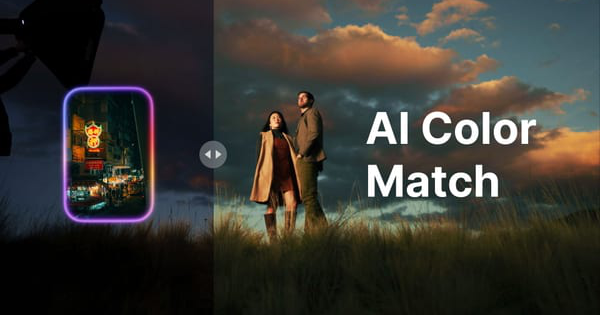
Polarr AI Color Match is a free web-based tool developed by Polarr that leverages artificial intelligence to instantly analyze the color, tone, and stylistic characteristics of a reference image (source photo) and transfer that look to a target photo. Users upload a source image—such as a professionally edited photo, movie still, painting, or any visual inspiration—and the AI applies its color grading to their own image in seconds. The primary purpose is to streamline color consistency across projects, recreate desired aesthetics without manual tweaking, and generate reusable assets like presets or LUTs for further editing in other software.
Key use cases include batch-style consistency for photographers shooting weddings or events, rapid experimentation for content creators on social media, and quick style matching for designers or video editors who export LUTs for tools like Adobe Premiere or DaVinci Resolve. The target audience spans amateur and professional photographers, graphic designers, marketers creating visual campaigns, and video editors seeking affordable color-matching solutions. It is particularly appealing to users who want a no-install, browser-only workflow rather than committing to desktop software. Research conducted as of March 8, 2026, confirms the tool remains positioned as an accessible entry point into Polarr’s broader ecosystem, including the Polarr Next desktop/mobile app.
Key Features & Capabilities
The core functionality revolves around one-click AI color transfer: select or upload a source image, load a target photo, and let the AI handle the rest. A simple strength slider allows real-time fine-tuning of how aggressively the match is applied, preserving original details where desired. Standout features that differentiate it from competitors include completely free access with no watermarks, direct export options as high-resolution JPG, Lightroom-compatible profiles, or industry-standard LUTs (for use in Polarr Next, Lightroom, Capture One, or video editors), and cross-style compatibility (it works on photos, illustrations, or filmic references). Unlike many paid tools, there is no requirement for account creation or software installation.
The web tool’s seamless integration with Polarr Next enables users to generate custom presets or LUTs on the fly and import them into the full app for advanced refinements like batch processing or RAW support. Compared to alternatives such as Capture One’s Match Look or Evoto AI, Polarr’s version emphasizes speed and zero cost while delivering surprisingly accurate results across diverse lighting conditions. Limitations include its web-only nature (no direct RAW file support or large-scale batch processing—those require the paid Polarr Next app), occasional imperfect matches on highly complex or mismatched exposures (AI cannot fully replicate manual artistic intent), and lack of video file input (though exported LUTs work for video grading). No advanced masking or selective color adjustments are available on the web version.

User Experience
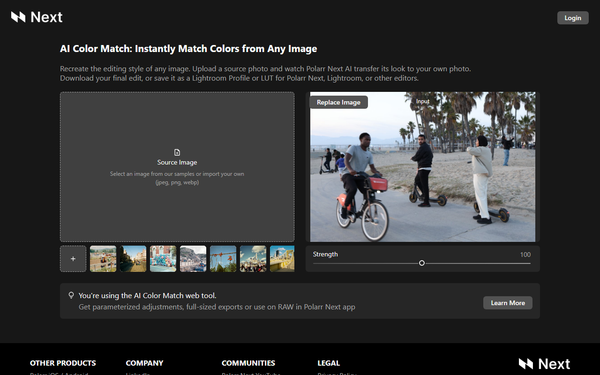
The interface is exceptionally clean and intuitive, with a minimalist two-panel layout: one for the source image (with sample options or upload) and one for the target image (with a “Replace Image” button). A single strength slider and instant preview make the entire process approachable even for beginners, resulting in a near-zero learning curve—most users can achieve usable results in under 30 seconds. The design feels modern and responsive across desktop browsers, with no clutter from ads or upsells.
Documentation is light but sufficient: the homepage provides clear instructions, while support is available via email ([email protected]) and active community channels including the Polarr Next YouTube channel, Facebook group, and social links. No extensive written manual exists for the web tool specifically, but official YouTube tutorials cover the closely related Polarr Next implementation. Overall, the experience prioritizes speed and simplicity over depth, making it ideal for quick tasks but less suited for users needing in-depth help articles.

Performance & Reliability
Processing is remarkably fast—typically completing the AI match in 1–5 seconds depending on image size and complexity—with full-resolution exports available immediately. The tool handles common formats (JPEG, PNG, WebP) reliably and maintains high image quality without visible artifacts in most cases. User feedback from launch discussions on Product Hunt and Polarr communities highlights consistent performance and minimal lag, even on standard laptops.
Known issues are minor and infrequent: occasional subtle mismatches in extreme lighting scenarios (common to all AI color tools) and the lack of progress indicators during very large uploads. No widespread complaints about downtime, crashes, or data loss were found across reviews and forums as of March 2026. Reliability is strong for its intended casual-to-professional use, though heavy users may prefer the desktop app for uninterrupted batch workflows.

Pricing & Value
AI Color Match is entirely free with no tiers, limits, or hidden costs—no account required and unlimited exports. This stands in stark contrast to competitors like Capture One (subscription-based) or premium AI features in Lightroom/Photoshop, which require paid plans. The ability to export professional-grade LUTs and Lightroom profiles at no charge delivers exceptional value, effectively turning any reference image into a reusable asset for other tools.
For the price (zero), the value proposition is outstanding: it saves hours of manual grading and democratizes professional color matching. Users already in the Polarr ecosystem gain even more by importing results into Polarr Next for advanced editing. The only caveat is that power users needing RAW batch processing or deeper customization will eventually upgrade to Polarr Next’s paid plans, but the web tool serves as an excellent standalone or entry-level solution.
Practical Tutorial
A dedicated official tutorial for the web tool is not prominently linked on the homepage, but closely related guidance is available on Polarr’s YouTube channel (search “AI Color Match Web Tool” or watch “How to Use AI Color Match in Polarr Next”). Below is a complete step-by-step walkthrough for the most common task: matching the cinematic color grade of a movie still to your own portrait photo.
- Navigate to https://colormatch.polarr.com/ in any modern browser.
- In the “Source Image” panel, click to upload your reference (e.g., a still from a favorite film) or select one of the provided samples.
- In the “Input” panel, click “Replace Image” and upload your target photo (e.g., a portrait needing consistent grading).
- The AI will automatically generate the color-matched preview. Use the “Strength” slider (0–100%) to dial in the intensity—start at 80% for natural results.
- Review the side-by-side comparison; tweak the slider until the tones align with your vision.
- Click “Download” to save the result as a JPG, or choose “Save as Lightroom Profile” or “Save as LUT” for reuse in other software.
Example outcome: Applying a cool, teal-orange movie look from a reference image to a daylight portrait instantly creates a cinematic series-ready photo. The entire process takes under one minute and produces files ready for social media or further editing. For video workflows, export the LUT and apply it in your editor of choice.
Final Verdict
Overall rating: 4.5/5 – An outstanding free tool that punches well above its weight.
Photographers, content creators, and hobbyists seeking quick, consistent color grading without spending a dime should use this tool—it excels at rapid style transfer and LUT generation. Professional video editors and advanced users who rely on RAW batch processing or extensive manual controls should avoid the web version alone and instead pair it with (or upgrade to) Polarr Next.
One-sentence recommendation: If you want professional-grade color matching in seconds at zero cost, Polarr AI Color Match is an essential bookmark for every visual creator’s toolkit.