Ai Homedesign Review: The Best AI Tool for Virtual Staging
Overview & Purpose

AI HomeDesign (https://aihomedesign.com/) is an AI-powered toolbox designed primarily for real estate professionals to create high-quality, listing-ready property visuals. Users upload photos of rooms or properties, and the AI instantly generates transformed images through tools such as virtual staging, item removal, image enhancement, day-to-dusk conversions, and renovation simulations (e.g., wall, floor, ceiling, or backsplash changes). Primary use cases include preparing professional MLS listings without physical staging costs, visualizing renovations for house flippers, decluttering cluttered spaces, and enhancing photos for marketing materials.
The platform targets real estate agents, photographers, teams, and house flippers who need fast, consistent visuals for client presentations or online listings. While homeowners or general interior enthusiasts can experiment with the AI Interior Designer tool for personal inspiration, the workflow and features are optimized for professional real estate photo editing rather than comprehensive consumer redesign projects or interactive experiences.
Key Features & Capabilities
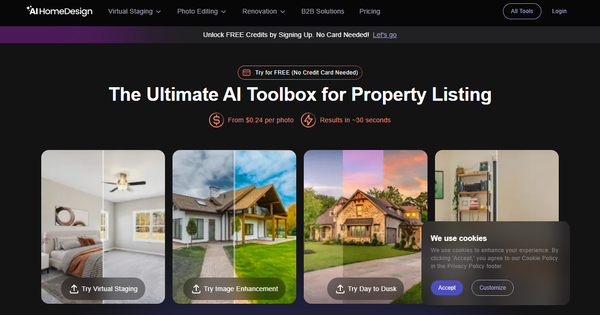
Core functionality is built around a simple upload-and-generate process: select a tool, specify room type or style where applicable, and receive edited results in approximately 30 seconds. Available tools include Virtual Staging (furnish empty rooms or restyle existing ones with multiple styles and 5+ room types), Item Removal (selective or bulk decluttering), Image Enhancement (with options like TV screen addition or sky replacement), Day to Dusk (twilight conversion with shadow removal and darkness adjustment), AI Furniture Restyle, AI Wall/Floor/Ceiling/Backsplash Change, Under Construction visualization, and the dedicated AI Interior Designer for creative concepts.
Standout features include an all-in-one workflow (e.g., remove items then stage in one session), free regenerations, realistic outputs tailored for MLS compatibility, team sub-accounts, and API access for larger businesses. These differentiate it from general consumer AI design tools by focusing on real estate-specific efficiency and listing optimization rather than broad creative experimentation.
Limitations include strictly 2D image outputs with no true 3D visualizations, virtual walkthroughs, or dimension-aware optimization. The AI sometimes struggles with larger apartments, perspective accuracy, furniture scaling, or complete object removal (e.g., leaving lamps behind). There is no advanced drag-and-drop furniture library or extensive manual customization found in professional design software, and style/room type options are more limited than some broader competitors.
User Experience
The web-based app (app.aihomedesign.com) features a clean, straightforward interface with drag-and-drop photo upload and simple dropdown selections for tools, room types, and styles, resulting in a low learning curve even for non-technical real estate users. Processing is fast and visual feedback is immediate, making it accessible for daily workflows.
Documentation is basic (primarily in-app tooltips and a small blog section), with support handled via email ([email protected]). User feedback on the interface is generally positive for simplicity, though customer service and subscription management receive mixed reviews.
Performance & Reliability
Image generation is highly efficient, consistently completing in about 30 seconds per photo, enabling quick batch processing for multiple listings. Reliability is strong for standard-sized rooms with good input photos, producing listing-ready results that many agents report receiving compliments on.
Common complaints from users (Trustpilot average 3.6/5 with around 50 reviews as of March 2026) include inconsistent proportions or over-stylization in complex spaces, occasional artifacts, incomplete removals, and less creative flexibility than expected for some prompts. The company actively responds to feedback and has improved the platform over time, but performance can vary with photo quality and room complexity.
Pricing & Value
AI HomeDesign follows a credit-based subscription model with no credit card required for free trial credits on signup:
- Pro plan: $19/month for 30 photos (~$0.63 each)
- Pro Plus: $29/month for 80 photos (~$0.36 each)
- Enterprise: $49/month for 200 photos (~$0.24 each), plus API and team features
Yearly billing offers up to 51% savings, with extras like watermark-free downloads, unlimited regenerations, backups, and storage included. Additional photos can be purchased on-demand.
The value proposition is excellent for real estate professionals: far cheaper and faster than hiring stagers ($ hundreds per room) or manual editing services, with strong ROI for frequent listers. It is less ideal for occasional personal use due to the subscription commitment, though still competitive against alternatives in the virtual staging niche.
Practical Tutorial
No official video tutorials are prominently linked on the site, but the interface is straightforward. Here is a step-by-step walkthrough for a common task—virtually staging a vacant living room photo for an MLS listing (based on the platform as of March 2026):
- Visit https://aihomedesign.com/, sign up for a free account (no credit card needed) to unlock trial credits, and log into the app at app.aihomedesign.com.
- Click to start a new project and upload a clear, well-lit photo of your empty room via drag-and-drop or file selection.
- Select the "AI Virtual Staging" tool (or "AI Interior Designer" for more creative options).
- Specify the room type (e.g., Living Room) from available categories and choose a design style (options include modern, traditional, and several others).
- Enable the optional "Remove Furniture" or switch to the Item Removal tool first if any existing items need clearing—use the brush or click-to-select method to mask unwanted objects.
- Click "Generate"; the AI processes the image in ~30 seconds and provides one or more staged versions.
- Review results; regenerate for free if needed, then refine further with enhancement or additional tools (e.g., Day to Dusk).
- Add any required disclosure text (e.g., "Virtually staged") and download the high-resolution, watermark-free image for your listing.
For best results, use high-quality input photos and test multiple styles. The entire process typically takes under 5 minutes.
Final Verdict
Overall rating: 4.0 out of 5 (as of March 2026 research).
This tool is highly recommended for real estate agents, photographers, and house flippers who want quick, affordable ways to create professional listing visuals and simulate renovations without physical costs or delays. It should be avoided by users seeking full interactive 3D walkthroughs, highly customizable consumer redesigns, or perfect consistency on complex projects, and those concerned about occasional subscription or support issues reported in reviews.
AI HomeDesign delivers practical, time-saving value for real estate pros focused on faster, more attractive property marketing.