Ai Mail Assistant Review: The Best Affordable Gmail AI Add-on?

Overview & Purpose
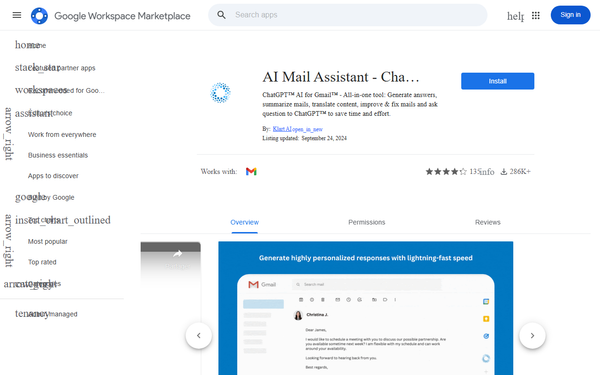
AI Mail Assistant is a Gmail add-on developed by Klart AI that integrates OpenAI's GPT-4o (and occasionally Mistral models) directly into the Gmail interface to streamline email workflows. It generates quick responses, summarizes long threads, translates messages across 13 languages, improves draft grammar and wording, analyzes text for ethical issues like sarcasm or discrimination, and allows users to query ChatGPT without a separate OpenAI account. Primary use cases include drafting professional replies, condensing email chains for quick scanning, overcoming language barriers in international communication, polishing drafts for clarity, and performing ad-hoc AI tasks from within the inbox.
The tool targets busy professionals, customer support teams, freelancers, marketers, executives, and non-native English speakers who handle high email volumes or cross-cultural correspondence. It is particularly appealing to Gmail users seeking an affordable, no-fuss AI boost without switching tabs or managing separate AI subscriptions, though it is less suited for power users needing deep personalization or enterprise-scale automation.
Key Features & Capabilities
Core functionality revolves around six main tools accessible via Gmail's sidebar:
- Generate Response: Creates context-aware replies, with an optional field for custom instructions before inserting as a draft.
- Summarize Email: Condenses threads into bullet-point key points with one click.
- Improve Draft: Scans and refines existing drafts for grammar, clarity, tone, and professionalism.
- Translate: Handles incoming emails or drafts in 13 languages (English, French, Spanish, Italian, German, Portuguese, Japanese, Arabic, Hindi, Turkish, Russian, Chinese, Korean).
- Analyze: Detects sarcasm, discrimination, ethical concerns, or tone issues in emails/drafts.
- Ask a Question: Direct ChatGPT-style querying from the inbox for any prompt.
Standout features include the Analyze tool (rare among basic Gmail add-ons), seamless translation support without external tools, and the ability to use advanced AI models without an OpenAI account or API key. It requires only standard Gmail permissions and works on both desktop and mobile.
Limitations include a very restricted free tier (typically ~5 requests before upgrade), clunky multi-click workflows that feel less fluid than native Gmail AI or competitors like Gemini, occasional subject-line formatting glitches, and lack of advanced personalization (e.g., no automatic tone-matching to your writing history or full thread context awareness). It also does not support automated sending or complex automations found in more advanced tools.
User Experience
Installation is straightforward: search the Google Workspace Marketplace, authorize permissions, create a free account at chatgptservices.app, and the sidebar icon appears in Gmail (accessed via the bottom-right cards menu). The learning curve is minimal for anyone familiar with Gmail—most features require just 2–4 clicks after opening an email.
The interface is clean and native to Gmail but basic: a simple sidebar panel with buttons for each feature. It lacks polished design elements like preview modes or one-click tone selectors found in premium competitors. Documentation is limited to a concise "How it Works" page on the official site with step-by-step instructions and no video tutorials or extensive help center. Support is email-only via [email protected], with no live chat or community forum mentioned.
Overall, it feels functional for occasional use but can frustrate frequent users due to repetitive navigation and the need to re-open the sidebar for each action.
Performance & Reliability
Response generation is fast thanks to GPT-4o, typically delivering results in seconds even for moderately long threads. Summaries and improvements are accurate for straightforward professional emails, and translations perform well across supported languages. Reliability is solid for basic tasks, with minimal downtime reported.
Common complaints from user reviews and hands-on tests include the free tier's quick exhaustion (limiting testing), occasional awkward insertions (e.g., duplicated or poorly formatted subjects), and outputs that feel generic without heavy editing. Some users report difficulty locating the sidebar icon initially, and the tool occasionally struggles with highly nuanced or context-heavy conversations compared to more integrated solutions like Gmail's own Gemini features. No major security issues have been widely reported, and it adheres to standard Google Workspace permissions.
As of April 11, 2026, the add-on has over 292,000 users and generally positive marketplace feedback focused on time savings, though critical reviews highlight workflow friction.
Pricing & Value
The tool offers a free plan with a severely limited quota (approximately 5 requests, based on user reports) and a 7-day free trial for new accounts. Premium plans start at €4.99 per month (or €45 billed annually), unlocking unlimited access. Enterprise options require a custom quote for teams of 10+ with organization-wide deployment and 24/7 support.
Value is strong for light-to-moderate users: at under €5/month, it provides GPT-4o-level AI without needing a separate €20+ ChatGPT Plus subscription. It outperforms free alternatives like basic Gmail Smart Compose for complex tasks and is far cheaper than dedicated AI email suites. However, heavy users or those already on Google Workspace plans may prefer Gmail's built-in Gemini features (included in higher-tier subscriptions) for better integration and fewer limitations. The low price makes it an accessible entry point, but the clunky experience reduces perceived value for power users.
Practical Tutorial
A step-by-step tutorial for a common task—generating a professional response to a client inquiry—is available directly from the official documentation at chatgptservices.app/how-it-works. Here is a practical walkthrough with a real-world example (research date: April 2026):
- Install and Set Up: Go to the Google Workspace Marketplace, install "AI Mail Assistant ChatGPT for Gmail," and authorize access. Create/log in to your account at chatgptservices.app if prompted.
- Open an Email: In Gmail, open the client inquiry (e.g., "Hi, we'd like to schedule a demo next week for our new project—can you propose times?").
- Access the Sidebar: Click the "<" cards menu in the bottom right of Gmail, then select the AI Mail Assistant icon.
- Generate Response: Click "Generate Response." Optionally type custom instructions like "Include availability for next Tuesday or Wednesday afternoon and mention our standard demo format." Click "Generate."
- Review and Insert: The AI produces a polished reply (e.g., "Dear [Client], Thank you for your interest... I'm available Tuesday at 2 PM or Wednesday at 3 PM..."). Click "Insert Draft" to populate the reply composer. Edit as needed, then send.
For translation: Select "Translate," choose the target language, and pick "Translate Mail" or "Translate Draft." Summarization and improvement follow similar one- or two-click flows. This entire process typically takes under 30 seconds once familiar.
Final Verdict
Overall rating: 3.8/5 – A capable and affordable Gmail AI companion that delivers on its promise of quick email assistance but falls short of seamless excellence due to workflow friction and tier limits.
Who should use this tool: Busy Gmail users, non-native speakers, small teams, or freelancers who want simple AI email help without high costs or complex setup—especially those handling international clients or needing occasional ethical tone checks.
Who should avoid this tool: Power users or organizations requiring fluid, context-rich automation, unlimited free usage, or deep personalization; they may be better served by Gmail's native Gemini or more polished competitors.
One-sentence recommendation: If you're looking for an inexpensive, no-account-required AI boost directly in Gmail for everyday tasks, AI Mail Assistant is a practical choice worth trying during the free trial.