Ai Portrait Generator Review: Create Custom Artistic Avatars
Overview & Purpose
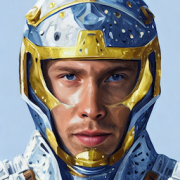
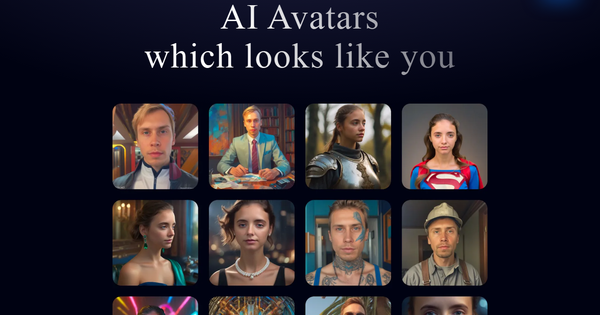
AI Portrait Generator at https://portret.ai/ is a specialized AI avatar creation platform that trains a dedicated neural network on a user's uploaded photos to produce personalized artistic portraits. Users upload a small set of reference images, after which the system generates dozens of avatars across numerous artistic styles, emphasizing creative, non-photorealistic interpretations rather than simple headshots or deepfakes. It positions itself as "the new standard to create own art portraits" by generating avatars from scratch using a per-user model for consistent, custom results via text prompts.
Primary use cases include creating fun, imaginative self-portraits for social media profiles, digital content, gifts for friends or family, or artistic experimentation. It is not designed for instant professional headshots or real-time editing but for one-time, high-variety avatar sets. The target audience encompasses social media enthusiasts, content creators, digital artists, and casual users seeking unique, stylized representations of themselves—rather than developers, marketers, or enterprise teams. It appeals to individuals who value privacy and ownership of a personalized AI model over quick, generic outputs.
Research note: Information is current as of April 13, 2026, based on the official website and third-party comparison sources. The tool has evolved since earlier mentions (e.g., photo requirements changed from 20 to 5 images).
Key Features & Capabilities
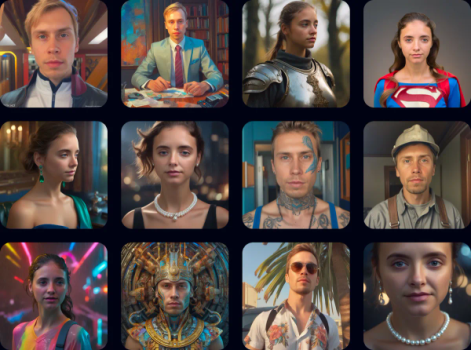
Core functionality involves uploading 5 well-lit photos of the face from slightly different angles (no hats or glasses), training a dedicated neural network per user, and receiving over 200 avatars in 50+ styles at 1024x1024px resolution. After initial generation, users access a dashboard to browse results and create additional custom avatars using text prompts (e.g., "as a Viking warrior" or "as Spider-Man"). The system explicitly avoids face-swapping masks, building avatars from scratch for a more integrated artistic look.
Standout features differentiating it from competitors include:
- Dedicated per-user neural network: Enables consistent style application across custom prompts, unlike generic one-shot generators.
- One-time payment model with no subscriptions: Users own access to their trained model indefinitely.
- Prompt-based customization: Post-training flexibility to generate new variations without re-uploading photos.
- Privacy focus: Data is stored securely, and only the user can access or use their trained network.
Limitations and missing features include no free tier or preview (due to high GPU costs for training), variable likeness quality across styles, and several "coming soon" enhancements such as upscaling to 2048x2048px and a photo enhancer tool. Outpainting is referenced in some descriptions but not prominently featured or confirmed as live on the current site. There is also no built-in collaboration, team sharing, or integration with design software. Compared to faster tools like Midjourney variants or instant headshot generators, the multi-hour training wait is a notable trade-off for deeper personalization.
User Experience
The interface centers on a clean, straightforward dashboard for uploading photos, monitoring training progress, browsing generated avatars, and prompting new ones. Signup is simple, followed by photo upload and payment. The learning curve is low for anyone familiar with basic web apps—upload, wait, then explore—but the wait time (up to 12 hours including queue) requires patience. No extensive documentation or video tutorials are provided on the site; support is primarily via email ([email protected]).
Interface quality is functional and minimalistic, with easy navigation once the model is trained. Older user feedback from 2023 noted a somewhat clunky or rough-around-the-edges feel during payment and initial setup, but core functionality has been described as reliable for artistic output. There are no in-depth help articles or community forums, which may frustrate beginners expecting guided onboarding. Overall, it prioritizes simplicity and privacy over polished, modern UX elements like live previews or mobile optimization details (desktop-focused).
Performance & Reliability
Training typically completes in about 1 hour of active processing plus queue time, with total turnaround up to 12 hours. Once ready, avatar generation via prompts is fast within the dashboard. Output quality is praised for artistic variety and hyper-realistic or stylized results in many cases, though consistency varies—some avatars capture likeness exceptionally well while others may deviate in facial features or expressions.
Known issues from limited user reports include occasional inconsistent results (e.g., unnatural artifacts in certain styles) and longer-than-advertised waits during peak times. There are no widespread recent complaints about downtime or data loss; the platform emphasizes secure, user-only access. Reliability is solid for a compute-intensive tool, but the lack of a preview means users commit fully before seeing outputs. No major outages or security incidents were reported in available sources as of April 2026.
Pricing & Value
Portret.ai uses a straightforward one-time payment model with no subscriptions or recurring fees—explicitly marketed as "no stupid subscriptions." The basic plan starts at approximately $9 (previously noted around $19 in older references), granting full access to the trained model, initial 200+ avatars, and ongoing prompt-based generations. No free tier or trial exists due to computational costs, though refunds are offered only for critical technical issues.
Value proposition is strong for users seeking permanent access to a personalized AI avatar generator at a low entry price compared to subscription-based competitors (e.g., $15–35/month plans elsewhere). It delivers high volume (50+ styles) and creative flexibility for a one-off cost, making it economical for occasional artistic use or gifting. However, it offers less value for users needing professional headshots or instant results, where faster, cheaper-per-image alternatives may suffice. Enterprise options are not advertised.
Practical Tutorial
No official video or step-by-step tutorials are linked on the site, but the process is straightforward based on the platform's flow. Here is a practical walkthrough for the most common task: creating your first set of custom AI avatars (tested conceptually from official descriptions and user-shared processes as of 2026).
-
Sign up and prepare photos: Visit https://portret.ai/, create an account, and prepare 5 well-lit, clear face photos from slightly different angles (portrait orientation recommended; avoid hats, glasses, or heavy makeup for best results). No cropping needed.
-
Upload and purchase: In the dashboard, upload the 5 images. Select the one-time payment option (Basic plan ~$9 via Stripe/Apple Pay). Confirm and submit—training begins automatically.
-
Wait for training: Monitor progress in the dashboard. Expect 1 hour of active training plus any queue time (total up to ~12 hours). You will receive notification when complete.
-
Browse initial avatars: Once trained, the dashboard populates with 200+ pre-generated avatars across 50 styles. Review and download favorites at 1024x1024px.
-
Create custom avatars with prompts: Use the prompt field (e.g., "yourname as cyberpunk samurai, ultra realistic, 4k, dramatic lighting") to generate new variations. Experiment with styles for artistic flair. Use the future upscaler/photo enhancer once available for refinements.
-
Download and iterate: Export images and return anytime to prompt more—no additional cost. For best results, reference prompt examples provided in the dashboard.
This process typically yields a full avatar library in under a day. For visual examples or updates, check the official site directly.
Final Verdict
Overall rating: 7.5/10 – A solid, privacy-focused tool for creative avatar generation that excels in artistic depth and value for a one-time fee but is held back by wait times and lack of a trial.
Who should use this tool: Creative individuals, social media creators, or anyone wanting a permanent, customizable set of artistic self-portraits for fun, gifts, or digital projects—especially those comfortable with a short wait and no preview.
Who should avoid this tool: Users needing instant results, professional LinkedIn-style headshots, or a risk-free trial; those on tight deadlines or preferring subscription flexibility with more polished UX may find competitors better suited.
One-sentence recommendation: If you're after affordable, one-time ownership of a personalized artistic AI avatar generator with strong prompt flexibility and privacy, Portret.ai is a worthwhile investment—otherwise, explore faster alternatives.