AI Renamer Review: The Smartest Way to Organize Your Files
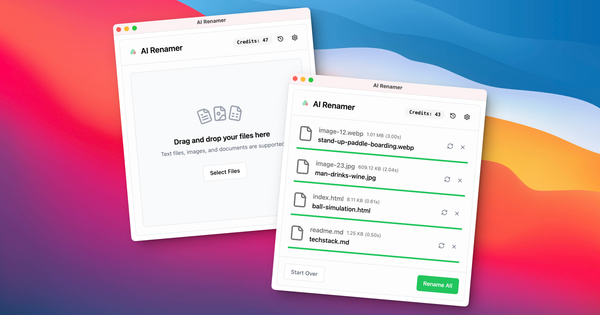
AI Renamer is a desktop application for macOS and Windows that leverages artificial intelligence to automatically rename files by analyzing their actual contents rather than relying on basic rules or patterns. It processes images (via visual recognition and EXIF data) and documents (via text extraction) to generate descriptive, searchable filenames—turning generic names like “IMG_8392.jpg” or “scan_2.pdf” into meaningful ones such as “black-leather-wallet-open.jpg” or “john-smith-bank-statement-2026-02-24.pdf”. Primary use cases include cleaning messy desktops, organizing batches of screenshots, invoices, bank statements, contracts, resumes, product photos, and audit documents, while improving overall digital asset management and searchability.
The tool targets a broad audience of professionals and individuals who handle large volumes of poorly named files: accountants, lawyers, HR specialists, auditors, designers, marketers, photographers, researchers, developers, and everyday users overwhelmed by disorganized folders. Its hybrid cloud/local architecture makes it particularly appealing for privacy-conscious users or those needing offline capabilities.
Key Features & Capabilities

Core functionality centers on AI-driven content analysis: the app scans file interiors (text in PDFs/TXT, visuals in JPG/PNG/GIF/WEBP, EXIF metadata) and suggests structured names. Users drag and drop files or entire folders, add custom instructions for naming conventions (e.g., “[Date][Type][Company]”), preview suggestions in real time, and apply changes in batch. Standout differentiators include true hybrid mode—Local Mode (one-time purchase for unlimited, fully offline renaming via Ollama, LM Studio, or API providers like OpenAI/Groq/Google AI Studio) and Cloud Mode (pay-as-you-go with private processing and no file storage)—plus dark mode support, cancelable operations, and consistent cross-platform experience.
Additional strengths: flexible file support (all types in Cloud; specific image/document formats emphasized locally), preview-before-rename safety net, and smart recognition that extracts dates, entities, document types, and context. These set it apart from rule-based tools or cloud-only alternatives that lack privacy options or content understanding.
Limitations include a 10MB per-file cap in Cloud Mode, potential AI inaccuracies (occasional gibberish or hallucinations mitigated by custom instructions and preview), no native Linux support, and dependence on local hardware performance or third-party model setup for offline use. Video, ZIP, or binary files receive limited or no advanced analysis. No free tier exists beyond possible trial credits.
User Experience
AI Renamer boasts an exceptionally intuitive drag-and-drop interface with a low learning curve for core tasks—most users can start renaming in under a minute in Cloud Mode. The preview screen displays suggested names side-by-side with originals, allowing easy edits or rejections before any changes occur. Local Mode requires a one-time setup (install Ollama or LM Studio and connect a model), which adds moderate complexity but comes with clear on-site guides.
The desktop UI is clean, modern, and now includes dark mode. Documentation is solid for a niche tool: an FAQ section covers common questions, while the blog offers practical posts with real examples, privacy explanations, and step-by-step installation tutorials complete with screenshots for both macOS and Windows. Support is available via a contact form on the site; no live chat or extensive knowledge base exists, but community feedback on Product Hunt and Reddit consistently praises its simplicity and usefulness (“Really easy and useful, great job!”).
Performance & Reliability
Processing speed is efficient for typical batches: Cloud Mode handles uploads and analysis quickly (hundreds of files in under a minute for smaller sets), while Local Mode performance depends on hardware and chosen model (faster with GPU-accelerated setups). The preview-and-apply workflow ensures reliability, with a “Rename All” button and per-file cancel options added in recent updates.
Known issues are minor and well-documented in the FAQ: occasional low-quality suggestions (resolved by better prompts or model choice), file-size limits in Cloud, and initial setup hurdles for local models. No widespread complaints or critical bugs appear in user forums, Product Hunt reviews, or comparison discussions as of March 2026; the preview system prevents accidental overwrites, and files are never stored permanently. Changelog updates (e.g., v1.8.0 in December 2025) show active maintenance.
Pricing & Value
AI Renamer uses a flexible hybrid model with no subscription lock-in. Local Mode is a one-time purchase of $19 for unlimited renaming (ideal for heavy or sensitive use). Cloud Mode is pay-as-you-go at $10 for 200 credits (1 credit per rename operation; credits never expire). All files are processed privately with no storage on servers.
Value is strong compared to subscription-heavy alternatives: local users pay once for unlimited offline work, while occasional users buy credits only as needed. The privacy control and content-aware AI deliver clear time savings (hours per month for professionals), making it cost-effective for anyone renaming more than a handful of files regularly. No enterprise tier is advertised, but the credit system scales affordably.
Practical Tutorial
Official blog posts provide excellent guidance with real examples; below is a complete walkthrough for a common task—batch-renaming a folder of mixed invoices and product photos—based directly on the app’s documented workflow (March 2026). For installation details, see the official macOS or Windows guides.
- Download the desktop app from https://airenamer.app/ and install (simple .dmg or .exe).
- Launch the app and choose your mode: Cloud for instant start or Local (install Ollama, pull a model like Llava for images, then connect in settings).
- Drag a folder or individual files into the app window (supports JPG, PNG, PDF, TXT, etc.).
- (Optional) Add custom instructions, e.g., “Format as [DocumentType]-[CompanyOrSubject]-[Date]. Use descriptive keywords for images.”
- Review the AI-generated preview list—edit any name manually if needed.
- Click “Rename All” to apply changes instantly.
Real examples from the tool’s documentation:
- Before:
scan_2.pdf→ After:marker-international-invoice-2026-01-02.pdf - Before:
IMG_8392.jpg→ After:black-leather-wallet-open.jpg - Before:
file_(9).pdf→ After:john-smith-bank-statement-2026-02-24.pdf - Before:
Untitled.pdf→ After:resume-customer-support-jordan-lee-26-02-24.pdf
The entire process takes seconds per file after setup. For more use cases (audits, academic papers, HR documents), see the official blog: https://airenamer.app/blog/can-i-use-ai-to-rename-files-yes-heres-how-with-examples.
Final Verdict
Overall rating: 4.5/5 — a polished, privacy-focused solution that genuinely solves a painful everyday problem with intelligent AI.
Professionals and power users who regularly deal with invoices, photos, contracts, or screenshots will love the time savings, custom control, and hybrid flexibility. Individuals or teams seeking better digital organization without monthly fees should strongly consider it.
Avoid it if you need Linux support, process files larger than 10MB frequently without local mode, prefer completely free non-AI tools, or handle highly specialized file types beyond images and documents.
One-sentence recommendation: AI Renamer is the smartest, most privacy-respecting way to turn chaotic file collections into perfectly organized assets—worth every penny for anyone tired of cryptic filenames.