AI Studios Com Review: The Ultimate Text-to-Video AI Tool Guide

Overview & Purpose
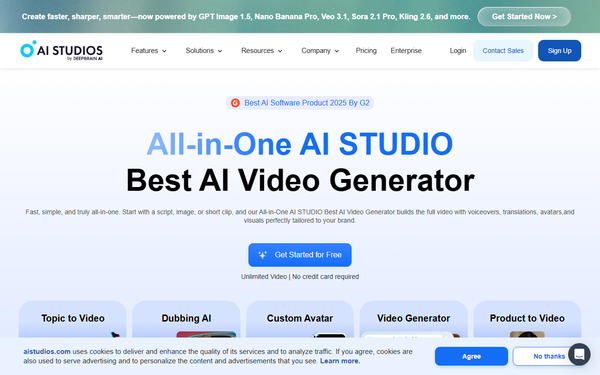
AI Studios, developed by DeepBrain AI, is a browser-based text-to-video platform that converts written scripts, documents, URLs, or ideas into professional-quality videos featuring realistic AI avatars, natural voiceovers, and automated visuals. It handles the entire workflow—from script generation and avatar selection to editing, translation, dubbing with lip-sync, and publishing—in a single workspace, eliminating the need for cameras, actors, studios, or advanced editing skills. Primary use cases include creating training modules (with interactive quizzes and SCORM export for LMS integration), marketing videos (ads, product demos, social clips), educational content (lectures, courses), and personalized or multilingual communications at scale.
The tool targets a broad audience: individual content creators and YouTubers seeking faceless or quick production options, marketers and sales teams needing cost-effective campaigns, educators building online courses, and enterprises requiring compliant, collaborative video workflows for internal training or global outreach. It appeals especially to non-technical users who want to scale video output without traditional production complexity.
This review is based on research conducted in March 2026 using the official website, user reviews on G2 and Capterra, and third-party sources.
Key Features & Capabilities
Core functionality revolves around AI-driven video creation: users input text or upload content (PDF, PowerPoint, Word, or URLs), select from 2,000+ stock AI avatars (or create custom ones from photos/videos), choose voices from 1,000+ natural TTS options across 150+ languages/dialects, and generate videos with automatic lip-sync, gestures, backgrounds, subtitles, and music. Standout features include one-click translation and multi-speaker dubbing that preserves tone and meaning, AI-assisted script generation, real-time conversational avatars (integrated with models like ChatGPT), interactive elements (quizzes, branching scenarios), and integration of generative AI models (Sora 2, Veo 3.1, Kling) for cinematic clips or visuals. Additional capabilities cover 7,000+ templates, brand kits, 4K exports, bulk generation, API access, and deepfake detection tools.
Differentiators from competitors like Synthesia or HeyGen include the unified all-in-one workspace combining avatar videos, advanced dubbing/translation (73+ languages with proofreading), SCORM-compliant interactive training, and generative AI for both short clips and full scenes—plus enterprise-grade security (ISO 27001, SOC 2, GDPR). Users report up to 90% faster production and 80% cost savings.
Limitations include credit-based caps on generative features and dubbing minutes (which reset monthly and do not roll over), limited voice cloning and custom avatars in lower tiers, occasional unnatural gestures or accents in non-English languages, and less granular control over cinematic editing compared to dedicated tools like Adobe Premiere. Advanced generative models consume credits quickly for longer or complex videos.
User Experience
AI Studios offers a low learning curve with an intuitive, drag-and-drop web interface that requires no technical expertise—most users can produce their first video in minutes. The clean dashboard, real-time previews, and instant script-to-video regeneration make it accessible for beginners, while power users appreciate keyboard shortcuts, pronunciation dictionaries, and brand kit consistency. Interface quality is modern and responsive, though some report minor mobile/browser quirks.
Documentation includes an integrated knowledge base, FAQs, blog insights, and official how-to guides. Support resources feature live chat (priority in paid plans), email, and a growing library of YouTube tutorials. Customer support receives mixed feedback: responsive for basic issues but occasionally slow for complex enterprise queries. Overall, the platform earns high marks (4.5–4.6/5 in ease-of-use categories on review sites) for streamlining workflows.
Performance & Reliability
Video generation typically completes in 2–5 minutes for short clips (up to 2 minutes), scaling with resolution and queue priority; paid plans offer faster processing and higher limits (e.g., 4K exports, unlimited priority in Enterprise). Output quality is consistently professional, with realistic lip-sync, natural voices, and high-resolution avatars that rival traditional production.
Known issues include occasional rendering delays during peak times, subtitle lag behind speech, and minor bugs in the editor (e.g., pronunciation inconsistencies or background glitches). Some users note dubbing translations can feel overly formal or lose nuance in certain dialects. Reliability is strong for core avatar videos, with few downtime reports, but advanced generative features can feel throttled by credit limits. Common complaints center on speed variability and the need for multiple regenerations for perfect results, though regular updates address many issues.
Pricing & Value
AI Studios uses a freemium model with a free plan offering limited videos (e.g., 3 per month, up to 3 minutes), basic avatars, and 16 generative credits—ideal for testing. Paid tiers include:
- Personal/Starter: Approximately $29–$30/month (or ~$24/month annually with 20% savings)—unlimited core AI videos up to 30 minutes, 3 custom avatars, 1080p export, 120 minutes dubbing/month.
- Team: Higher limits (up to 60-minute videos, 4K, more collaboration, 240 dubbing minutes), starting around $55+/seat/month.
- Enterprise: Custom pricing with unlimited everything, SSO, dedicated support, SCORM, and bulk tools.
Add-ons for extra credits, avatars, or dubbing are available. No long-term contracts; credits reset monthly.
Value is strong for the feature depth and time savings compared to alternatives (e.g., Synthesia or HeyGen at similar or higher prices with fewer generative tools). It delivers excellent ROI for high-volume or multilingual needs, though heavy generative users may incur extra costs, and free-tier restrictions feel limiting.
Practical Tutorial
A common task is creating a short marketing or training video from a script or blog post. Here is a step-by-step walkthrough based on official guidance (tested workflow as of March 2026):
- Sign up or log in at aistudios.com (free account works for starters).
- Start a new project: Click “Create Video” or select “Text to Video” / “Docs to Video” from the dashboard.
- Input your content: Type a script directly, paste text, upload a PDF/PPT/Word file, or enter a URL—the AI can auto-research and expand it. Keep sentences concise and conversational for best results.
- Choose avatar and voice: Browse 2,000+ avatars (filter by gender, accent, tone); select or create a custom one. Pick a voice from 1,000+ options (150+ languages) or clone your own for branding.
- Customize: Add backgrounds/templates (7,000+ options), gestures, music, subtitles, or interactive elements like quizzes. Use the drag-and-drop editor to insert images or effects.
- Generate preview: Click “Generate Video.” Review the 2–5 minute render (lip-sync, narration, visuals).
- Edit and refine: Update script, adjust timing/gestures, or apply one-click translation/dubbing. Regenerate instantly.
- Export and share: Download in MP4 (1080p or 4K), embed, or export SCORM for LMS. Add to YouTube or social platforms directly.
Example: Turn a 300-word product description into a 2-minute promo video—upload the URL, select a professional avatar, generate in English, then dub to Spanish with auto lip-sync in one click. For visual walkthroughs, see the official guide at https://www.aistudios.com/how-to-guides/how-to-use-an-ai-video-generator-2026-step-by-step-guide or YouTube tutorials like “How to Use DeepBrain AI to Create Videos.”
Final Verdict
AI Studios earns a solid 4.4/5 rating. It excels for marketers, educators, content creators, and small-to-medium businesses needing fast, professional, multilingual videos without production overhead—delivering realistic results, massive time/cost savings, and scalability through its all-in-one platform and generative tools.
Avoid it if you require ultra-cinematic full control, heavy custom editing beyond templates, or unlimited advanced generative output on a tight budget without enterprise scaling.
AI Studios is a top-tier choice for anyone looking to automate high-quality video production efficiently and globally.