Ai Suggests Review: The Best Free AI Tool for Quick Content Creation
Overview & Purpose

AI Suggests (https://ai-suggests.com/) is an AI-powered content generation platform that helps users quickly create fresh, ready-to-use text for various digital needs. It leverages artificial intelligence to produce ideas and copy in seconds, eliminating lengthy brainstorming sessions for businesses and web creators. Primary use cases include crafting social media posts, SEO-optimized headlines and meta descriptions, marketing ads, product descriptions, blog outlines, and more niche content like recipes or short stories.
The tool targets content creators, marketers, bloggers, influencers, indie makers, and small business owners who need fast, on-demand assistance with social media, SEO, and promotional copy. It positions itself as an accessible "AI assistant" for anyone managing online presence without advanced technical skills or large budgets.
Research for this review was conducted as of April 10, 2026, drawing from the official website and available directory listings.
Key Features & Capabilities
Core functionality revolves around 20+ specialized templates powered by the GPT-3.5 model. Available templates include Instagram Caption, Video Titles, LinkedIn Post, Keywords, Tweets, Blog Titles, Facebook Ads, Product Description, Meta Description, Blog Outline, Hashtags, Google Ads, Summarize, SEO Extractor, and others such as Color Scheme, Startup Names, and Spell Checker. Users input a prompt or topic, select a template, and receive instant generated output. Additional capabilities include saving important documents for later access and generating SEO-friendly elements like headlines, titles, meta descriptions, and keywords.
Standout features include its completely subscription-free model—users can generate content with free credits indefinitely for basic needs—and built-in support for effortless marketing campaigns and ads copy. The platform also offers social media tips implicitly through template outputs, helping maintain consistent posting schedules. Unlike many competitors that lock features behind monthly fees, AI Suggests emphasizes pay-as-you-go credits to unlock additional templates or higher volume, giving users full control without recurring commitments.
Limitations include reliance on the older GPT-3.5 model (potentially less advanced than GPT-4 or newer alternatives in creativity and accuracy), a finite number of free credits per account (requiring purchases for heavy use or expanded templates), and the need for human review to ensure quality, accuracy, and brand voice alignment—common to all AI generators but explicitly noted in some directory feedback. It lacks advanced collaboration tools, image generation, or deep analytics found in premium suites like Jasper or Copy.ai. No enterprise-level features (e.g., team accounts or custom model training) are mentioned.
User Experience
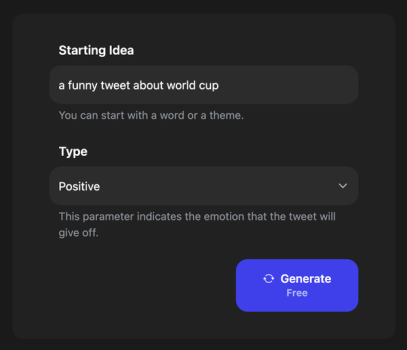
The tool is designed with simplicity in mind, featuring a straightforward, user-friendly interface accessible to beginners with minimal learning curve. Registration is free and quick (no credit card required), after which users can immediately select templates or "ask anything" in their niche. Navigation centers on template selection and prompt input, with outputs generated in seconds and options to save or refine results.
Interface quality appears clean and focused, though detailed screenshots or demos are limited on the public site. Support resources include a live chat window (bottom right) for direct contact with creator Thomas, plus email access via the dashboard. No extensive documentation, video tutorials, or knowledge base exists publicly, which may challenge absolute novices seeking guided help beyond basic usage.
Performance & Reliability
Generation is described as fast and efficient, delivering ready-to-use content "in a matter of seconds" thanks to GPT-3.5. Reliability appears solid for standard tasks like SEO elements and social copy, with no widespread outages or major technical complaints reported in available sources. Users report consistent output for common templates, though results can vary in creativity and may feel generic without strong prompting.
Known issues are minimal and typical of AI tools: occasional need for editing to avoid generic phrasing or inaccuracies, and potential credit consumption on repeated generations. No verified common complaints about downtime, data loss, or security were found across review directories or forums as of April 2026. The platform's low public review volume suggests it's still building a broad user base rather than facing widespread criticism.
Pricing & Value
AI Suggests operates on a free-to-start model with no subscription required. Registration grants access to unlimited basic usage via initial free credits, allowing users to generate months of content without payment. Additional credits can be purchased to unlock more templates or increase volume, providing flexibility for light or heavy users alike. Exact credit pricing is handled post-login, but the emphasis is on affordability and control.
Value proposition stands out against subscription-heavy competitors (e.g., Jasper or Anyword), making it ideal for cost-conscious creators or testers. It delivers strong ROI for occasional needs like SEO headlines or ad copy without long-term commitments. However, frequent users may find credit purchases add up, and the GPT-3.5 base limits it compared to higher-tier tools offering advanced models at similar or higher costs. Overall, it provides excellent entry-level value for budget-focused individuals.
Practical Tutorial
No official video tutorials or step-by-step guides are publicly available on the site or major platforms. Below is a practical, self-contained walkthrough for a common task—generating SEO-friendly blog titles and meta descriptions—based on the tool's template-driven flow. This can be replicated directly on ai-suggests.com.
-
Sign Up/Login: Visit https://ai-suggests.com/ and click "Start generating content" or "Open the app." Create a free account with email (no credit card needed).
-
Access the Dashboard: Once logged in, you'll see template options or a prompt area. Scroll or search for relevant templates.
-
Choose Templates: Select "Blog Titles" for headlines, then "Meta Description" (or use "SEO Extractor" if available). For efficiency, run them sequentially on the same topic.
-
Input Your Prompt: For example, enter: "Topic: Best AI tools for content creators in 2026. Target audience: bloggers and marketers. Tone: professional and helpful. Generate 10 unique titles." Adjust length or keywords as needed.
-
Generate and Review: Click generate. AI Suggests will output multiple options instantly. Review for relevance, then copy or save to your documents library.
-
Refine and Export: Use the "Paraphrase" template if outputs need tweaking, or "Spell Checker." Save the best results for your content calendar. Repeat for meta descriptions with prompt: "Create 5 SEO meta descriptions under 160 characters for the above titles."
-
Scale Up: For marketing campaigns, chain with "Facebook Ads" or "Google Ads" templates using the same topic.
This process typically takes under 5 minutes per batch and leverages the tool's strengths in quick ideation. For variations, experiment with "Product Description" or social templates using real examples from your niche.
Final Verdict
AI Suggests earns a solid 4.0 out of 5 rating. It excels as an accessible, no-subscription entry point for quick content ideation and SEO/marketing copy, particularly suiting solopreneurs, bloggers, and small marketers who value simplicity and low cost.
Who should use it: Budget-conscious content creators, indie makers, or teams needing fast template-based outputs for social media, ads, and blogs without ongoing fees—especially those starting out or testing AI assistance.
Who should avoid it: Advanced users or enterprises requiring the latest AI models (e.g., GPT-4o), extensive customization, team collaboration, or proven high-volume reliability with abundant independent reviews; heavy users may outgrow the credit system quickly.
In one sentence: AI Suggests is a refreshingly free and straightforward GPT-3.5 content generator perfect for quick wins in SEO and marketing copy, though it shines brightest for light users willing to edit outputs manually.