Ai Time Machine Review: Creating Historical Avatars with AI

Overview & Purpose
MyHeritage's AI Time Machine™ was an innovative AI-powered photo tool launched in November 2022 that allowed users to generate hyper-realistic avatars depicting themselves (or a single subject) in various historical eras, fantasy settings, and cultural themes. By uploading 10-25 photos of one person, the tool built a personalized AI model of the subject and then synthesized it across predefined themes ranging from prehistoric times and ancient civilizations to the Victorian era, space exploration, and popular culture motifs like sports or street art. The primary purpose was to provide a fun, imaginative way to visualize personal history or alternate identities, making it ideal for genealogy enthusiasts exploring family heritage, casual users creating unique social media profile pictures, or anyone seeking entertaining "time travel" visuals for sharing.
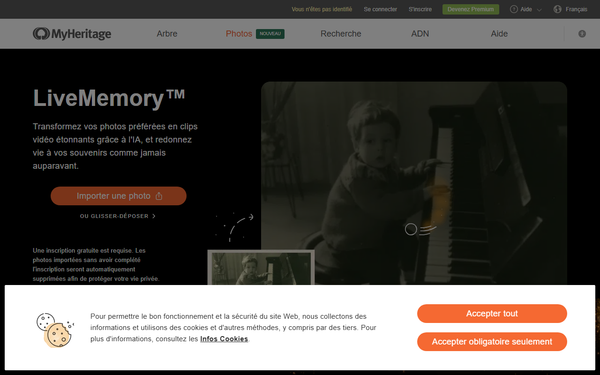
Target audience primarily included family historians and MyHeritage subscribers interested in enhancing family trees with creative visuals, as well as general consumers drawn to viral AI photo tools. It was not aimed at developers or professional designers but rather everyday users via a simple web interface. As of April 2026 research, the tool has been discontinued (sunset in January 2026), with the official page now redirecting to MyHeritage's LiveMemory™ feature for photo animation. MyHeritage continues to innovate with other AI tools, but AI Time Machine is no longer available.
Key Features & Capabilities
Core functionality centered on creating a consistent "AI avatar" model from user-uploaded photos, then applying it to dozens of themed packs. Users received batches of 8 high-resolution, photorealistic images per theme, with options for Time Travel (historical eras), Avatar (pop culture/fantasy), or All-Inclusive packages yielding 300–800+ images total. Standout features included exceptional consistency in facial likeness across wildly different contexts, photorealistic quality powered by licensed text-to-image AI (from Astria, based on Stable Diffusion), and integration with MyHeritage's genealogy platform for contextual family history use. Themes spanned global history, from Egyptian pharaohs and Vikings to 1960s hippies and astronauts, differentiating it from generic AI generators by emphasizing historical accuracy and personalization rather than open-ended prompting.
It stood out from competitors like general Stable Diffusion tools or early Midjourney by handling complex pose/lighting variations automatically and delivering ready-to-use themed sets without manual prompting. Limitations included the requirement for a diverse photo set (no group shots or obscured faces), occasional AI artifacts (e.g., distorted limbs or missing elements in some outputs), and the one-model-per-purchase restriction. It lacked advanced customization like text prompts or video output, and results could vary based on input photo quality. Post-discontinuation, these capabilities are unavailable on the platform.
User Experience
The tool was designed for exceptional ease of use with a low learning curve. Users simply visited the dedicated page, uploaded photos via drag-and-drop, selected gender/title, and waited for processing notifications via email. The interface was clean, intuitive, and mobile-friendly, with clear guidelines for optimal photo selection (e.g., variety in poses, lighting, and angles). No steep technical knowledge was required, making it accessible to non-experts. Documentation included on-page instructions and FAQ, while support came through MyHeritage's general resources (email/chat), though some users reported automated systems as unhelpful for complex issues. Overall interface quality earned praise for simplicity during its active period.
Performance & Reliability
Model creation typically took 30 minutes to 2 hours initially, with subsequent themes generating in 1–2 minutes—efficient for the era's AI standards. Reliability was generally high for facial consistency, with millions of images created during its viral peak. However, common complaints included variable output quality (e.g., artifacts, headless figures, or unnatural distortions in ~50% of images per some user reports), especially in complex themes. Processing delays occurred during high demand post-launch. Broader MyHeritage platform issues like subscription management occasionally affected users, but AI-specific performance was reliable once the model was built. No major outages were widely reported beyond typical AI limitations.
Pricing & Value
At launch, AI Time Machine was free for a limited introductory period (one model, up to 20 themes/160 images). It later shifted to paid one-time packages: Time Travel (~$12 for 480+ images), Avatar (~$10 for 320+ images), or All-Inclusive (~$18 for 800+ images). MyHeritage Complete subscribers received enhanced quotas (up to 3 models/year with full themes) at no extra cost. There were no ongoing free tiers or enterprise options beyond standard subscriptions.
Value was strong for its novelty and output volume compared to alternatives like paid AI image services, especially for genealogy fans tying results to family trees. It offered a cost-effective "fun factor" versus building custom models elsewhere. Post-discontinuation, value is zero as the tool is unavailable; users now seek alternatives for similar historical avatar generation.
Practical Tutorial
Prior to its January 2026 discontinuation, the following step-by-step tutorial represented a common task: generating a full set of historical avatars from personal photos. (Note: This is historical guidance only, as the feature is no longer accessible on MyHeritage.)
- Log into (or create) a free MyHeritage account and navigate to Photos > AI Time Machine (or visit the dedicated page directly).
- Review photo guidelines: Prepare 10–25 clear, varied photos of one person only (different days, poses, angles, lighting; include full-body, upper-body, and close-ups; avoid hats, sunglasses, or group shots).
- Upload photos via drag-and-drop or file selector.
- Enter the subject's first name/title and select gender, then click Continue.
- Wait for processing notification (30 minutes–2 hours for the initial model; check email).
- Once ready, browse initial theme results (8 images per theme). Use navigation to view/download individuals or sets.
- Select additional themes from available packs (historical, pop culture, etc.) to generate more images instantly.
- Download JPEGs or share directly via social links. Results included AI watermarks for transparency.
Official historical tutorials were available via MyHeritage's blog and in-app guidance. For similar effects today, users explore general AI tools or MyHeritage's current LiveMemory™.
Final Verdict
Overall rating: 4.5/5 (during its active lifespan for innovation and delight, tempered by quality variability and eventual discontinuation).
Who should use this tool: Genealogy hobbyists, families, and casual users seeking fun, shareable historical visualizations tied to personal photos—especially those with a MyHeritage subscription for best value.
Who should avoid this tool: Anyone needing ongoing access (as it is now discontinued), professional-grade consistency without artifacts, or advanced customization features unavailable here.
One-sentence recommendation: AI Time Machine was a groundbreaking, joyfully creative tool for historical self-reinvention that delivered viral-worthy results while it lasted, but users today should explore MyHeritage's evolving AI alternatives like LiveMemory™ or third-party generators for comparable experiences.