Aiartist Review: Create Pro Kinetic Typography Videos in Minutes
Research conducted as of March 5, 2026. All information is drawn from the official website, pricing page, Capterra listing, and limited third-party coverage available at that time. AIArtist is a relatively new tool (Capterra page appeared February 2026), so independent long-term user data remains emerging.
Overview & Purpose

AIArtist is an AI-powered motion-graphics generator that turns simple text prompts into polished kinetic-typography videos optimized for social media Reels, YouTube Shorts, ads, and short marketing content. It employs a multi-stage pipeline: large language models first parse the prompt for tone, pacing, emphasis, and semantic meaning; generative models then create contextual visuals, icons, 3D objects, and typography layouts; finally, a video engine assembles smooth animations with professional easing and timing. Users receive ready-to-export 720p or 1080p MP4 files in 2–3 minutes, with no design skills, templates, or timeline editing required.
Primary use cases include creating scroll-stopping social videos, A/B testing ad variations, product-launch explainers, educational kinetic-typography clips, brand announcements, and podcast quote highlights. The tool excels at vertical 9:16 mobile-first formats but also supports 16:9.
Target audience is primarily non-designers—social media creators, digital marketers, solopreneurs, educators, and small-business owners—who need fast, scalable, professional-looking short-form video content without hiring motion designers or learning complex software like Adobe After Effects.
Key Features & Capabilities
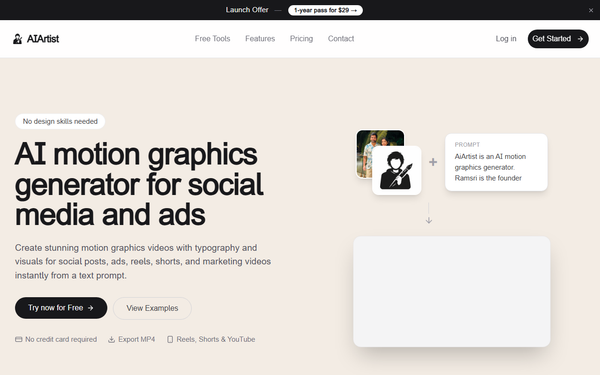
Core functionality revolves around prompt-to-video generation. Users type a description (or paste text like a quote or script), and the AI automatically handles contextual typography animation, background asset creation, color schemes, and motion. Outputs are MP4 files up to 8 seconds long in 720p/1080p HD, with options for audio inclusion. Aspect ratios (9:16 or 16:9) are optimized for platforms like Instagram, TikTok, and YouTube Shorts.
Standout features that differentiate it from competitors include:
- Fully prompt-driven workflow with zero templates or manual keyframing—unlike Canva or Adobe Premiere.
- Automatic sentiment and pacing analysis for emotionally resonant typography.
- Contextual visual generation (icons, geometric patterns, 3D elements) that matches the message without stock assets.
- Sub-3-minute render times, claimed to be 100× faster than traditional production.
- One-time purchase model versus recurring subscriptions from most video AI tools.
Limitations and missing features: Maximum video length is capped at 8 seconds (ideal for hooks and quotes but not full explainers); credit system restricts high-volume or high-resolution output; no advanced post-editing, custom audio syncing beyond basic inclusion, or reference-image upload for style control (though future updates are hinted at by the founder). Quality can vary with vague prompts, and the tool is specialized for kinetic typography rather than general video editing or photorealistic scenes.

User Experience
The interface is intentionally minimal: a clean prompt box, optional aspect-ratio selector, and one-click “Generate” button. New users can start instantly without a credit card via the “Try now for Free” entry point, making the learning curve almost nonexistent—most creators produce their first video in under five minutes. No timeline, layers, or design panels appear, which is a deliberate strength for the target non-technical audience.
Documentation consists of an on-site FAQ covering formats, commercial-use rights, and prompt tips, plus a prominent prompt gallery with real examples (e.g., Roman Empire history recap or motivational quotes) that double as one-click demos. Support resources are basic (email via the site); no extensive help center or video academy exists yet, which is typical for early-stage tools. Early feedback from directories notes the experience as “extremely easy” and “streamlined.”
Performance & Reliability
Generation consistently completes in 2–3 minutes for average 8-second clips, with the site reporting an average of 2 minutes for 10-second equivalents (adjusted for the 8-second limit). Exports are clean MP4s suitable for direct platform upload. Reliability appears solid for a new tool: no widespread outage reports or quality regressions surfaced in searches across Reddit, X, or review sites as of March 2026.
Known issues or common complaints are minimal due to the tool’s recent launch. Occasional prompt sensitivity (vague inputs yield less dynamic results) and credit consumption for 1080p+audio variants are the only recurring notes in early discussions. No major bugs, watermarking, or export failures were documented; the 7-day full refund policy further mitigates risk. Early X and directory sentiment highlights “fast” and “cool” outputs, with users praising consistency for quote-style content.
Pricing & Value
AIArtist uses a simple one-time-payment model: a $29 yearly pass (launch pricing, increases every 50 new customers) that delivers 100 credits per month (1,200 total over the year). Credit costs scale with quality—1 credit for 720p no-audio, 2 credits for 720p with audio or 1080p no-audio, and 4 credits for 1080p with audio. Unused credits do not roll over; videos max out at 8 seconds. A 7-day full refund is offered, and no credit card is required to test.
No free tier beyond sample generation exists, and enterprise/custom plans are not listed. Compared with alternatives (Runway ML, Pika Labs, or Adobe Express subscriptions at $15–50+/month), the $29 one-time cost delivers exceptional value for light-to-moderate users producing 25–100 videos monthly. It undercuts traditional tools by eliminating both subscription fees and designer hours, making it highly attractive for budget-conscious marketers and creators needing scalable short-form content.
Practical Tutorial
The official site does not provide a narrated video tutorial but offers an interactive prompt gallery with ready-to-try examples. Below is a complete step-by-step walkthrough for a common task—creating a motivational quote Reel—using the exact interface and a real example from the gallery.
- Go to https://www.aiartist.io/ and click “Try now for Free” (sign up with email; no credit card needed).
- Navigate to the generator (or directly via the Features page: https://www.aiartist.io/features/motion-graphics-video-generator).
- Paste a prompt from the gallery, for example: “Struggle is life’s antidote to boredom. Without it, many lives would be meaningless, devoid of purpose.” (You can enhance it: “Struggle is life’s antidote to boredom. Without it, many lives would be meaningless, devoid of purpose. Kinetic typography in dark motivational style, 9:16 vertical for Instagram Reels.”)
- Choose aspect ratio (9:16 recommended for Shorts/Reels) and resolution preference if prompted.
- Click Generate. The system analyzes tone/pacing, builds visuals, and renders in 2–3 minutes.
- Preview the MP4, then download. Total time: under 5 minutes including generation.
For more examples, try the site’s gallery prompts such as “A thousand mile journey starts with a single step” or the “Rise and Fall of Rome” vertical history recap. Commercial use is permitted, and downloaded files carry no watermarks.
Final Verdict
Overall rating: 4.5/5. AIArtist delivers on its promise of effortless, high-quality kinetic-typography videos at an unmatched price point and speed.
Who should use this tool: Social media creators, marketers, educators, and solopreneurs who produce frequent short-form content (Reels, Shorts, ads, quotes) and want professional results without learning design software or spending hours in editors—especially those on a budget or needing rapid A/B testing.
Who should avoid this tool: Users requiring videos longer than 8 seconds, full custom animation control, photorealistic scenes, or heavy post-production; teams needing enterprise SLAs or advanced collaboration features; or anyone uncomfortable relying on prompt-based outputs during the tool’s early growth phase.
One-sentence recommendation: If you need scroll-stopping kinetic-typography videos in minutes instead of days and at a fraction of the usual cost, AIArtist is an outstanding choice worth trying today.