Aicado AI Review: Launch Custom AI Agents Without Any Coding
Overview & Purpose

Aicado.ai is a no-code AI Implementation Hub that allows users to launch fully branded chat, voice, and image AI agents directly into websites, apps, or platforms in minutes. It eliminates the need for custom development by letting users upload data (PDFs, web pages, databases), connect real-world tools via MCP servers (such as Amazon, LinkedIn, or Instagram for automated actions), customize appearance and behavior, and embed everything with a single code snippet. Primary use cases include customer support chatbots, lead capture forms, data analysis assistants, content creation tools, image analysis or generation, and workflow automation—turning conversations into actionable outcomes without infrastructure management.
The platform targets non-technical audiences: small business owners, founders, marketers, agencies, and no-code builders (including Bubble.io users) who want to add sophisticated AI capabilities without hiring developers or managing servers. It democratizes AI by focusing on speed, branding control, and enterprise-grade security (SOC 2 Type II and GDPR compliance), making advanced agents accessible to teams that previously relied on expensive custom solutions.
Key Features & Capabilities
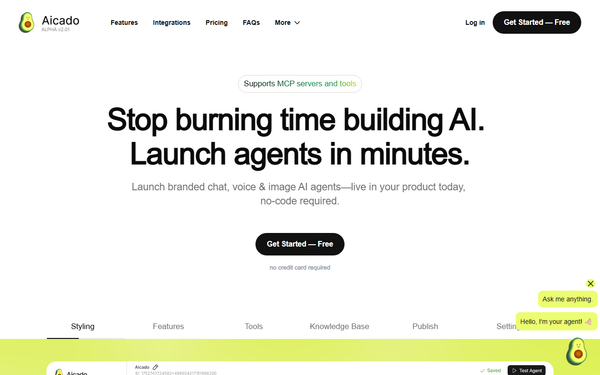
Core functionality revolves around a simple builder interface with tabs for knowledge base training, tool connections, styling, features, and publishing. Users drag-and-drop files to train agents in as little as 8 seconds, enable voice interaction with two clicks, add image upload/analysis or text-to-image generation, and connect MCP servers or webhooks/APIs for live data and actions. Full customization includes brand colors, fonts, logos, responsive chat bubbles, and custom domains. Agents support multiple AI models, team collaboration, and embed options for any website or app.
Standout features that differentiate Aicado.ai include its MCP server integration for private, real-time tool calling (beyond basic chatbots), multi-modal agents (chat + voice + image in one platform), white-label options via add-ons, and pay-as-you-go credits with no monthly subscriptions—plus a free integration tier. The platform constantly updates with new AI advancements, as noted in user testimonials.
Limitations include usage-based billing that can scale with high traffic (exact credit consumption per interaction is not transparently detailed on the site), a relatively new ecosystem with fewer pre-built templates than some competitors, and less granular control for advanced developers who prefer self-hosted or fully custom LLMs. No native mobile SDKs or ultra-deep ML fine-tuning options are mentioned.
User Experience
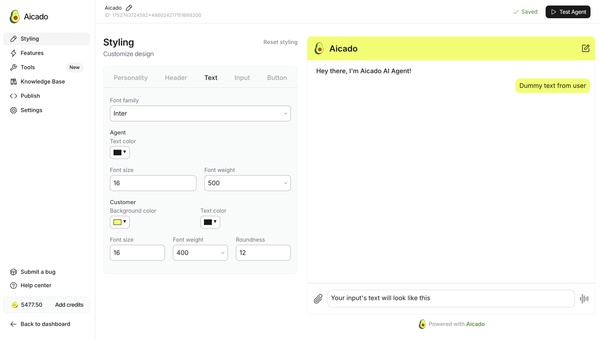
Aicado.ai boasts an exceptionally low learning curve, making it accessible even for users with zero technical background. The clean, tabbed dashboard (Styling, Features, Knowledge Base, Publish, Settings) guides users intuitively through setup—most can launch a functional agent in under 10 minutes. Interface quality is modern and responsive, with drag-and-drop training, live previews, and one-click voice activation. Testimonials highlight how non-technical founders quickly built live chat systems that transformed operations.
Documentation at docs.aicado.ai is clear and concise, with quick-start guides, step-by-step embeds, and links to community support. Additional resources include story-based tutorials on the main site, YouTube videos, a community server, and direct contact support. While not exhaustive, the materials are “very explanatory” per users and regularly updated. Minor room for improvement exists in deeper troubleshooting guides, but overall UX earns high marks for simplicity and speed.
Performance & Reliability
Agents train and respond quickly, with claims of near-instant file learning and low-latency tool connections. Embedding is reliable across websites and no-code platforms, and security features (encryption, SOC 2 compliance) provide enterprise trust. The platform receives positive notes for constant updates that improve speed and reduce costs.
No widespread issues or common complaints surfaced in searches across G2, Reddit, Product Hunt, or review sites as of March 2026—users report smooth deployment and responsive support. Potential general AI limitations (occasional hallucinations if training data is insufficient) apply, but proper knowledge-base use mitigates them. Overall reliability suits production use for SMBs, though very high-traffic scenarios may require monitoring credit usage.
Pricing & Value
Aicado.ai follows a refreshingly simple “free to integrate, pay for what you use” model with no monthly fees or setup costs. The free tier grants full access to agent creation, embedding, training, and integrations; users purchase credits only as needed (starting at approximately $0.01 per credit, with volume discounts down to $0.007 for large purchases—e.g., 1,000 credits for $10). Add-ons include white-label branding ($99 one-time), multiple domains (from $27), and expert services (from $500 per project). Enterprise custom solutions are available on request.
Value proposition is strong for low-to-medium usage: it dramatically undercuts developer costs or subscription-heavy competitors while offering comparable (or superior) branding and multi-modal features. For sporadic or testing needs, the pay-as-you-go approach saves significantly compared to fixed monthly plans elsewhere. High-volume users benefit from bulk discounts but should note scaling costs. Overall, it delivers excellent ROI for non-technical teams seeking fast AI deployment.
Practical Tutorial
A common task is creating and embedding an Image Analyzer AI agent—ideal for e-commerce, education, or content sites where users upload photos for instant insights.
Here is a step-by-step walkthrough based on official documentation and site stories (tested as of March 2026):
-
Sign In — Go to https://aicado.ai, create a free account (no credit card required), and log in to the dashboard.
-
Create AI Tool — Click “Create AI tool,” give it a name (e.g., “Product Photo Analyzer”), and save. You can edit later.
-
Enable Features — Navigate to the Features tab and toggle on “Image Upload” so users can submit photos. Optionally enable other tools like voice or webhooks.
-
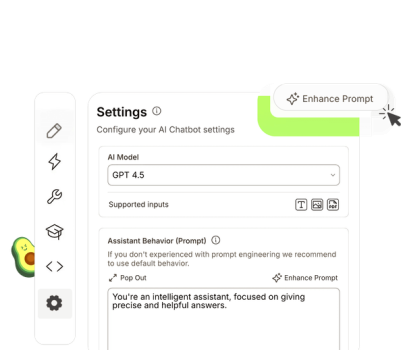
Customize Settings & Prompt — In the Assistant Behavior (Prompt) section, paste a clear instruction such as: “You’re an intelligent assistant designed to enhance image analysis and understanding. Allow users to upload images and ask specific questions. Analyze photos to extract relevant information and provide immediate insights. Primary language: English (respond in the user’s language if different).” Adjust personality, models, or knowledge base as needed.
-
Publish & Embed — Go to the Embed tab, copy the provided code snippet, and paste it into your website’s HTML (or Bubble HTML element, WordPress, etc.). Customize the chat bubble style if desired. For custom domain or white-label, upgrade via add-ons.
That’s it—the agent is live and ready to analyze images in seconds. Test by uploading sample photos and asking questions like “What brand is this product?” Official tutorial: https://www.aicado.ai/stories/how-to-create-an-image-analyzer-in-five-steps. For chatbots or voice agents, follow the same flow and reference https://docs.aicado.ai/.
Final Verdict
Overall rating: 4.5/5 — Excellent accessibility and speed earn top marks; minor deductions for usage-based cost opacity and a still-growing review base.
This tool is perfect for non-technical business owners, marketers, founders, and agencies who need quick, branded AI agents without coding or high upfront costs. It shines when you want to add customer support, image tools, or automation in minutes while maintaining full brand control.
Avoid it if you require highly predictable flat-rate pricing for massive scale, deep custom coding/integration, or extensive pre-built templates—more mature enterprise platforms may suit better.
One-sentence recommendation: Aicado.ai makes launching professional AI agents effortless and affordable—ideal for any non-technical team ready to harness AI without the usual headaches.