Optimize Your AI Spending with Aicosts Ai: A Complete Review

Overview & Purpose
AICosts.ai is a unified AI cost and resource management platform that aggregates spending, usage, and performance data from dozens of AI providers into a single dashboard. It tracks expenses across large language models (LLMs), workflow automation tools, vector databases, creative AI services, voice tools, and agent frameworks—eliminating the need to log into multiple vendor portals or manually reconcile spreadsheets. Primary use cases include preventing surprise overages, identifying inefficient models or workflows, setting budgets with alerts, comparing model costs (e.g., GPT-4 vs. Claude 3 vs. Gemini), and optimizing ROI for AI-heavy operations such as agent automations or content generation pipelines.
The platform targets AI automation agencies, AI-first startups, SaaS companies embedding AI features, solopreneurs and ecommerce managers running AI workflows, CTOs and technical leads overseeing multiple projects, and finance teams responsible for AI budget oversight. Organizations with fragmented AI spending across 5+ providers benefit most, as the tool claims to deliver up to 30%+ savings through centralized visibility and actionable recommendations. Research conducted as of March 9, 2026, based on the official site, blog posts, and limited third-party directories.
Key Features & Capabilities
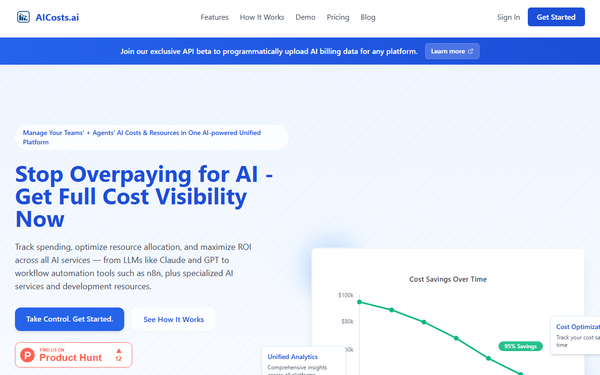
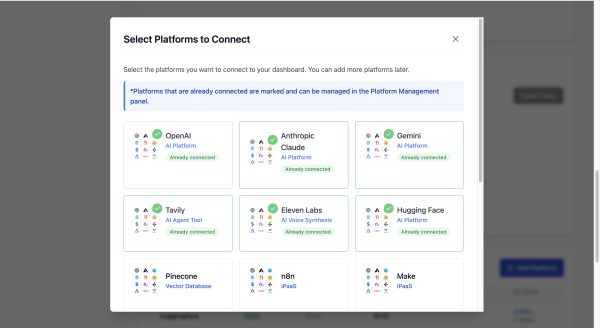
Core functionality revolves around a unified dashboard that pulls or uploads data to display real-time spending breakdowns, token usage, quota monitoring, monthly trends (M1–M6), and ROI metrics. Users can set resource budgets, receive spike alerts, and compare costs across models or platforms. Standout features include broad ecosystem coverage (OpenAI, Anthropic, Google Vertex, AWS Bedrock, Make, Zapier, n8n, Pinecone, RunwayML, ElevenLabs, and 50+ more), AI agent workflow tracking via custom logging in automation tools, predictive insights for resource allocation, and an exclusive API beta for programmatic CSV/PDF/JSON billing uploads with AI-powered parsing. These differentiate it from provider-native dashboards (limited to one vendor) or general cloud cost tools that ignore AI-specific metrics like token consumption or creative workflow costs.
The platform also supports Google Sheets/Excel exports for legacy data and auto-logging examples for n8n/Make workflows. Limitations include reliance on manual uploads or API beta for many non-LLM services (not all offer real-time API pulls yet), opaque public pricing details, and no advanced team role management or granular permissions mentioned in available sources. Some directory listings note limited third-party integrations and no refund policy as early-stage cons. Overall, the focus on AI agents and non-LLM tools (often overlooked elsewhere) is a clear differentiator.
User Experience
Setup appears straightforward with a low learning curve: users select services, connect via API keys where available, or upload billing files, then immediately view the consolidated dashboard. The interface is described as clean and visual, featuring charts for cost trends/savings over time, tables for workflow logs (timestamp, action, tokens, cost), and side-by-side model comparisons—eliminating portal-switching fatigue. Previews show intuitive breakdowns and one-click alerts.
Documentation is blog-centric rather than a comprehensive knowledge base, with practical guides on workflow logging, API uploads, and optimization checklists; no extensive video library or in-app help articles were found beyond a demo walkthrough mention. Support is email-based ([email protected]) for integrations, sales, or issues, with quick responses implied by founder responsiveness in community posts. As a newer tool, the experience feels polished for core tasks but may require initial experimentation for custom uploads. No widespread usability complaints appear in searches.
Performance & Reliability
The dashboard processes uploads and analytics efficiently, with claims of reliable uptime and fast trend calculations even across large datasets. Predictive alerts and optimization recommendations run proactively without noticeable lag in described use cases. Known issues or complaints are virtually absent—searches across review sites, Reddit, and forums returned no negative user reports, likely due to the platform’s relatively recent launch (May 2025). Testimonials highlight time savings (e.g., 15 hours/month) and cost reductions without performance hiccups. Reliability appears strong for its purpose, though real-time syncing depends on provider connections rather than universal live pulls.
Pricing & Value
Pricing is primarily custom and contact-based ([email protected]), with a prominent “Limited Time: 2 Months Free” offer and a standard 7-day free trial included across plans. Third-party directories list approximate tiers starting at $19.99/month (Starter/Basic) and $49.99/month (Professional), scaling to enterprise custom quotes—though official confirmation requires reaching out. No public free tier exists beyond the trial.
Value is compelling for teams with multi-provider AI spend: users report 26% average cost cuts and hours saved monthly, far outweighing subscription fees through prevented overages and smarter model selection. Compared to alternatives (manual tracking, single-vendor dashboards, or broader FinOps tools like Vantage), AICosts.ai’s AI-specific focus and agent workflow support deliver superior ROI for its niche. Early adopters find the investment pays off quickly via unified insights unavailable elsewhere.
Practical Tutorial
Official in-depth video tutorials are limited to dashboard demos on the site, but the blog provides actionable guidance for common tasks like workflow logging and data uploads. Below is a step-by-step walkthrough for a frequent use case—tracking and optimizing costs from an n8n or Make.com AI agent workflow—based directly on the platform’s documented “How It Works” process and API/blog instructions (real example using a content-generation automation).
-
Prepare logging in your workflow tool — In n8n (or Make.com), add a Function or Code node after each AI step (e.g., OpenAI or Claude call). Capture data: timestamp, workflow name, action (e.g., “generate_image”), tokens used (or estimated cost via provider pricing), and any custom metadata. Export results daily/weekly to Google Sheets or CSV. Official example available in site workflow tracking references.
-
Sign up and onboard — Visit https://www.aicosts.ai/, create an account (7-day free trial), and verify email. Navigate to the dashboard and select “Add Service” or “Upload Billing Data.”
-
Upload and connect data — For n8n logs, use the API beta (request access via blog link) or manual upload: choose CSV/Google Sheets option, map columns (tokens, cost, timestamp), and let the AI parser extract usage. For direct integrations (e.g., OpenAI API key), connect once for automatic pulls. Repeat for other providers (Claude, RunwayML, etc.).
-
Analyze and optimize — View the unified dashboard: check monthly trends chart, model comparison table (e.g., Claude cheaper for your task?), and budget alerts. Apply recommendations (e.g., switch models or add quotas). Set alerts for spikes and export reports to share with finance.
-
Monitor savings — Re-run workflows; track “Cost Savings Over Time” graph showing reductions. Example outcome from site testimonials: identify $2,000/month savings by optimizing agent parallel calls.
Full API upload guide: https://www.aicosts.ai/blog/api-beta-upload-ai-billing-data-automation. For checklist-based optimization: https://www.aicosts.ai/blog/ai-cost-optimization-checklist-free-download. This process typically takes 15–30 minutes initially and runs hands-off thereafter.
Final Verdict
Overall rating: 4.3/5 – a promising, purpose-built solution that excels at solving real fragmentation pain for AI-heavy teams but is still maturing.
Use this tool if you manage AI spend across multiple providers (LLMs + automations + creative tools) and want proactive visibility plus optimization to maximize ROI without spreadsheet chaos.
Avoid it if your usage is limited to one provider (native dashboards suffice), you need fully transparent self-serve pricing without sales contact, or you require advanced enterprise permissions in a very early-stage product.
One-sentence recommendation: AICosts.ai delivers game-changing unified control and proven savings for any organization whose AI costs have outgrown scattered vendor portals.