Aidrive Review: The Ultimate AI Document Management Solution
Overview & Purpose

AI Drive (myaidrive.com) is an intelligent cloud-based document management platform that combines secure storage with conversational AI to let users upload, organize, and interact with PDFs, DOCX files, images, spreadsheets, and more. It transforms static documents into dynamic, queryable knowledge bases, enabling natural-language chats, summaries, insights extraction, semantic search, and automated workflows. Primary use cases include contract review and due diligence for legal teams, research paper analysis for academics, financial report processing for analysts, patient-record summarization in healthcare, and bulk data extraction across enterprise document libraries.
The platform stands out for persistent, indefinite storage and processing capabilities that go far beyond the temporary context windows of native ChatGPT solutions, supporting large files (up to 2GB each) and entire folders for long-term access. Target audience spans legal and compliance professionals, financial services teams, healthcare providers, real estate analysts, researchers, students, and business operations staff—essentially any individual or organization managing high volumes of complex documents. With over 700,000 registered users, it appeals to both solo professionals seeking efficiency and enterprise teams needing collaboration and scale.
Key Features & Capabilities
Core functionality centers on AI-powered document interaction: upload once and query indefinitely via natural language, with automatic metadata extraction (titles, authors, types, key dates), intelligent semantic search across your entire library, and instant summarization or insight generation. Standout differentiating features include Automatic OCR (99.2% accuracy on scanned documents, Pro tier), Custom AI Agents that act as domain-specific assistants for tasks like extracting structured data from hundreds of contracts into spreadsheets, multi-model selection (GPT-5 for deep analysis, Claude for writing, Gemini for research—Pro tier), Live Artifacts for real-time interactive HTML/code previews, multi-session tabbed chats (work with multiple documents simultaneously), folder-level querying, and built-in PDF manipulation tools (merge, split, redact, watermark) via agents. Additional enterprise capabilities encompass collaboration/sharing, API access, and email-triggered agents (Business plans).
These features set AI Drive apart from basic PDF chat tools or ChatGPT by offering persistent storage, scale (hundreds or thousands of files at once), automation beyond simple Q&A, and workflow-specific agents rather than generic responses. Limitations include a credit-based consumption model (queries and especially agent tasks deduct credits, with costs rising for premium models or complex operations), several advanced features locked behind Pro/Business tiers, and standard LLM caveats such as occasional hallucinations requiring human verification. Compliance certifications (ISO 27001 and SOC-2 Type 2) are in progress rather than fully completed, and exact per-file size limits are not prominently published on the site (though the platform is designed for professional-scale documents).
User Experience
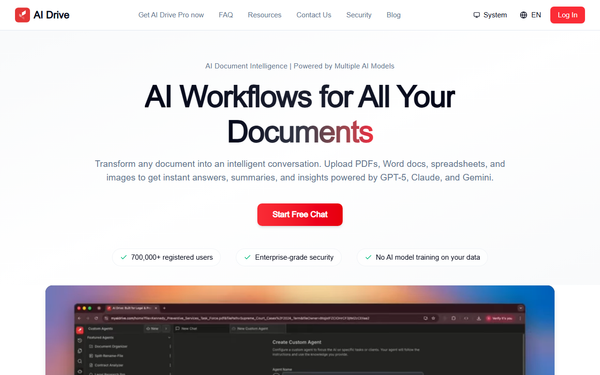
Getting started is straightforward with a clean, minimalist web interface: drag-and-drop uploads, an organized dashboard, preserved folder structures, and an intuitive PDF viewer integrated with chat tabs. The learning curve is low for basic summarization and search (similar to chatting with ChatGPT but with your own library), while custom agents introduce a moderate step up that is well-supported by in-app examples and prompts. Interface quality feels modern and responsive, with real-time artifact previews and multi-tab workflows enhancing productivity without clutter.
Documentation and support resources are strong: an in-site FAQ section answers common questions directly, while the official YouTube channel (@AI_Drive) hosts detailed video guides. Paid plans add priority support and even an onboarding call with the founder. Overall, the experience is accessible for non-technical users yet powerful enough for power users, with natural-language interaction eliminating the need for complex queries or manual tagging.
Performance & Reliability
Response speed is consistently praised for both simple queries and complex agent-driven tasks, with testimonials highlighting dramatic time savings (e.g., reducing deposition preparation from hours to minutes or accelerating contract reviews). The platform efficiently handles large collections and folder-level searches without noticeable lag, thanks to semantic indexing and multi-model optimization. Reliability appears solid for day-to-day professional use, supported by enterprise-grade security (AES-256 encryption, Google data centers) and no widespread reports of downtime or data loss.
Known issues are minimal in public feedback: the primary practical concern is careful credit management for heavy users (intensive agent runs or premium-model queries can consume credits quickly), and users must always verify AI outputs for accuracy. Independent reviews and Reddit discussions are sparse but uniformly positive regarding efficiency gains over native LLM tools; no major complaints about bugs, data privacy breaches, or performance degradation were found across trusted sources as of March 2026.
Pricing & Value
AI Drive follows a freemium model. The free tier provides a limited number of monthly credits for basic chatting and analysis (sufficient for light personal use). Pro plans (approximately $19.99–$39/month) unlock OCR, custom agents, multi-model selection, and higher credit allotments. Business plans start around $200/month for 300,000 credits, team collaboration (up to 100 users), API access, priority support, and unlimited uploads. Enterprise options are custom-priced (often 500,000+ credits) with dedicated onboarding, compliance features, and potential HIPAA alignment. Extra credits can be purchased as needed, with consumption rates varying by model (0.5–60+ credits per page) and task complexity.
Value is excellent for document-heavy professionals: the persistent storage, folder-scale intelligence, and automation deliver time savings that far outweigh credit costs compared with ChatGPT Plus (no long-term library), standalone PDF tools, or manual workflows. For casual or one-off use, the free tier or cheaper alternatives may suffice; for serious researchers or legal teams, the ROI is rapid.
Practical Tutorial
A common task is uploading a PDF research paper or contract and using AI Drive to summarize it, extract key insights, and generate structured output. Here’s a step-by-step walkthrough (based on official features and YouTube guides as of March 2026):
-
Sign Up and Log In: Visit https://myaidrive.com/ and create a free account (or log in). The free tier lets you test core functionality immediately.
-
Upload Documents: Click the upload button or drag and drop your PDF (supports large files up to ~2GB). You can upload single files or entire folders. The system automatically extracts metadata and applies OCR for scanned documents if you are on Pro.
-
Access the Document: In your library dashboard, locate the file (or folder) and open it in the viewer or start a chat session directly.
-
Start Conversational Analysis:
- Create a new chat tab for the document (or select the folder for multi-file queries).
- Example prompt: “Provide a detailed summary of this research paper, including the abstract, methodology, key findings, and conclusions.”
- Follow-up: “Extract all mentioned statistics and data points into a markdown table. Also, create a timeline of the study’s events or references.”
-
Advanced Features:
- Switch AI models (Pro required) — e.g., use Claude for polished writing or GPT-5 for in-depth analysis.
- For complex tasks, create a Custom AI Agent: Set a system prompt such as “Act as a research assistant specialized in [your field]. Analyze documents for biases, gaps, and action items.” Then query: “Review this PDF and generate a comparison report with the other uploaded document.”
-
Export and Collaborate: Ask the AI to generate reports or artifacts, export tables/spreadsheets, or share the chat/agent with teammates (Business plan). Download outputs directly.
For visual walkthroughs and Pro tips, watch the official tutorials:
- “The Ultimate Guide to AI PDF and AI Drive” (YouTube: https://www.youtube.com/watch?v=nrLbLA0yJFA)
- “Meet AI Drive PRO” for advanced features.
This entire process typically takes under 5 minutes and turns a static PDF into an interactive, reusable resource. Start with public-domain papers or sample contracts to experiment safely.
Final Verdict
Overall rating: 4.5 out of 5
AI Drive excels for researchers, legal professionals, students, and business teams who manage large document libraries and need persistent, scalable AI analysis that remembers context indefinitely — it delivers genuine workflow transformation through custom agents, multi-model power, and seamless storage. Users should avoid it if they only need occasional one-off PDF chats (free ChatGPT suffices) or prefer completely transparent, usage-unlimited pricing without credits.
Highly recommended for anyone tired of re-uploading documents or losing context in generic AI chats: AI Drive turns your PDFs into a true intelligent assistant.