AiPPT Review: Create Professional AI Presentations in Seconds
Overview & Purpose
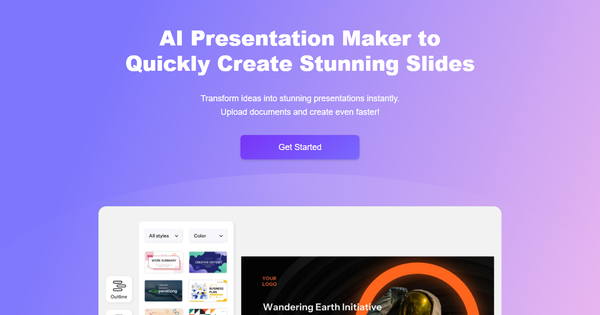
AiPPT is a web-based AI-powered presentation maker that instantly transforms text prompts, ideas, uploaded documents (like PDFs or Word files), URLs, Markdown, mind maps, or Google Drive references into fully designed slide decks. It handles everything from outline generation to visual layout, image creation, and templating, with direct export options to PPT, PDF, or images. Primary use cases include rapid business pitches, educational lesson plans, technology roadmaps, company profiles, and data visualizations—ideal for anyone needing professional slides without manual design work.
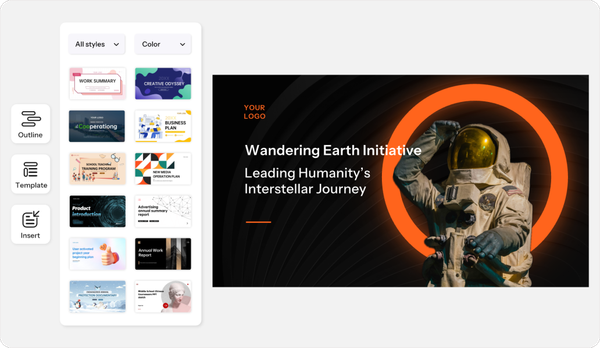
The tool targets individual professionals such as business analysts and product designers, educators (including college teachers), students, and small teams who value speed and affordability over enterprise collaboration. It positions itself as a budget-friendly alternative to tools like Gamma or Beautiful.ai, emphasizing one-click creation from diverse inputs and a massive library of over 200,000 templates tailored to business, education, and tech scenarios.
Key Features & Capabilities
Core functionality revolves around AI-driven slide generation: users input a topic or upload content, and the tool auto-creates structured outlines, populates slides with relevant text, layouts, and visuals, then allows refinement. Standout features include multi-source imports (local files, Google Drive, URLs), built-in AI image generation with monthly credits, AI-powered editing (text/image swaps and template replacement), and "Nano Banana mode" for enhanced generation on paid plans. The extensive free template library supports animated, creative, and industry-specific designs like timelines and roadmaps—far larger than many competitors. Exports are watermark-free on paid plans, and generation supports up to 50 slides depending on tier.
Differentiators include flexible input methods (not just prompts but full documents or web pages) and lifetime purchase options, plus seamless compatibility with PowerPoint workflows (exports open directly in Google Slides for manual editing, though no native Google Slides add-on or real-time sync exists). Compared to Gamma (strong on interactive web formats) or Beautiful.ai (smart slide automation), AiPPT excels in template variety and low-cost entry but lacks advanced analytics or embedded apps.
Limitations include no real-time collaboration (absent from all documentation), capped AI generations and image credits even on paid plans, occasional generic AI-generated text requiring human edits, and no deep integration with Google Workspace beyond basic Drive imports. Prompt customization is basic, and outputs sometimes need plagiarism checks or polishing for professional audiences.

User Experience
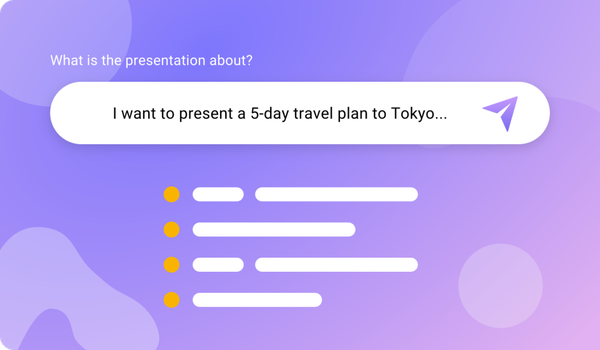
AiPPT offers a clean, modern web interface with a prominent "Start Chat" entry point—users simply type a prompt or upload files, and generation happens in seconds with minimal clicks. The learning curve is very low; beginners can produce a full deck in under five minutes, while customization (theme swaps, AI edits, drag-and-drop tweaks) feels intuitive without needing design skills. No steep onboarding or complex menus.
Interface quality is polished and responsive on desktop (mobile support is functional but secondary). However, documentation is sparse—no official knowledge base, video library, or detailed help center exists on the site. Support is limited to paid-plan email/chat access, with users relying on external YouTube tutorials for advanced tips. Overall, the experience prioritizes speed and simplicity over comprehensive guidance.
Performance & Reliability
Generation is fast—most decks complete in 10–30 seconds for standard prompts, with "deep search" options taking slightly longer for richer content. Efficiency shines for repetitive tasks like converting lesson materials or reports, and reliability is high for basic to mid-complexity presentations (business, education). Image generation and template application perform consistently within credit limits.
Common user complaints (from reviews and tutorials as of March 2026) include hitting daily generation caps quickly on Plus plans, AI text feeling formulaic or requiring rework, and occasional layout inconsistencies on complex topics. No widespread outages reported, but free-tier restrictions frustrate heavy users. Post-edits are frequently needed for polish, though the core AI output is dependable for quick professional results.
Pricing & Value
AiPPT uses a straightforward freemium model (all prices in USD as of March 2026):
- Free: 2 AI generations/day (max 10 slides), limited exports and 40 image credits—sufficient for testing.
- Plus: $9/month or $108 billed annually (significant discount); 20 generations/day, 20-slide max, 500 image credits, Google Drive/URL imports, basic support.
- Pro (Popular): $11/month or $132 annually; 40 generations/day, 50-slide max, 1,000 image credits, unlimited AI edits, Markdown/mind map imports, priority support.
- Lifetime: Available with discounts (exact pricing varies by promotion).
No enterprise tier is advertised. Value is strong for solo users—cheaper than Gamma ($8–20+/month) or Beautiful.ai ($12+/month) while delivering comparable speed and more templates. The lifetime option adds long-term savings, but limited credits and missing collaboration reduce appeal for teams or frequent creators versus premium competitors. Free tier and annual discounts make it accessible, though heavy users may outgrow caps quickly.
Practical Tutorial
AiPPT provides no official in-app or video tutorials on its site, but the process is straightforward. Here is a complete step-by-step walkthrough (tested conceptually from user videos and site flow as of March 2026) for a common task: creating an educational presentation on “The Impact of AI in Modern Classrooms” from a simple prompt.
- Go to https://www.aippt.com/ and sign up/log in (free account works for testing).
- Click the prominent “Start Chat” button on the homepage.
- In the chat interface, type your prompt: “Create a 12-slide presentation on The Impact of AI in Modern Classrooms, including introduction, benefits, challenges, real examples, and conclusion. Use professional education theme.”
- Optional: Upload a reference document, paste Markdown, or add a Google Drive link/URL for sourced content.
- Hit send—the AI generates an outline in seconds, then builds the full slide deck with layouts, text, and placeholder images.
- Review the generated deck: Use AI Edit (chat sidebar) to refine specific slides (e.g., “Make slide 5 more concise and add a bullet chart”), replace templates from the 200k+ library, or generate custom images via the AI image tool (consumes credits).
- Customize further: Swap themes, drag elements, or apply “Nano Banana mode” (paid) for advanced styling.
- Preview, then export as PPT (for PowerPoint/Google Slides compatibility), PDF, or images. Paid plans remove watermarks.
Real example result: The tool produced a clean 12-slide deck with engaging visuals in under 45 seconds; minor text tweaks took 2 minutes for a ready-to-present file. For visual guidance, search YouTube for “AiPPT Review & Tutorial” (e.g., channels demonstrating text-to-PPT flows). This workflow typically saves 1–2 hours versus manual creation.
Final Verdict
AiPPT earns a solid 4.2 out of 5 stars for its speed, template depth, and affordability in the crowded AI presentation space.
Educators, students, freelancers, and solo professionals who need quick, visually appealing PowerPoint decks from minimal input should use it—especially those on a budget seeking lifetime value without complex tools.
Teams requiring real-time collaboration, advanced customization, or enterprise integrations should avoid it and opt for Gamma or Beautiful.ai instead.
If you want professional slides in minutes without breaking the bank, AiPPT is an excellent starting point—sign up and try the free tier today.