Airtable AI Review: Build Intelligent Apps with No Code
Overview & Purpose
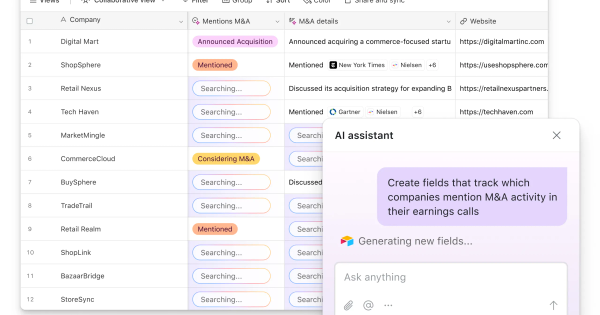
Airtable AI transforms the Airtable platform into an AI-native workspace where teams can build custom apps, deploy intelligent agents, analyze data, generate content, and automate workflows entirely through natural language conversations—no coding required. At its core, it powers features like Omni (a conversational AI sidekick for app building and deep data insights) and Field Agents (specialized AI researchers, analysts, and creators embedded in your bases). Primary use cases include turning customer feedback into actionable marketing insights, generating campaign concepts from a brief, enriching leads with real-time web data, extracting details from PDFs or contracts, triaging support tickets by sentiment, and rapidly prototyping production-ready apps such as product roadmaps or event planners.
It is ideal for teams that already manage structured data in Airtable or want to centralize operations without switching tools. Target audience spans non-technical professionals across marketing, product development, operations, HR, finance, and sales—anyone who needs to make smarter decisions faster without AI expertise or developer help. As of March 2026, Airtable positions it as “the fastest, safest way to deploy AI workflows” for leading teams seeking secure, context-aware intelligence directly tied to their databases.
Key Features & Capabilities
Core functionality revolves around three pillars: conversational app building with Omni, AI-powered Field Agents for scalable task automation, and built-in analysis/generation tools that pull from your base data plus optional web research. Users describe needs in plain English (“Build a dashboard to track campaign ROI and auto-generate reports”), and Omni creates editable tables, interfaces, automations, and even agents. Agents then handle recurring work—categorizing feedback, summarizing documents (up to hundreds of pages), translating text, drafting content, or routing records based on sentiment.
Standout differentiators include enterprise-grade data security (model providers never retain or train on your data; optional Amazon Bedrock keeps data fully private), choice of models (OpenAI, Anthropic, Meta Llama, Google Gemini, IBM Granite—admins control which are enabled), and true data-native orchestration that combines your internal records with live web insights without leaving Airtable. Building and iterating apps consumes zero AI credits, making rapid prototyping essentially free. Pre-built “AI Plays” (templates for campaign ideation, event research, etc.) and official templates accelerate onboarding.
Limitations include credit-based billing for queries, analysis, document processing, and agent runs (simple questions cost ~10 credits; heavy document analysis can hit 200+), variable consumption depending on model and input size, and reliance on well-structured base data—garbage in still produces suboptimal outputs. Omni cannot perform complex calculations beyond basic counts, edit certain views, create forms, or handle massive record duplication reliably. It also lacks direct integration with external personal AI accounts and works best inside existing Airtable workspaces rather than as a standalone chatbot.
User Experience
Airtable AI boasts an exceptionally intuitive conversational interface: a chat window (Omni icon in the top-left of bases or bottom-right of interfaces) lets you type natural-language requests and receive step-by-step checklists, undo options, and thumbs-up/down feedback for refinement. The learning curve is gentle for basic prompting but steeper for users new to Airtable’s relational database concepts—once you grasp tables, fields, and interfaces, AI accelerates everything dramatically. Results are fully editable with drag-and-drop, so you never feel locked into AI output.
Interface quality is clean, modern, and consistent with Airtable’s signature spreadsheet-meets-app aesthetic; mobile access works but feels secondary (some users note extra taps to reach favorite tables). Documentation and support are outstanding: comprehensive guides at support.airtable.com, the Airtable Academy, official YouTube tutorials, AI Playbook, and an active community forum. Admins benefit from clear workspace toggles and usage dashboards. Overall, it feels empowering rather than overwhelming for teams already comfortable with no-code tools.

Performance & Reliability
Prototyping speed is impressive—Omni can generate a full app skeleton (tables + interface + agents) in seconds from a single prompt, with web research and document analysis completing in under a minute for typical inputs. Field Agents execute recurring tasks reliably at scale once configured. Reliability is high for core functions, with built-in undo and revision history protecting against errors; most users report consistent results when prompts include clear context and guardrails.
Known issues include unpredictable credit burn rates (heavy document work or internet-enabled research can deplete allotments faster than expected, triggering warnings only at 75% usage), occasional hallucinations in creative generation (common to all LLMs), and rare automation glitches inherited from Airtable’s core engine. Reddit and review threads occasionally mention “AI slop” in early outputs or frustration when agents fail on poorly formatted data, but enterprise admins praise model-choice controls and audit logs. No widespread downtime reported; performance scales well on Business and Enterprise plans.

Pricing & Value
Airtable AI is bundled into all plans with monthly credit allotments (research date: March 13, 2026):
- Free: 500 credits per editor; suitable for light testing.
- Team ($20/seat/mo billed annually or $24 monthly): 15,000 credits per paid user.
- Business ($45/seat/mo billed annually or $54 monthly): 20,000 credits per paid user + AI admin controls.
- Enterprise Scale: Custom pricing with 25,000 credits per paid user at list.
Additional credit packs start at ~$40/month for 20,000 credits (roughly $2 per 1,000). App building itself is unlimited and free. Portals and advanced syncs add separate costs. Compared to alternatives like Notion AI (included in paid plans but less database-centric) or standalone tools like Zapier AI or custom GPTs, Airtable AI delivers superior value for teams already invested in structured data: you get production-grade apps, agents that act on your records, and ironclad security at a per-seat cost that scales with usage. Heavy AI users may need packs, but the no-credit app-building feature makes it more economical than competitors requiring per-query fees for everything. For organizations with 5–50 users doing moderate analysis, ROI is strong through time saved on manual work.
Practical Tutorial
Official tutorials abound; the best starting point is Airtable’s beginner video “Build your first AI app on Airtable” (https://www.youtube.com/watch?v=6QK0-isR0eQ) and the guide “Accelerate your work with Airtable AI” (https://www.airtable.com/guides/scale/how-to-use-airtable-ai). Here is a self-contained step-by-step walkthrough for a common task—summarizing customer feedback and generating insights—using Omni (tested as of March 2026):
-
Open or create a base and add a table named “Customer Feedback” with fields: Feedback Text (long text), Date (date), Product (single select), Sentiment (formula or AI field placeholder).
-
Click the Omni icon (upper-left in the base). In the chat, type: “Create a new table for customer reviews if it doesn’t exist, then analyze the Feedback Text column for common themes, sentiment trends by product, and actionable insights. Categorize each record with positive/negative/neutral tags.”
-
Upload sample feedback CSV or paste 5–10 example rows directly into the chat if needed. Omni will build or enhance the table, add an AI Field Agent for sentiment categorization (costs ~1 credit per record), and return a summary report.
-
Follow up in the same chat: “Generate a dashboard interface showing top insights as charts and draft a marketing response email for the top 3 negative themes.” Omni creates the Interface page and populates a draft.
-
Review the checklist of actions Omni performed, click Undo on anything you dislike, and thumbs-up the output to train future responses. Add an automation trigger (“When new feedback arrives, run Omni analysis”) via the Automations tab—no extra code needed.
-
Test by adding a new record; the Field Agent auto-runs and routes high-priority issues. Total time: under 10 minutes. For advanced versions, reference the official AI Plays at airtable.com/ai-plays (e.g., “Discover marketing insights in customer feedback”).
This workflow turns raw reviews into prioritized action items instantly while keeping everything auditable inside your secure base.
Final Verdict
Overall rating: 4.7/5 – Excellent for data-centric teams, docked slightly for credit management overhead and Airtable’s inherent learning curve.
Teams already using Airtable (or willing to adopt it) for collaborative databases should use this tool: it supercharges existing workflows with secure, context-aware AI that saves hours weekly on analysis, content, and automation while maintaining full editability and governance. Avoid it if you only need lightweight chat-based AI (try ChatGPT or Notion AI instead), operate on extremely tight budgets without scaling plans, or prefer completely standalone agents outside a relational database ecosystem.
One-sentence recommendation: If you manage structured data and want AI that actually builds and runs production apps inside your workspace, Airtable AI is the smartest, safest choice available in 2026.