AISmartCube Review: Build Custom AI Agents Without Coding
Overview & Purpose

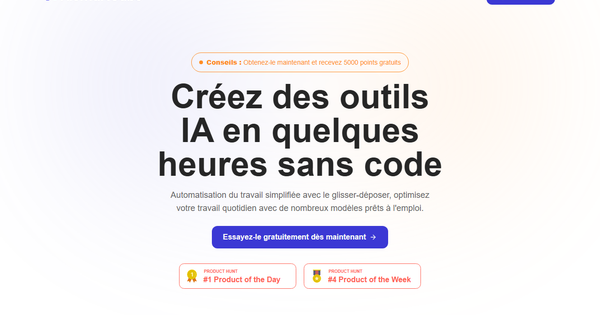
AISmartCube is a low-code/no-code platform that lets users build, automate, and enhance AI tools and assistants through a visual drag-and-drop interface resembling building with Lego blocks. Users connect modular nodes for large language models (LLMs), data processing, web crawling, and outputs to create complete workflows that can be exposed as chat-based AI agents or assistants. It integrates a shared, real-time updated public knowledge base (with scraped data on technology, trends, and media) alongside custom knowledge bases built via uploads or scraping.
Primary use cases include automated research assistance, content summarization (e.g., generating mind maps from URLs or scraping Amazon reviews), copywriting, social media tools, SEO optimization, translation workflows, e-commerce helpers, and knowledge management. The platform turns ideas into functional AI solutions in hours rather than weeks.
It primarily targets business users, marketers, content creators, and IT professionals who need custom AI automation without deep coding expertise. Non-technical teams benefit from ready templates and agent invocation, while developers or power users can prototype rapidly.
Key Features & Capabilities
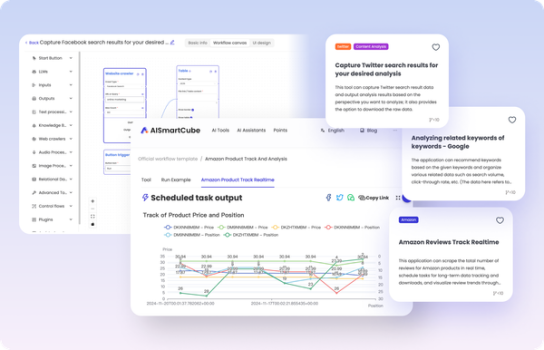
Core functionality centers on a visual workflow editor where nodes (Start Button, LLMs, Web Crawlers, Text Processing, Knowledge Base, Image/Audio tools, Control Flows, and Plugins) are dragged, connected, and configured to define data flow and execution order. Workflows support button triggers or scheduled runs and can be published for direct use or linked to AI Agents that intelligently select and invoke them during natural-language chats.
Standout features differentiating it from competitors include instant-copy official templates for marketing, SEO, productivity, and research; seamless multi-LLM access (ChatGPT, Claude, Gemini); real-time shared knowledge base integration for context-aware outputs; and one-click conversion of workflows into conversational assistants. The modular design plus public KB scraping enables smarter, always-updated tools without manual data maintenance.
Limitations include a relatively small node library compared to mature platforms like n8n or Zapier, pay-per-use credit consumption that can accumulate with heavy LLM or scraping activity, and no advanced enterprise features such as role-based access control or on-premise deployment mentioned publicly. Complex custom logic may still require some trial-and-error due to the indie nature of the tool.
User Experience
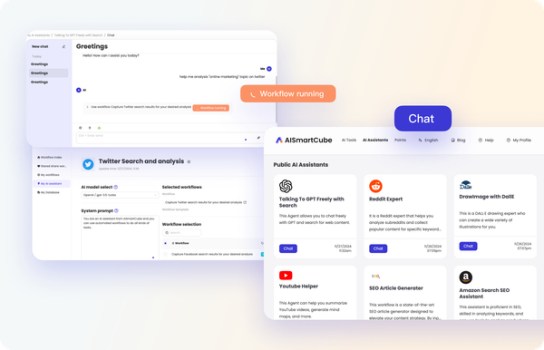
The drag-and-drop editor offers a low learning curve, making it genuinely accessible for non-coders—users report it feels playful and intuitive right away. Interface quality is clean and modern, with clear separation between editing mode (for builders) and usage mode (for end-users executing workflows).
Documentation exists at ais martcube.com/docs but remains high-level and conceptual, covering node types and workflow/agent relationships with example scenarios (e.g., URL-to-mind-map summarizer) yet lacking clickable step-by-step guides or embedded videos. Support resources are basic (FAQs on the homepage and email contact); no community forum or extensive knowledge base is available. Overall, the experience shines for quick starts via templates but may frustrate users seeking in-depth guidance.
Performance & Reliability
Workflow execution is efficient for typical tasks like research scraping, summarization, or content generation, with performance tied to the chosen LLM and data volume rather than platform overhead. Building and testing tools happens quickly thanks to the visual interface and pre-built nodes.
As of March 10, 2026, known issues are virtually nonexistent in public feedback; the platform shows no widespread reports of downtime, crashes, or scraping blocks. Limited user reviews on Product Hunt rate it 5.0/5 (praising creativity and ease), with no common complaints surfacing on established sites. Reliability appears solid for an indie tool, though the small user base means long-term scalability at enterprise volumes remains untested. A few third-party security scanners flagged the app subdomain cautiously, but this appears to be a false positive common with newer low-traffic sites.
Pricing & Value
AISmartCube uses a transparent pay-as-you-go credit system—no mandatory subscriptions required. New users receive 5,000 free points for full exploration. Additional credits are purchased on-demand in bundles (examples from directories: ~7,000 credits for $9.99, 25,000 for $29.99, 50,000 for $59.99). Points cover LLM calls, scraping, and processing; unused credits do not expire unnecessarily.
This model delivers strong value for sporadic or experimental use compared to fixed-subscription alternatives, allowing marketers and small teams to pay only for actual consumption while avoiding over-provisioning. For heavy users the variable cost could exceed some flat-rate platforms, but the free tier and template speed make it an excellent low-risk entry point into custom AI automation.
Practical Tutorial
No exhaustive official video or click-by-click public tutorial exists, though conceptual examples appear in the docs and a short promotional YouTube overview is available. Below is a practical, real-world walkthrough for a common task—building a basic “Web Content Research Assistant” (inspired by the official mind-map summarizer example). This can be completed in under 15 minutes and costs only a few credits to test.
-
Sign up for free at https://app.aismartcube.com/ (or start directly at https://app.aismartcube.com/pub_workflows) and claim your 5,000 free points.
-
From the dashboard, click “New Workflow” or browse public templates and duplicate one labeled “Research” or “Summarizer” if available. Otherwise start blank.
-
In the visual editor:
- Add a Start Button node (trigger).
- Connect it to a Web Crawler node; configure the input field to accept a URL (label it “Research URL”).
- Connect the crawler output to an LLM node (choose Claude or Gemini for summarization quality).
- In the LLM prompt, enter something like: “Create a detailed mind map summary of the page content, including key sections, bullet points, and actionable insights. Output in markdown.”
- Connect the LLM output to a Knowledge Base node (optional—select the shared public KB for extra context or your custom one).
- Finally, connect to an Output node (set type to Text or Markdown for easy reading).
-
Click “Save” and name the workflow (e.g., “Article Researcher”).
-
Switch to the Usage interface or create an Agent: go to Assistants, create a new one, and link your workflow. Name it “Research Buddy.”
-
Test: In the assistant chat, type “Research this URL: [paste any article link]” or run the workflow directly via the button. Review the mind-map output.
-
Publish and share the assistant link with your team or embed it. Monitor credit usage in your account dashboard.
For variations (copywriting, SEO, translation), simply swap the LLM prompt or add Image/Audio nodes. Official docs provide node reference details; experiment with public templates first to accelerate onboarding.
Final Verdict
AISmartCube earns a solid 4.0 out of 5. It excels for rapid AI tool creation with minimal friction.
Marketers, business users, and solo entrepreneurs who want to automate research, content, or daily workflows without hiring developers should use it—especially if they value flexible pay-per-use pricing and real-time knowledge integration. Avoid it if you require extensive documentation, a large community, or enterprise-grade security/compliance features; more mature open-source alternatives like n8n may suit complex production needs better.
AISmartCube is a promising Lego-like builder for custom AI automations—ideal to try with free credits if you're looking to boost productivity without coding expertise.