Aitwo Co Review: The Ultimate AI Tool for Interior Redesign
Overview & Purpose
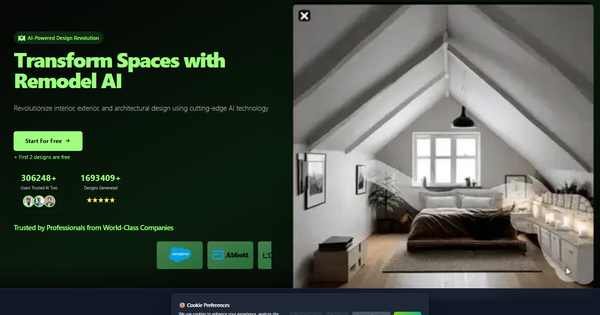
AITWO.CO is an AI-powered all-in-one creative design suite that transforms how users visualize and remodel spaces. It specializes in generating photorealistic redesigns for interiors (such as bedrooms, living rooms, kitchens, bathrooms, and dining rooms), exteriors of homes and buildings, architectural concepts, virtual staging, landscaping, and even paint ideas. Users upload a photo or sketch of a space, select styles and parameters, and receive redesigned images in seconds—making it ideal for quick ideation, renovation planning, real estate visualization, and creative experimentation.
Primary use cases include exploring home renovation options without hiring professionals, virtual staging for property listings, generating client presentations for designers, and turning rough sketches into realistic renders via its standout Sketch2Real feature. The platform targets a broad audience: homeowners and DIY renovators seeking inspiration, real estate agents and stagers, interior designers and architects for rapid prototyping, and even creative professionals in related fields like fashion or product visualization (due to additional tools for tattoos, clothing, and generative art). No prior design experience is required, positioning it as an accessible entry point for both amateurs and pros looking to save time and money on initial concepts.
Research for this review was conducted as of April 12, 2026, drawing from the official website, blog, and third-party aggregator reviews.

Key Features & Capabilities
Core functionality revolves around uploading an existing photo or sketch and generating redesigned versions through AI. Users can apply one of 60+ design styles (including tropical, modern, traditional, rustic, mid-century, minimalistic, eclectic, gaming, glamorous, industrial, coastal, bohemian, farmhouse, art deco, Mediterranean, Asian, French country, English cottage, Moroccan, Scandinavian, Hollywood Regency, and more), with new styles added monthly and custom requests supported. Additional controls include selecting room types, level of change (subtle refresh to dramatic overhaul), optional furniture/decor additions, lighting/quality settings, and specific area targeting for partial redesigns.
Standout features that differentiate AITWO.CO include:
- Sketch2Real: Converts hand-drawn sketches or concepts into photorealistic interior/exterior renders with accurate textures, lighting, and proportions.
- Multi-tool suite: Beyond core remodeling, it offers AI Architecture Design, Landscaping AI, Paint AI, virtual staging, and even broader creative tools (e.g., product photos or fashion mockups).
- Commercial usage license included in paid plans, allowing professional or business applications.
- Fast generation (under 30 seconds) that respects real-world architectural constraints like lighting and structural realism.
Limitations include typical AI constraints: outputs are inspirational rather than construction-ready blueprints (users should consult professionals for final plans); results depend heavily on input photo/sketch quality; and style library, while broad, may not perfectly match every ultra-niche aesthetic. Some users report occasional unrealistic elements or the need for multiple iterations. Unlike CAD-focused tools, it prioritizes visualization over precise measurements or 3D modeling.

User Experience
AITWO.CO boasts a clean, intuitive web-based interface with minimal learning curve. The workflow is straightforward: upload an image via drag-and-drop or button, select room/style parameters (or use prompt-based tweaks), toggle options like "Auto" enhancements, and hit generate. Pre-set examples and a responsive design make it accessible even for non-tech users. The platform runs on modern tech (React/Next.js frontend) for smooth performance.
Interface quality is high, with clear previews, redesign buttons for quick iterations, area-specific editing, and easy download options. Documentation is light on the main site but supported by an active blog featuring practical guides. No dedicated help center or extensive video library was evident, though community testimonials and in-app prompts guide beginners. Support appears responsive via the platform, with cancel-anytime subscriptions easing entry. Overall, it's praised for being "easy to use" and "no experience required," though email verification for high-res outputs adds a minor friction point.
Performance & Reliability
Generation speed is a highlight—most designs complete in under 30 seconds with high realism, thanks to backend integrations like Stable Diffusion variants and dedicated GPU resources. Users report consistent results for practical visualizations, with over 1.69 million designs generated by 306,000+ creators as of early 2026. On-site rating sits at 4.9/5 from verified testimonials, and aggregator reviews average 4.4–4.85/5.
Known issues are limited but include occasional trial frustrations (one review described free credits as leading to paywalls after uploads) and the inherent variability of AI outputs (e.g., "goofy" or generic results if prompts lack detail). No widespread downtime or major reliability complaints surfaced in recent searches; the platform emphasizes server-side processing for quality. Real-user feedback on Reddit highlights its value for quick layout feedback and idea generation, though it's not positioned as a full replacement for human designers.
Pricing & Value
AITWO.CO follows a freemium model with the first 2 designs free, allowing low-risk testing. Paid plans (billed monthly, yearly with ~40% savings, or weekly options) include:
- AI Two Plus: ~$29/month (or $20.75/month yearly) for 1,300 designs/month (7,000/year).
- AI Two Premium: ~$99/month for 3,000 designs/month (20,000/year).
- Lower-tier options like AITwo Mini (~$11.50/month) for lighter annual credits.
All paid tiers offer commercial licenses, full tool access, and cancel-anytime flexibility (no refunds due to instant GPU costs). Value is strong for frequent users needing fast visualizations—it can save hundreds of hours and thousands in professional fees compared to traditional designers or render farms. Compared to competitors like Interior AI Designs or DecorAI, it stands out with Sketch2Real, broader tool integration, and competitive per-design costs for hobbyists or small pros. It's less ideal for ultra-high-volume enterprise needs without custom scaling.
Practical Tutorial
Official tutorials are available on the AITWO.CO blog (e.g., for kitchens, study rooms, or exteriors). Below is a step-by-step walkthrough for a common task—redesigning an interior room (adapted from official guides for a study or living room). This uses real workflow from the platform.
-
Open the AITWO.CO Website: Navigate to https://aitwo.co/ and go to the Interior AI section (or use the main design tool). Sign up for free to access your first designs.
-
Upload Your Room Image: Click the image upload button and select a clear, well-lit photo of your target room (e.g., a bedroom or living room). For best results, use a high-quality image showing the full space.
-
Choose Room Type and Settings: Select the room type (e.g., "Bedroom" or "Living Room"). Pick a style from the 60+ options (try "modern" or "Scandinavian" for a refresh). Adjust level of change, quality, lighting, and add optional furniture/decor prompts if desired.
-
Start Designing: Click "Start Designing" or the generate button. The AI processes your upload and produces results in under 30 seconds.
-
Review and Iterate: Examine the output. Use "Redesign This Design" to tweak styles or prompts. For targeted changes, select "Design Only This Area of Image," highlight a section (e.g., walls or furniture), and regenerate.
-
Customize Further (Optional): Upload an inspiration image or sketch for Sketch2Real mode to blend ideas. Experiment with exterior/landscaping tools if expanding the project.
-
Download Your Final Design: Once satisfied, click "Download" to save high-resolution images (available after free credits or subscription).
Example outcome: Uploading a plain living room photo and selecting "mid-century modern" with moderate change might yield a redesigned space with updated furniture, lighting, and color scheme—perfect for before/after visualization. For video walkthroughs, check the site's examples or YouTube shorts featuring AITWO transformations. Always refine inputs for optimal realism.
Final Verdict
Overall rating: 4.5/5 — Excellent for speed and creativity, with minor deductions for occasional trial friction and AI variability.
This tool shines for homeowners, real estate professionals, and hobbyist designers who need quick, realistic visualizations to spark ideas or impress clients—it's particularly valuable for budget-conscious renovations or early-stage planning. Avoid it if you require precise technical drawings, ultra-custom niche styles without iteration, or have zero tolerance for any AI imperfections.
One-sentence recommendation: AITWO.CO is a fast, user-friendly AI design powerhouse worth trying for anyone seeking inspiring interior/exterior makeovers without the cost or wait of traditional services.