Aivideo Com Review: The Ultimate All-in-One AI Video Generator
Overview & Purpose

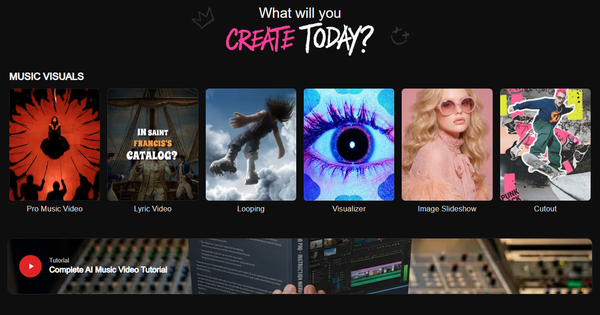
AIVideo.com is an all-in-one AI video creation platform that enables users to generate complete videos from simple text prompts or scripts. It handles everything from script writing and visual generation to voiceovers, background music, sound effects, and final editing in a single dashboard. Primary use cases include producing viral short-form content for social media, music videos (lyric videos, visualizers, looping clips), e-commerce poster ads, marketing videos, and educational or faceless YouTube content. The platform aggregates access to multiple leading AI models (including options akin to Kling, Luma, Google Veo, and others) so creators can experiment without switching tools.
It primarily targets content creators, digital marketers, social media influencers, educators, indie artists, and beginners who want to produce professional-looking videos quickly without advanced editing skills or expensive equipment. Advanced users like professional video producers benefit from its workflow tools and custom character consistency features for scaled production.
Key Features & Capabilities
Core functionality revolves around two main modes: the Video Composer (for end-to-end generation from a prompt or script, automatically adding visuals, voiceover, and effects) and the AI Native Editor (a chat-based tool for refining clips, fixing issues via text commands, and managing assets like styles or custom characters). Standout features include multi-model access in one interface, built-in music generator and sound effects library, image-to-video and audio-to-video conversion, templates for specific formats (Pro Music Video, Lyric Video, Image Slideshow, Cutout, Poster Ad), remove-background tools, and custom character creation for consistent appearances across scenes. Higher tiers add scheduled tasks, integrations, and priority support.
These differentiate it from single-model competitors (e.g., standalone Runway or Synthesia) by offering a unified hub with model switching for optimal quality per project. Limitations include credit-based consumption that escalates quickly during iterations or error fixes (edits often cost credits), variable output quality depending on the chosen model (occasional artifacts, lip-sync issues, or obvious AI elements), no unlimited generation tier, and some advanced tools marked as desktop-only. Long-form videos beyond a few minutes become cost-prohibitive, and there is no native collaboration or advanced motion control found in specialized tools.
User Experience
The platform boasts a clean, modern dashboard with intuitive templates and one-click “Try Now” buttons for common tasks, making it accessible for beginners with a minimal learning curve—most users can generate their first video within minutes after signup. The AI Editor’s chat interface feels conversational and responsive for refinements. Interface quality is professional, with asset management (characters, styles, music) centralized in one place.
Documentation includes an on-site FAQ covering credits and billing, plus built-in tutorials (e.g., “Complete AI Music Video Tutorial”). Community support is listed on lower plans, with priority/Dedicated support on higher tiers and a contact form/Discord option. However, user feedback notes inconsistent support responsiveness, and some find credit tracking and model selection overwhelming at first. Overall, it scores well for speed-to-creation but requires prompt engineering practice for best results.
Performance & Reliability
Generation speed varies by plan and model: basic clips complete in minutes on priority plans, while complex HD music videos or multi-scene projects can take longer (up to hours in some reports). Efficiency shines for short-form content, with the Composer delivering polished, ready-to-export videos from a single prompt. Known issues include AI inconsistencies (poor lip sync, unwanted elements, or style drift) that require costly re-generations, occasional long wait times, and high credit burn rates (e.g., one user reported 6,000 credits for a 4-minute video with fixes). Reliability complaints center on billing (difficulty canceling subscriptions, continued charges post-cancellation) rather than core generation downtime.
As of March 2026 research, most users report good final quality for music visuals and short ads when prompts are optimized, though results can appear “obviously AI” without heavy editing.
Pricing & Value
AIVideo.com uses a credit-based subscription model with all plans billed yearly and a “3 months free” promotion. Details (as of March 2026):
- Starter ($14/month billed yearly): 1,800 credits/month (~90 video clips or 1,800 images), basic features, community support.
- Creator ($29/month billed yearly, most popular): 4,100 credits/month + 5,000 bonus credits (~205 clips), full features.
- Director ($74/month billed yearly): 12,200 credits/month after first month + 50,000 bonus credits (never expire), priority support, integrations.
- Studio ($224/month billed yearly): 42,000 credits/month after first month, dedicated support.
New users receive 100 free credits for testing. Credits cover video clips (costs vary: e.g., HD full music video ~900 credits per minute), images, voiceover minutes, and sound effects; unused credits generally do not carry over except bonus ones on higher plans. No perpetual free tier exists beyond the trial.
Value is strong for occasional users creating short viral content (time savings outweigh cost versus hiring editors), but heavy users or those needing frequent iterations find it expensive compared to unlimited alternatives. Enterprise custom options are available via contact. Compared to single-tool platforms, the multi-model access and full workflow provide better all-in-one convenience.
Practical Tutorial
AIVideo.com provides built-in workflow guidance and a “Complete AI Music Video Tutorial” on the site. Below is a step-by-step walkthrough for a common task—creating a 30-second promotional lyric video from a script (based on official Composer/Editor flows and verified YouTube tutorials as of March 2026; example uses a sample product promo script).
-
Sign up and explore: Go to https://www.aivideo.com/, create a free account (no credit card required; receive 100 trial credits). Log in to the dashboard and select “Create from Script” or “Lyric Video” template under Music Visuals.
-
Input your content: Paste or type a short script (e.g., “Introducing our new eco-friendly water bottle – stays cold for 24 hours. Shop now!”). Add lyrics or key phrases if using lyric mode. Choose voiceover style/gender and background music genre.
-
Select models and generate: Pick from available AI models in the playground for visuals (try different ones for best fit). Set duration (e.g., 30 seconds), resolution (SD for testing to save credits), and generate. The Composer automatically creates script visuals, adds voiceover, and stitches clips (costs ~150–300 credits depending on length/model).
-
Refine in AI Editor: Open the generated video in the AI Editor (chat interface). Type commands like “Fix lip sync on scene 2,” “Change background to forest,” or “Add custom character wearing our product.” Re-generate specific segments as needed.
-
Add finishing touches: Upload or generate sound effects, apply cutout/remove background if using images, or insert text overlays. Preview the full video.
-
Export and download: Once satisfied, export in HD (additional credits may apply). Download or share directly to social platforms.
For visual reference and variations, see the official site tutorial or this quick YouTube guide: https://www.youtube.com/watch?v=JukiHfrkQrc. Total time: 5–15 minutes for a basic version; expect 200–500 credits for a polished short.
Final Verdict
Overall rating: 3.8/5. AIVideo.com excels as a time-saving, beginner-friendly all-in-one studio for marketers and content creators who need fast short-form videos (music visuals, ads, social clips) without juggling multiple tools—its Composer and multi-model access deliver impressive results quickly and justify the cost for moderate use. Users should avoid it if they require pixel-perfect consistency, long-form projects, heavy editing iterations, or rock-solid billing/support, as credit waste and occasional subscription frustrations can outweigh benefits.
One-sentence recommendation: If you want professional short videos from a single prompt without learning multiple apps, start with AIVideo.com’s Creator plan—but monitor credits closely and test the free trial first.