Alice App Review: The Ultimate Desktop AI Automation Assistant
Overview & Purpose

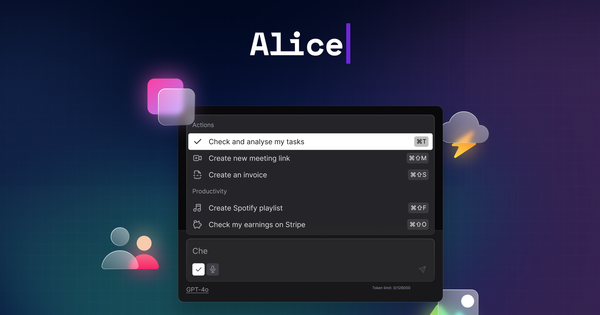
Alice App is a native desktop AI assistant for macOS, Windows, and Linux that embeds powerful AI models directly into the operating system, allowing users to summon intelligent assistance via a single global hotkey for tasks ranging from content generation to full workflow automation. It transforms vague chat interactions into actionable outcomes by integrating with external apps, calendars, CRMs, and no-code platforms like Zapier or Make.com. Primary use cases include automating social media and SEO content creation, managing tasks and calendars through natural language commands, generating or debugging code, summarizing documents with context memory, performing web research with vision analysis, and executing custom automations such as updating sales reports or blocking meeting time.
The tool targets developers, marketers, designers, sales professionals, project managers, CEOs, and general productivity enthusiasts who spend significant time switching between apps and want a privacy-first alternative to browser-based AI. As of research conducted in March 2026, it has built a loyal base of over 8,000 users by solving the frustration of fragmented workflows while keeping all conversations and documents local.
Key Features & Capabilities
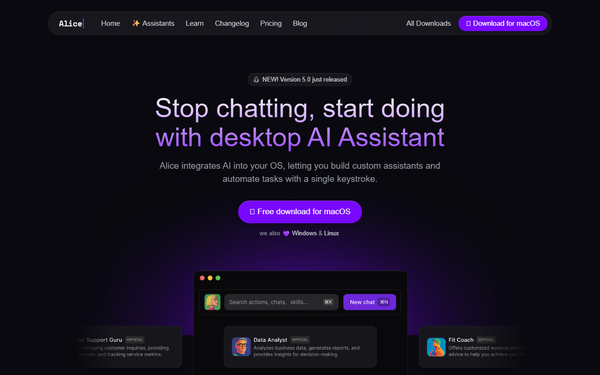
Core functionality centers on a unified chat interface that supports frontier models including GPT-4o, Claude 3.5 Sonnet, Grok variants, and offline options, with seamless switching and the ability to bring your own API keys. Standout features include Skills and Snippets (reusable prompt templates assignable to custom keyboard shortcuts for one-keystroke execution anywhere in the OS), a growing library of over 50 ready-to-install AI Assistants (such as “SEO Content Writer” or “Bug Hunter,” some available for a small one-time fee), long-term memory that recalls project documents and user preferences, voice input/output with text-to-speech, image generation and screenshot analysis, built-in web search, and Remote Actions/MCP servers for triggering real automations in connected tools.
These capabilities differentiate Alice from competitors like standalone ChatGPT or Raycast by enabling true OS-level actions—such as commanding your calendar to “block two hours tomorrow” or posting to WordPress—rather than merely generating text responses, all while maintaining a local-first privacy model with no data sharing. Limitations include separate costs for heavy API usage (unless using a subscription plan with bundled credits) and the requirement for initial configuration of advanced integrations or custom skills. Missing features noted in user feedback include native cloud sync across devices (by design for privacy) and more polished Windows-specific stability in edge cases.
User Experience
Alice delivers an intuitive experience with an extremely low barrier for core use: download, add an API key, press your chosen hotkey (default often Cmd+Space or similar), and start chatting or applying snippets instantly. The interface is clean, responsive, and unified across models, featuring dark/light themes and minimal clutter that feels truly native rather than a web wrapper. Basic tasks require almost no learning curve, while power features like building Assistants or Remote Actions introduce a moderate but rewarding one that grows with usage.
Documentation shines through the official Alice Academy, which provides clear step-by-step guides, while support includes responsive updates, community testimonials, and email channels. Some users on established platforms note occasional delays in support responses or outdated older docs, yet the overall quality remains high and the product continues to evolve rapidly based on feedback.
Performance & Reliability
Running natively on the desktop, Alice offers blazing speed with near-instant responses, no browser loading times, and reliable execution even during peak hours—users frequently describe it as faster and more dependable than web-based alternatives. Productivity gains are commonly reported through features like OCR on screenshots, document memory, and webhook automations that execute background tasks flawlessly.
Known issues remain minor and infrequent: occasional LLM errors on Windows installations or account sync hiccups during heavy customization, with a handful of reviews mentioning refund processing delays. Overall reliability earns consistent praise across platforms, with the app’s local-first architecture contributing to consistent performance and fewer outages than cloud-only tools.
Pricing & Value
Alice employs a flexible, user-friendly pricing model centered on a one-time lifetime license for full app access (with ongoing updates) paired with the option to bring your own API keys, eliminating monthly fees for core functionality. Subscription plans are also available for users who prefer bundled AI usage credits and additional seats, starting at modest per-user monthly rates for teams. Pre-built Assistants from the library carry small one-time purchase options in some cases (around $5), and extra credits can be added on demand.
This structure delivers exceptional long-term value compared to subscription-heavy competitors, especially for power users who leverage custom automations and shortcuts daily—pay once for the app and control AI costs directly via your preferred providers. The lifetime option combined with privacy guarantees and no usage limits on the core software makes it particularly compelling for individuals and small teams seeking sustainable productivity tools without recurring SaaS lock-in.
Practical Tutorial
Official resources are available at the Alice Academy (https://heyalice.app/academy) and blog, including dedicated guides on Skills, Assistants, and Remote Actions. Below is a complete, real-world walkthrough for a common task highlighted in the app’s marketing: automating social media content creation with a reusable custom Skill (essentially an advanced Snippet). This example mirrors official blog guidance and can be completed in under five minutes.
-
Download and install Alice from https://www.heyalice.app/ (macOS direct download; Windows/Linux links provided). Launch the app and sign in or start the trial period.
-
In Settings, add your preferred API key (e.g., Anthropic for Claude or OpenAI for GPT-4o) to enable high-quality responses.
-
Navigate to Settings → Skills and click “New Skill.”
-
Configure as follows:
- Name: Generate Social Media Post
- Category: Marketing/Content
- Description: Creates engaging LinkedIn or Twitter posts
- Main Prompt (paste exactly): “You are a professional social media expert. Turn the following idea or text into an engaging, concise LinkedIn or Twitter post. Include a strong hook, key value, relevant hashtags, and a clear call-to-action. Keep under 280 characters for Twitter or 300 for LinkedIn. Respond ONLY with the final post text.”
- Enable “Copy responses to clipboard” for instant pasting.
- Optionally select a preferred model and toggle “Single-turn Skill” for speed.
-
Save the Skill, then go to Settings → Assistants, edit your main assistant (or create a new “Content Creator” one), and assign the new Skill to it via the toggle list.
-
(Recommended) In the Skill editor, assign a global keyboard shortcut (e.g., Cmd+Shift+P) for one-keystroke activation from any application.
-
Test it: Highlight an idea or draft text anywhere on your desktop (or simply summon Alice), press your shortcut or type “/Generate Social Media Post” followed by your topic in the chat (example: “AI desktop assistant that uses hotkeys”). Alice instantly returns a polished post ready to copy and publish.
For even more power, extend this into a Remote Action by linking the Skill to a Zapier or Make.com webhook that auto-posts to your accounts. Full official examples and variations appear in the academy under “Skills” and “Remote Actions Basics.”
Final Verdict
Alice App earns a strong 4.5 out of 5 overall rating for its seamless desktop integration, powerful customization, and genuine privacy focus. Professionals and teams who value actionable AI automations, custom keyboard shortcuts, and lifetime ownership should use this tool—it excels at turning repetitive tasks into one-keystroke efficiencies while keeping data secure and costs controllable. Those who prefer completely free or zero-setup mobile/web AI, or who avoid managing any API keys whatsoever, should avoid it due to the initial configuration investment and separate usage costs.
In one sentence: Alice is the standout desktop AI companion for anyone serious about productivity through native actions and custom automations.