Altavize Review: The Ultimate AI-Powered Excel Text Analytics Tool

Overview & Purpose

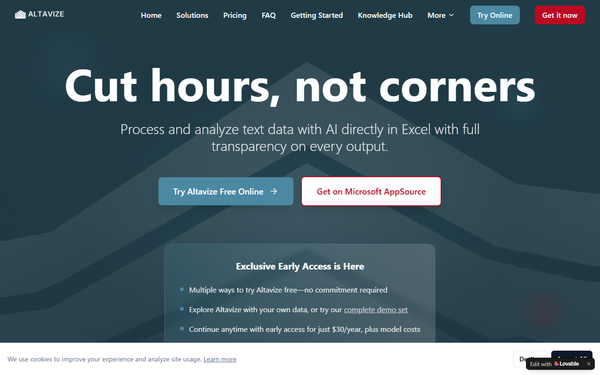
Altavize is an AI-powered Excel add-in that embeds text analytics capabilities directly into Microsoft spreadsheets, allowing users to process, categorize, extract, and analyze unstructured or messy text data without ever leaving their existing workflow. It leverages structured pre- and post-processing around OpenAI models (running on Azure infrastructure) to mitigate common LLM issues like hallucinations, prompt drift, and context loss at scale, while delivering transparent confidence scores with every output. Primary use cases include auto-generating categories for unclear datasets, performing binary or hierarchical classifications, bulk PDF extraction (at document or line level) straight into worksheets, data anonymization, and free-format insight generation from surveys, reports, contracts, or customer feedback.
The tool is purpose-built for analysts and professionals who work extensively with text-heavy, unstructured data inside Excel. Its target audience includes consultants, data analysts, researchers, and domain experts in consulting, banking, private equity, law, marketing, healthcare, and social sciences—particularly those seeking to replace manual coding or copy-paste processes with scalable, auditable AI assistance while retaining complete control over which cells the models access. Research conducted as of March 2026.
Key Features & Capabilities
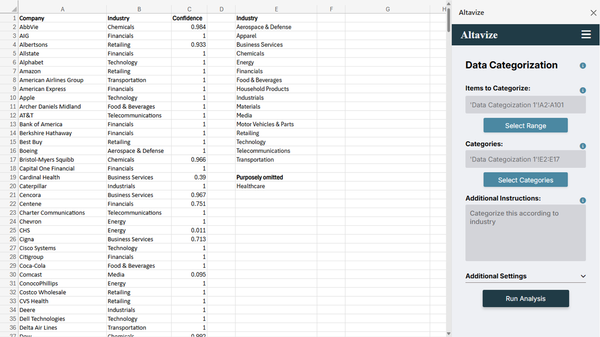
Core functionality centers on seamless, Excel-native AI tools that read selected cell ranges, combine them with user instructions, and return structured results plus confidence scores directly into adjacent columns or new sheets. Key tools include Data Categorization (with an automatic Category Generator), Binary/Hierarchical Classification, PDF Extraction (bulk processing of multiple files into Excel), Data Anonymization, and free-format analysis requests.
Standout differentiators include its emphasis on transparency and reliability through engineered pre- and post-processing layers (beyond raw LLM calls), full user control over data exposure, zero-retention privacy model, and the ability to bring your own OpenAI API key or purchase tokens at cost with no markup. This makes it far more enterprise-ready and auditable than generic chat-based AI tools or Excel’s built-in Copilot for text-heavy analytic workflows. It also scales efficiently for large datasets and supports hierarchical or custom logic that generic alternatives often struggle with.
Limitations include dependency on OpenAI models (incurring usage costs for heavy workloads and occasional variability despite mitigations), restriction to Excel environments (no native support for Google Sheets or other platforms), and the absence of custom model training or advanced machine-learning pipelines. As an emerging product, it also lacks some enterprise features like team collaboration dashboards or deep integrations beyond Excel.
User Experience
Installation is straightforward via the Microsoft 365 Add-ins store or Marketplace, after which Altavize appears as a dedicated ribbon tab or task pane inside Excel. The interface is clean and intuitive for anyone familiar with Excel: users simply select a data range, choose a tool, provide brief instructions if needed, and run the process—results populate instantly with confidence scores for quick review and iteration. The learning curve is low for Excel users and moderate for those new to AI prompting, thanks to guided templates and examples.
Documentation consists of a getting-started section on the official site, instructional demo videos on the Altavize YouTube channel, and Microsoft certification materials. Support resources include in-app help and contact options through the publisher, though independent community forums or extensive knowledge bases are limited given the tool’s niche and relatively recent launch. Overall, the experience feels native and non-disruptive, preserving analysts’ preferred spreadsheet environment.
Performance & Reliability
Processing speed is efficient for typical analyst workloads, with results returning in seconds to minutes depending on dataset size and OpenAI API latency; bulk PDF extraction handles hundreds of pages scalably without requiring external uploads. Reliability benefits from confidence scoring and structured processing, which users report reduces manual verification time significantly. Microsoft 365 certification and Azure hosting contribute to enterprise-grade stability and security (data sent over the internet only for the selected cells, with zero retention).
Known issues are minimal; one reported GitHub incident involved temporary desktop Excel compatibility hiccups tied to Office/WebView2 updates, but these appear isolated and resolved quickly. With only a handful of public ratings (5.0/5 on the Marketplace from early users) and sparse independent reviews, widespread complaints are absent—most feedback highlights time savings and accuracy on real-world messy datasets.
Pricing & Value
Altavize follows a subscription model centered on a yearly license fee billed annually, with users able to connect their own OpenAI API key or purchase tokens directly through the provider at cost (no markup). Exact license pricing is not prominently published on the main site and is presented as affordable and value-based; directory sources describe it as low-cost access (some listings note equivalents around $10–28 per month when annualized). No prominent free tier exists, though limited trials or demo modes are implied for evaluation.
The value proposition is strong for its target users: it replaces hours of manual categorization or extraction at a fraction of the cost of hiring help or building custom scripts, while offering superior privacy, transparency, and Excel integration compared to broader tools like Microsoft Copilot or general-purpose AI platforms. For heavy users, token costs remain the primary variable expense, but the overall structure avoids the unpredictable overages common in other SaaS AI products.
Practical Tutorial
Official text-based tutorials are limited, but the publisher provides clear demo videos on its YouTube channel (@Altavize) and a getting-started guide at altavize.com/getting_started. Below is a practical, step-by-step walkthrough for a common task—categorizing open-ended customer survey responses—based on the tool’s documented workflow and publicly available demos (e.g., the “Data Categorization Demo” short).
- Install Altavize: Open Excel, go to Insert > Get Add-ins (or search the Microsoft 365 Add-ins store), search for “Altavize,” and click Add.
- Prepare your data: Open a workbook with a column of text responses (e.g., Column A: “The checkout process was confusing and slow”).
- Activate the add-in: Click the Altavize tab in the ribbon to open the task pane.
- Select your data: Highlight the range of text cells you want analyzed (the tool only processes what you select).
- Choose the tool: Select “Data Categorization” or “Category Generator” from the tool list.
- Provide instructions: Choose binary/hierarchical mode or let it auto-generate categories; type a simple prompt such as “Categorize by theme: usability, speed, pricing, other. Output one primary category per response.”
- Run the analysis: Click Run. The add-in sends only the selected cells to the model, processes them, and returns two new columns—one with the assigned category and one with a confidence score (0–100%).
- Review & iterate: Sort by low-confidence scores (<70%) for manual spot-checks. Refine the prompt and rerun on selected rows if needed.
- Export or analyze further: Use standard Excel features (pivot tables, filters) on the enriched data.
For PDF extraction, the process is similar: select a column containing file paths or drag PDFs into a dedicated tool pane, specify fields to extract, and receive structured output with confidence scores. Full video walkthroughs are available on the Altavize YouTube channel for visual guidance.
Final Verdict
Overall rating: 4.5/5
Altavize is ideal for Excel-centric analysts and consultants who spend significant time on unstructured text data—its seamless integration, transparency features, and privacy controls deliver immediate productivity gains and trustworthy results where generic AI falls short. It should be avoided by users outside the Microsoft Excel ecosystem, those requiring fully custom ML models, or organizations with zero budget for API usage.
If your daily work involves wrangling messy text inside spreadsheets, Altavize is a smart, low-friction investment that finally makes enterprise-grade AI feel like a natural Excel extension.