Amical Review: The Best Free, Private AI Dictation Tool
Overview & Purpose
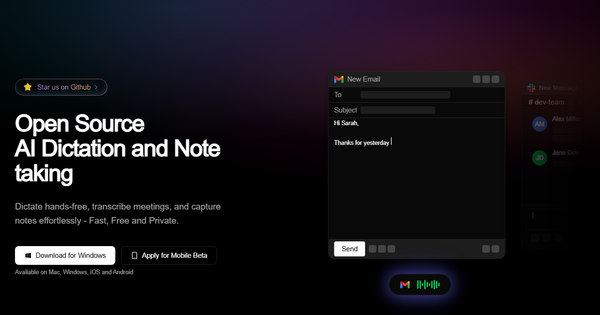
Amical is an open-source, local-first AI-powered desktop application for hands-free dictation, meeting transcription, and structured note-taking. It uses speech-to-text powered by models like Whisper combined with LLMs to convert voice into intelligently formatted text, adapting automatically to the active application—such as drafting professional emails in Gmail, casual posts in Instagram, or code comments in an IDE. Primary use cases include boosting productivity through voice input in any text field, real-time meeting capture with mic and system audio, and quick voice notes that become summaries or tasks. It supports both fully offline local processing for maximum privacy and optional cloud models for enhanced performance. The tool targets developers, marketers, content creators, designers, and any professionals who rely on apps like Slack, Jira, Gmail, or WhatsApp, especially those prioritizing privacy, zero cost, and multilingual support across 100+ languages.
Key Features & Capabilities
Core functionality revolves around real-time dictation activated by holding a hotkey (default: fn key) or via a floating desktop widget, with automatic context-aware formatting, grammar correction, and punctuation. Standout differentiators include deep app-context intelligence that writes "like you" in the target app, custom vocabulary for industry jargon and proper nouns, custom hotkeys/shortcuts for workflows, transcription history with export, and seamless local/offline operation using open-source models (Whisper for STT and Ollama for LLM processing) or cloud fallback. It also offers smart voice notes and emerging AI workflows via MCP for app control. These features set it apart from subscription tools like Otter.ai or Granola by delivering free, private, extensible performance without vendor lock-in.
Limitations include several advanced capabilities still in progress or planned: full smart note-taking summaries/tasks, complete real-time meeting transcription with insights, MCP voice commands for app automation, and Linux support (currently Mac/Windows only, with iOS/Android in private beta). Custom vocabulary and per-app prompts are available but require manual setup, and documentation for deep customization remains basic.
User Experience
Installation is straightforward: on Mac via the recommended brew install --cask amical or manual .dmg download; on Windows via executable from the site or GitHub releases. First launch requires granting microphone and accessibility permissions (standard for dictation apps), after which a floating widget and hotkey activation make starting dictation effortless. The learning curve is minimal for core use—open any app and hold the fn key to speak—but rises slightly for custom vocabulary, hotkey remapping, or model selection due to currently sparse documentation. The interface feels modern and unobtrusive (built with Electron, Tailwind, and shadcn), with a clean widget that stays out of the way. Support resources include a basic quick-start guide, GitHub README, active Discord community, and issue tracker; no extensive video tutorials or enterprise helpdesk exist yet, but the community responds quickly. Early users praise the frictionless workflow once permissions are set.
Performance & Reliability
Dictation is real-time and sub-second on capable hardware (especially Apple Silicon Macs with 16GB+ RAM), delivering high accuracy enhanced by LLM post-processing for context, grammar, and formatting. Local models ensure offline reliability and privacy with no data leaving the device, while cloud options provide a speed/accuracy boost when needed. Performance scales with chosen model size—smaller ones are lighter on CPU but less intelligent. As of March 2026 (research date), no widespread complaints or critical bugs appear in GitHub issues, Reddit, or Threads discussions; feedback highlights surprising accuracy for jargon-heavy speech and consistent 3x typing speed gains. Minor caveats include higher resource use with large local models on lower-end hardware and occasional setup tweaks for optimal microphone sensitivity. Overall reliability is strong for a v1.0 release, with active development addressing roadmap items rapidly.
Pricing & Value
Amical is completely free with a permissive MIT open-source license—no tiers, subscriptions, or hidden costs. Users can self-host, modify, or contribute via GitHub. This delivers exceptional value compared to paid alternatives like Wispr Flow, Granola, or Otter.ai (often $10–20/month), especially for privacy-focused users or teams avoiding recurring fees. The combination of zero cost, local-first operation, context intelligence, and extensibility makes it a high-ROI tool for individuals and developers who value customization over polished enterprise features.
Practical Tutorial
Official documentation provides a concise quick-start guide (no in-depth video series yet). Here is a step-by-step walkthrough for a common task—dictating a professional email in Gmail—based on the current implementation as of March 2026.
-
Install and launch: Visit https://amical.ai/, download for your platform, or run
brew install --cask amicalon Mac. Open the app and grant microphone and accessibility permissions during first-time setup. (Optional: Install Ollama locally for full offline mode or select a cloud provider in settings for faster processing.) -
Configure basics (optional but recommended): In Amical settings, add custom vocabulary (e.g., project names or technical terms) under the vocabulary tab for higher accuracy. Customize the activation hotkey if desired.
-
Open target app: Launch Gmail and start a new email (focus the compose field).
-
Dictate with context: Hold the fn key (or your custom hotkey) and speak naturally: "Draft a professional email to the marketing team about Q2 goals. Subject: Q2 Planning Update. Body: Hi team, attached please find the latest metrics. Action items: 1. Review campaign performance by Friday. 2. Schedule follow-up call next week. Best, [Your Name]". Release the key.
-
Review and send: Amical automatically transcribes, applies smart formatting (proper email structure, bullet points, grammar fixes), and pastes directly into the Gmail field. Edit if needed and send.
The same process works across Slack (concise messages), Jira (task descriptions), or WhatsApp. For meeting notes, enable recording mode via the widget once that feature matures. Full details and updates: https://amical.ai/quickstart and GitHub releases.
Final Verdict
Overall rating: 4.5/5. Amical excels for privacy-conscious developers, marketers, writers, and professionals who want powerful, context-smart dictation and notes without subscriptions or cloud dependency—its open-source nature and intelligent formatting deliver immediate productivity gains. Users needing mature meeting insights, full mobile support, polished enterprise documentation, or Linux compatibility right now should wait or choose established paid alternatives. One-sentence recommendation: Amical is the standout free, private, local-first dictation app that turns voice into perfectly formatted text across your workflow.