Anime AI Review: Create 100 Custom Anime Avatars for Just $2
Overview & Purpose
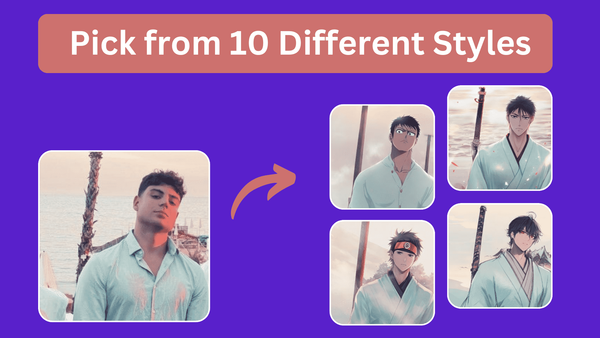
Anime AI is a web-based AI photo generator that transforms user-uploaded portrait photos into personalized anime-style avatars. It leverages Stable Diffusion models trained on hundreds of thousands of anime images to adapt a real person's appearance across various anime aesthetics, producing 100 unique variations per generation.
Primary use cases include creating fun anime self-portraits, profile pictures for social media or gaming, personalized gifts, or simply experimenting with anime transformations for entertainment. It stands out for fans of specific series who want themselves (or a single subject) rendered in styles like One Piece or Naruto without needing advanced prompting skills.
The target audience is primarily casual anime enthusiasts, hobbyists, and everyday users seeking quick, affordable anime avatars rather than professional artists, developers, marketers, or designers. It appeals to those wanting high-volume outputs at low cost, with no technical expertise required.
Key Features & Capabilities
Core functionality revolves around a simple photo-to-anime workflow: upload a single-person portrait, select gender, choose one or more styles, optionally add attributes (e.g., glasses, cap), and generate 100 images. Available styles include Fate, Classic, Webtoon (for more natural looks), and stylized options like Dragon Ball, One Piece, Naruto, and elf. Users can combine styles for variety, and the AI blends the input photo's features with the chosen aesthetic.
Standout features include its extremely low-cost bulk generation (100 images at once), GDPR-compliant data handling with originals stored temporarily in France before automatic deletion, and indefinite storage of generated photos. The service requires no sign-up or account, making it instantly accessible. It emphasizes user-friendly tweaks like attribute selectors to improve recognition of features underrepresented in anime training data. Upcoming HD upgrades (beyond current 512x512 resolution) will apply automatically to existing generations at no extra cost.
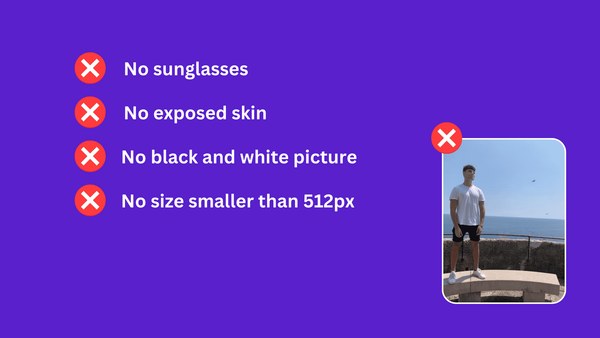
Limitations include optimization for single-person portraits only (multi-person support planned), potential inconsistencies in output quality or resemblance depending on the style and input, and current 512px resolution. It may struggle with complex attributes or diverse features not common in anime datasets, though support can provide personalized remakes. No advanced editing, text-to-image from scratch, or enterprise features are available.
User Experience
The tool offers excellent ease of use with virtually no learning curve. The interface is a clean, straightforward web page where users drag-and-drop a photo, toggle gender/styles/attributes via simple selectors, and click "Run." No registration, app download, or complex prompts are needed, making it accessible even for non-technical users.
Interface quality is functional and minimalist, focused on the generation workflow rather than flashy design. Testimonials highlight its speed and simplicity, with results available in minutes.
Documentation is light but supplemented by a dedicated blog with style-specific guides. Support is available via contact for unsatisfactory results (with offers of free personalized generations). No extensive help center or video tutorials exist on-site, though the process is intuitive enough that most users won't need them.
Performance & Reliability
Generation typically completes in a few minutes, though server load can cause brief waits. It runs on powerful GPUs for efficient processing, and outputs are consistent in volume (always 100 images).
User feedback from site testimonials and Product Hunt (5.0/5 rating) praises reliability for the price, with many noting high-quality Naruto or Dragon Ball results that capture essence well enough for casual use. Common complaints are minimal and mostly relate to style-specific deviations or occasional attribute mismatches—issues acknowledged on the site with support remedies. No widespread outages or major reliability problems were reported in available reviews as of April 2026.
Pricing & Value
Pricing is straightforward and highly affordable: a one-time $2 pack generates 100 personalized photos. The core service is positioned as free to access with no sign-up, though full generation requires the paid pack (a paid version with additional features is noted as coming soon). There are no subscription tiers, free credits beyond initial access, or enterprise options. Refunds are not standard due to infrastructure costs, but support assists with remakes.
Value is exceptional compared to alternatives that often charge more per image or require subscriptions for similar bulk outputs. For anime fans, $2 for 100 variations (with potential HD upgrades) delivers strong bang-for-buck, especially versus pricier specialized AI art tools. It excels for one-off fun projects but may feel limited for power users needing frequent or higher-resolution work.
Practical Tutorial
A common task is generating a set of Naruto-style avatars from your photo. Official guides are available on the Anime AI blog for specific styles.
Step-by-step walkthrough (as of April 2026):
- Visit https://animeai.app/ (no sign-up required).
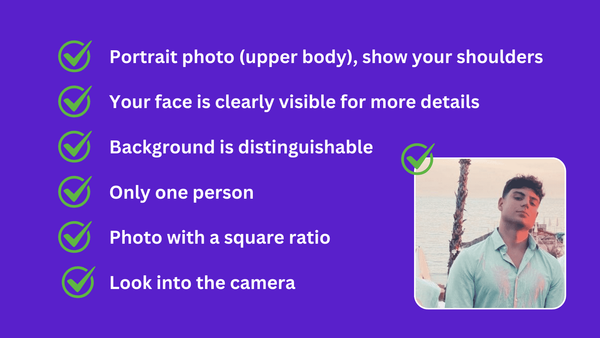
- Upload a clear portrait photo of one person (face-forward recommended for best results; avoid group shots).
- Select your gender to help the AI interpret features accurately.
- Choose "Naruto" from the style options (or combine with others for variety). For more natural results, try "Classic" or "Fate" instead.
- Optionally select attributes (e.g., headband or specific hair if applicable) to guide the AI on underrepresented details.
- Click "Run" to start generation. Wait a few minutes while the AI processes on GPUs—100 images will appear.
- Browse and download your favorites. Generated photos are stored indefinitely; contact support if results are unsatisfactory for a potential remake.
- For style-specific tips (e.g., optimizing for One Piece), refer to the blog: https://animeai.app/blog/how-to-generate-one-piece-avatars or https://animeai.app/blog/how-to-generate-naruto-avatars.
Results vary by input quality—use a well-lit, high-contrast photo for optimal anime adaptation.
Final Verdict
Overall rating: 4.2/5 (strong value and simplicity, docked slightly for resolution limits and output variability as of April 2026 research).
Who should use this tool: Casual anime fans, social media users, or gift-givers looking for an effortless, budget-friendly way to create dozens of personalized anime avatars from a single photo—especially those who enjoy styles from popular series like Naruto or One Piece.
Who should avoid this tool: Professional designers needing high-resolution, consistent, or editable outputs; users requiring multi-person scenes or advanced customization; or anyone sensitive to potential style inconsistencies.
One-sentence recommendation: Anime AI is a fantastic, no-frills pick for anyone wanting quick, cheap anime versions of themselves—grab it for fun if you're an anime lover on a budget.