AnyClip Review: Transform Video Libraries with Visual Intelligence

Overview & Purpose
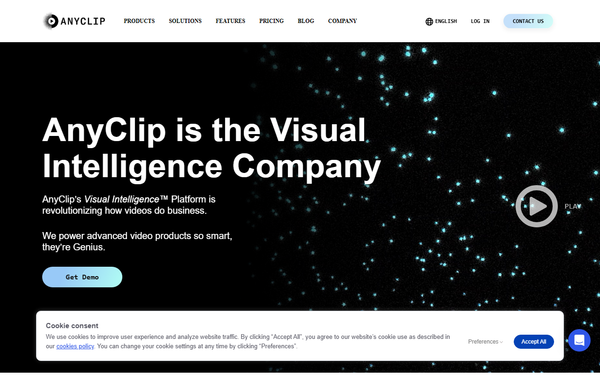
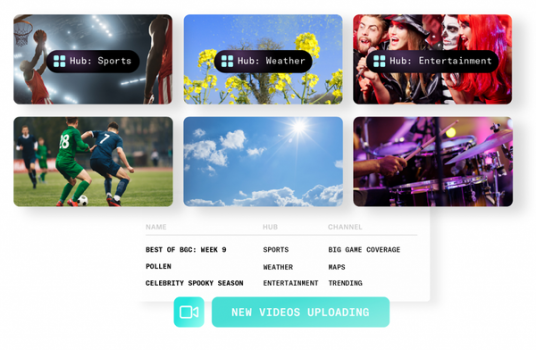
AnyClip's Visual Intelligence™ Platform is an AI-driven video management solution that analyzes video content frame by frame to transform static libraries into searchable, measurable, personalized, and interactive assets. It centralizes video hosting, organization, distribution, and analytics while powering three core products: Genius Plus for customer-facing marketing and engagement, Genius Work for internal team collaboration and knowledge sharing, and the Visual Intelligence API for custom data enrichment and machine learning integrations. Primary use cases include automating video chapters and highlights for marketing campaigns, enabling in-video search for publishers, creating interactive experiences for retail or event content, generating real-time captions for live streams, and facilitating internal training or HR communications. The platform targets enterprises, marketers, content publishers, media companies, retailers, healthcare and financial services organizations, as well as internal teams (HR, sales, IT, engineering) and developers building custom video applications. It is particularly suited for businesses with large video libraries seeking to unlock actionable intelligence rather than basic hosting.
Key Features & Capabilities
Core functionality revolves around five AI-powered modules that process videos during upload:
- Watch+: Instant Video Chapters, Auto Video Descriptions, and AI Video Highlights for automatic segmentation and summarization.
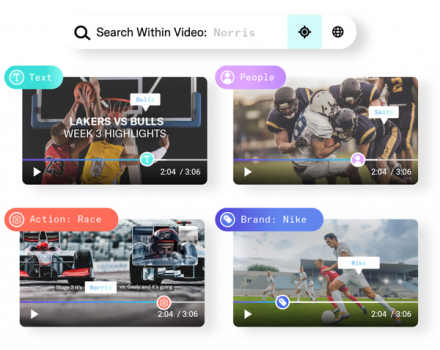
- Search+: In-Video Search (recognizing people, brands, text), AI Topic Clusters, Custom Facial Recognition (ethical/compliant), and Brand Safety filters.
- Engage+: Interactive Touch Points (clickable links) and Video Chat AI for conversational querying of content.
- Players+: Web Context Recognition for dynamic playlists, Interactive Story Players, and Ever-Present floating players.
- Live+: Real-time Closed Captions in 14 languages and Post-Live Content Activation for VOD repurposing.
Standout differentiators include deep frame-by-frame visual intelligence that goes beyond metadata tagging—enabling nuanced recognition, brand-aligned safety, and context-aware engagement—plus seamless API access for developers and unlimited hosting/streaming across plans. This sets it apart from basic video CMS platforms (e.g., Vimeo or Brightcove) that lack comparable AI depth. Limitations include no native video creation or advanced editing beyond basic tools (higher tiers only), dependency on upload quality for optimal AI accuracy, and Video Chat AI originally listed as "coming soon" (status may vary). Integrations focus on CRM/MAP/social and WordPress, with a mobile SDK in higher plans; advanced custom ML requires the API.
User Experience
The platform offers an intuitive dashboard for uploading, searching, and embedding videos, with AI processing handled automatically in the background. Users report a moderate learning curve—straightforward for basic tasks but requiring time to master advanced AI features and API integrations. Interface quality is clean and modern, emphasizing video libraries with topic chips and color-coded search results. Documentation is comprehensive via the AnyClip Help Center (90+ articles on uploading, searching, embedding, insights, SEO, and developer APIs), including setup guides and feature overviews; however, it lacks abundant video walkthroughs or interactive tutorials. Support resources include dedicated assistance in Business plans, with generally positive feedback on responsiveness. Overall, self-service is viable for tech-savvy teams, though enterprise onboarding benefits from sales-guided implementation.
Performance & Reliability
AI analysis occurs efficiently during upload, delivering chapters, highlights, and searchable data with minimal delay for most content; unlimited streaming and live captioning perform reliably across devices. Real-time features (captions, floating players) handle high-traffic scenarios well for enterprise users. Known issues are minimal in recent feedback—no widespread reports of downtime or bugs. Older complaints (pre-2021) related to legacy ad players (e.g., pop-ups or memory leaks on third-party sites) are unrelated to the current platform. Common user praise centers on accurate topic clustering and search; occasional variability in AI highlights depends on video quality or accents. Reliability is strong for centralized video management, with scalability proven across industries.

Pricing & Value
Pricing is entirely custom and quote-based with three tiers (no free tier or public pricing):
- Essential: 20 hours of Visual Intelligence analytics/uploads, 1 admin, 1 live event, 1 Video Hub, unlimited hosting/streaming.
- Growth: 50 hours, 3+ admins, 3+ live events, 3+ Video Hubs, CRM/social integrations, video editing, and revenue tools.
- Business: 250+ hours, 5+ admins, 10+ live events, 3+ integrations, mobile SDK, dedicated support, and advanced revenue tools.
A separate structure exists for Genius Work (internal focus). Enterprise options scale higher with custom needs. Value is excellent for organizations with substantial video libraries, as AI-driven insights and automation deliver strong ROI through improved engagement, accessibility, and monetization—outperforming simpler platforms in data enrichment. However, the enterprise focus and opacity make it less cost-effective for small teams or low-volume users compared to affordable alternatives like Vimeo or free tools with basic AI. Contact sales for demos and quotes.
Practical Tutorial
AnyClip provides official resources including a product demo video and Help Center guides. Below is a step-by-step walkthrough for a common task—uploading a video and leveraging AI to generate chapters, descriptions, and highlights (based on platform behavior described in documentation and demos; exact UI may vary slightly).
- Log in to your AnyClip account at anyclip.com (or via your organization's dashboard) and navigate to the Video Library.
- Click the "Upload" button (supports file upload, URL import, or bulk via API).
- Select your video file (recommended: clear audio/visual quality for best AI results) and add basic metadata if desired. Submit for processing—AI automatically begins frame-by-frame analysis.
- Monitor progress in the library (typically minutes to hours depending on length). Once complete, view auto-generated Instant Video Chapters (topic-segmented timeline), Auto Video Descriptions (narrative summary), and AI Video Highlights (key moment clips).
- Use Search+ to test in-video querying (e.g., type a brand name or speaker) or add Interactive Touch Points via the editor. Embed the enhanced video using the provided code or WordPress plugin.
- Review insights dashboard for engagement metrics and export highlights for marketing.
For visuals and variations, watch the official AnyClip Product Demo (YouTube) or explore the Help Center at https://docs.anyclip.com/en/. A full platform demo is available at https://anyclip.com/resources/anyclip-demo-video/. This process typically takes under 10 minutes of active time, with AI handling the heavy lifting.
Final Verdict
Overall rating: 4.3/5. This tool excels for mid-to-large enterprises with extensive video assets needing deep AI intelligence for marketing, publishing, or internal knowledge management—delivering measurable gains in searchability, engagement, and accessibility. Avoid it if you are a small team, solo creator, or operate on a tight budget without significant video volume, as custom pricing and the enterprise focus may not justify the investment. Highly recommended for organizations ready to turn video from a cost center into a high-performance business asset.