Anything World Review: Automate 3D Rigging and Animation with AI

Overview & Purpose

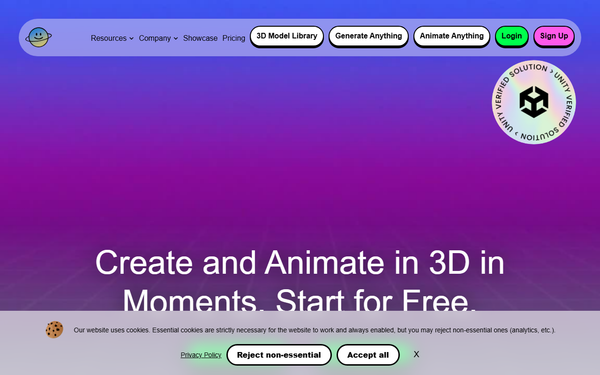
Anything World is an AI-powered platform that automates 3D model rigging, animation, and generation, enabling users to transform static assets into interactive, animated content in minutes. It combines a vast 3D model library, text- or voice-driven animation commands, mesh generation from prompts or images, and game-engine SDKs to eliminate traditional manual rigging workflows. Primary use cases include rapid prototyping for video games, populating metaverse environments, creating animated assets for mobile apps or web experiences, and accelerating 3D content pipelines for interactive media.
The target audience is primarily game developers, indie studios, metaverse designers, app creators, students, and small creative teams—anyone who needs fast, cost-effective 3D animation without dedicated animation artists or expensive software. Larger enterprises can use it for early-stage ideation or supplementary assets. Research conducted as of March 2026 notes that the original Anything World company underwent insolvency in May 2025; its technology and brand assets were reacquired by the founder and continue under the Everything Universe umbrella, with all core services and features remaining fully operational and enhanced.
Key Features & Capabilities
Core functionality revolves around two web-based tools—Generate Anything (AI mesh creation from text or image prompts) and Animate Anything (automatic rigging plus natural-language or voice animation)—plus a searchable library of pre-rigged assets and direct export/integration. Users upload FBX/GLB models (or generate new ones), run AI processing for rigging and behaviors (walking, jumping, dancing, etc.), preview in-browser, and export or push directly into engines via SDKs. Supported engines include Unity (primary focus with behavioral intelligence) and Unreal, with plugins for real-time control, splines, and voice-triggered actions.
Standout differentiators include full end-to-end automation (rig + animate + integrate in one flow), credit-based cloud processing that works on any model geometry without manual skeleton setup, voice-command support for live behavior editing, and SDKs that embed AI-driven characters with custom logic—features that set it apart from traditional tools like Mixamo (limited library, no generation) or manual solutions like Blender’s Rigify. Exports are production-ready FBX/GLB formats, and the platform claims up to 40% faster development for interactive 3D experiences.
Limitations include credit consumption (typically 5 credits per rig/animate or generate action), occasional refinement needed for complex motions (stiffness, clipping, or floaty transitions on non-ideal models), and model constraints (neutral pose recommended; complex accessories or multi-mesh setups can reduce accuracy). It is not designed to replace high-end motion-capture pipelines for AAA titles.

User Experience
The browser-based web tools deliver a low learning curve—most users can produce their first animated asset in under 10 minutes after signup. The clean, unified interface combines model search, upload, prompt input, real-time preview, and export without installing heavy desktop software or switching contexts. Game-engine SDK installation is straightforward via Unity Package Manager or Unreal plugins, with in-editor browsers for the library.
Documentation is excellent: a comprehensive GitBook with quickstarts, API references, and code examples, supplemented by official YouTube tutorials and an active Discord community for support. No steep technical barriers for developers; non-technical users can still succeed with the web tools alone. Minor friction exists around credit tracking and occasional model-prep requirements, but overall the experience is accessible and intuitive.
Performance & Reliability
Processing is cloud-based and fast—most rigs and basic animations complete in seconds to a couple of minutes, even for moderately detailed models. Efficiency shines in rapid iteration: prototypes that once took days now take minutes, with believable results for standard humanoid/quadruped motions (75–85% accuracy reported for basics). Reliability is high for clean inputs, and the platform has maintained uptime post-restructuring.
Known issues are typical of current AI 3D tools: complex animations (intricate dances, physics interactions) can show stiffness or require manual post-edits; quality varies with model topology; and free-tier users sometimes report “mediocre” results on edge-case assets. No widespread outages or major complaints appear in recent user forums, though the credit system can feel limiting during heavy prototyping sessions.
Pricing & Value
Anything World uses a credit-based freemium model:
- Individual – Free (students/personal use or revenue/funding < $100K/year): 20 Animate/Generate credits per month, 200 library API calls & downloads, unlimited models/animations within credits, 1 seat.
- Micro – $50/month (small/micro studios, revenue < $200K): 300 credits, 500 API calls.
- Pro – $250/month (medium/large studios): 1,500 credits, 2,000 API calls.
- Enterprise – Custom pricing and higher limits.
Billed monthly or yearly; extra credit packs available. The free tier provides meaningful access for hobbyists and testing, while paid plans deliver strong value for professionals—saving hundreds of hours of rigging labor compared with manual work or competitor subscriptions. Compared to alternatives (e.g., Mixamo’s limited free library or paid rigging services), Anything World’s combination of generation + animation + SDK integration offers superior speed and flexibility at a competitive price point.
Practical Tutorial
Common task: Rig and animate a static 3D character model using the web tool (ideal first step before SDK integration).
- Go to app.anything.world and sign up/log in (free Individual tier works for this).
- Navigate to the Animate Anything web tool (or start in Generate Anything if creating a new model).
- Upload your static FBX or GLB file (ensure neutral pose, clean topology, and reasonable poly count—e.g., a simple humanoid character downloaded from a free asset site). Alternatively, use the library search or Generate Anything with a prompt like “cartoon fox character.”
- The AI automatically analyzes geometry, detects limbs, and applies a rig—preview the skeleton overlay.
- In the animation panel, type a natural-language command (e.g., “run forward in a loop”) or use voice input if enabled. Select from preset behaviors or combine actions.
- Click Generate—the model is rigged and animated in the cloud (usually < 60 seconds). Review the preview window; tweak timing, speed, or add secondary motions if needed.
- Once satisfied, download the animated FBX/GLB or copy the asset directly into your Unity/Unreal project via the SDK (install the Anything World package, then drag the model into your scene for runtime control).
For visual guidance, follow the official Animate Anything Web Tool Tutorial on YouTube: https://www.youtube.com/watch?v=pJHDCkGziqE. Additional SDK examples are in the GitBook Quickstart and Unity tutorials. Real example outcome: a static wolf model becomes a looping run cycle ready for a game prototype in under 5 minutes.
Final Verdict
Overall rating: 4.2 out of 5 – a powerful time-saver that democratizes 3D animation but still requires occasional human polish.
Who should use this tool: Indie game developers, metaverse builders, solo creators, students, and small studios who want to prototype interactive 3D experiences quickly and affordably.
Who should avoid this tool: Teams requiring pixel-perfect, production-ready AAA animations without any post-processing, or users needing offline/high-volume work beyond credit limits.
One-sentence recommendation: If you’re tired of spending days rigging characters and want AI to handle the heavy lifting while seamlessly feeding into Unity or Unreal, Anything World (now Everything Universe) is an essential addition to your 3D toolkit.