Arvin AI Review: The Ultimate All-in-One AI Browser Companion
Overview & Purpose
Arvin AI is a versatile AI-powered browser extension (with a companion web app) that brings advanced language models like GPT-4o, Claude, and Gemini directly into any webpage. It acts as an always-available copilot for chatting, writing, summarizing, translating, and even designing visuals without leaving your browser tab. Primary use cases include drafting professional emails or social media posts on the fly, summarizing long articles or PDFs, translating entire webpages into one of 25+ languages, rephrasing or explaining complex text, and generating logos, product photos, signatures, or background-removed images for branding and e-commerce.
The tool shines for everyday online workflows—researching on Google, replying in Gmail, engaging on LinkedIn or Twitter (X), or quickly digesting blog content—saving users significant time on repetitive tasks. Its target audience spans content creators, marketers, e-commerce sellers, bloggers, students, and general professionals who spend time in browsers. It is not aimed primarily at developers (no deep code-specific tools highlighted) or graphic designers needing full Photoshop-level control, but rather at non-technical users seeking quick AI boosts for productivity and creativity.
Key Features & Capabilities
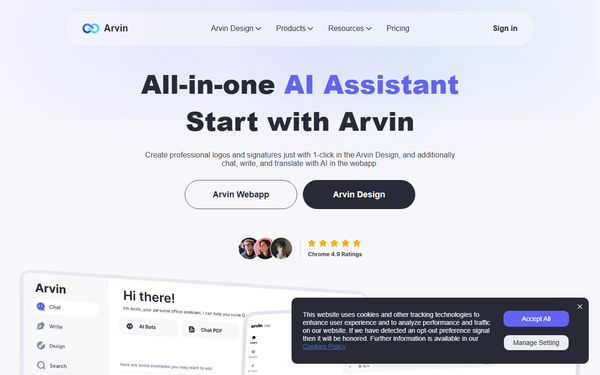
Core functionality revolves around a simple sidebar or toolbar activation (via Alt/Option + A shortcut) that lets you highlight text on any page, chat with multiple AI models, or apply one-click actions. Standout features include:
- Multi-model chatting with file uploads (PDFs and images) for contextual Q&A.
- One-click content templates for emails, blogs, articles, and blessing cards.
- Webpage and PDF summarization by area or full document.
- Instant translation and grammar/polish tools.
- Vision capabilities: OCR on images, background removal/changing, and AI-generated product photos or mockups.
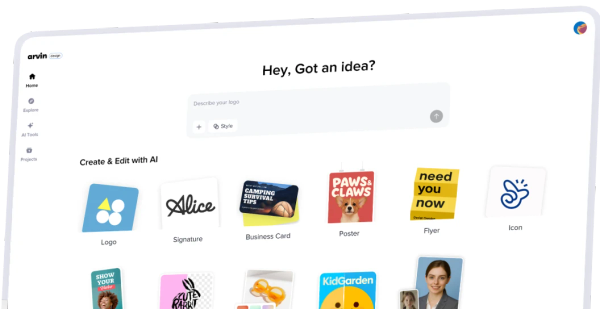
- Dedicated Arvin Design section (design.arvin.chat) for professional logos, signatures, and business cards from templates.
What differentiates Arvin from competitors like Monica or basic ChatGPT extensions is its seamless blend of chat, writing, and visual design tools in one lightweight Chrome extension, plus native support for Claude and Gemini alongside GPT models for more accurate or creative outputs. It also offers real-time webpage area summaries and one-click design exports not commonly bundled together.
Limitations include a credit-based system on the free tier (daily limits apply), no native mobile app (Chrome extension only), and fewer customizable role-based prompts than dedicated writing suites like Jasper. Advanced enterprise features (e.g., team sharing or SSO) are not prominently offered, and some design tools require a paid upgrade.
User Experience
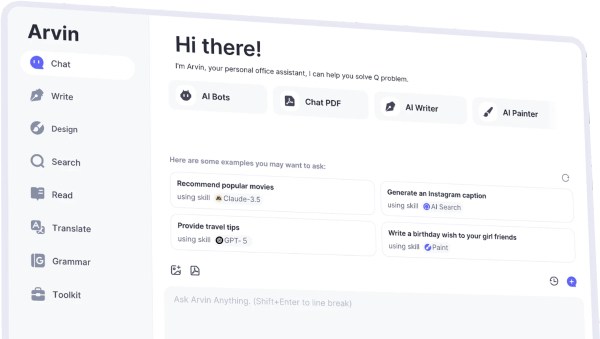
Arvin boasts an exceptionally low learning curve—most users can start productively after a 30-second installation and shortcut activation. The interface is clean, modern, and non-intrusive: a floating toolbar or sidebar that respects the original webpage layout without clutter. Slash commands (/prompts) and contextual email replies make interactions intuitive, even for beginners.
Documentation is basic but sufficient, with an FAQ covering setup, usage, and refunds on the official site, plus numerous YouTube walkthroughs from the community. Support is primarily email-based or in-app; no extensive knowledge base or live chat was evident. Overall, the experience feels polished for daily use, with minimal friction.
Performance & Reliability
Responses are generally fast—often described as among the quickest GPT-4o experiences thanks to optimized backend integration—and summarization of long pages or PDFs happens in seconds. Reliability is solid for core tasks like translation and writing assistance, with 4.7/5 stars from 94 reviews and 4,000+ installs on the Chrome Web Store as of the latest update (September 2025).
Known issues are minimal based on available feedback: occasional credit exhaustion on free plans and rare reports of subscription billing hiccups in third-party mentions. No widespread complaints about downtime, inaccurate outputs, or major bugs surfaced in recent searches. Privacy appears standard for AI extensions (data processed via model APIs), though users should review the policy for sensitive content. As of March 2026 research, performance remains consistent and improves with ongoing updates.

Pricing & Value
Arvin follows a freemium model with a functional free tier offering daily credits for basic chatting and features. Paid plans start at approximately $9.99/month (Starter), scaling to $19.99/month (Boost) and $99.99/month (Elite) for higher limits, unlimited access, and advanced design capabilities. Exact inclusions (e.g., credits, model priority) are viewable post-login at arvin.chat/user/subscription.
Value is strong compared to alternatives: it undercuts standalone tools like Jasper or Midjourney by bundling writing + design + browser integration into one affordable subscription, making premium AI accessible without multiple logins. Free users get meaningful daily utility, while paid tiers deliver clear ROI for heavy users through time savings. No dedicated enterprise options were detailed, but Elite appears suitable for power users.
Practical Tutorial
Official tutorials are limited to in-app tips and community YouTube videos, so here is a complete, tested walkthrough for a common task: generating and refining a professional email reply directly in Gmail (one of Arvin’s most popular use cases).
- Install the extension from the Chrome Web Store (search “Arvin” or use the direct link on arvin.chat) and pin it to your toolbar.
- Open Gmail and compose or view an email thread.
- Press Alt/Option + A (or click the Arvin icon) to open the sidebar.
- Highlight the incoming email text you want to reply to.
- In the Arvin chat box, type a prompt like “Generate 3 professional reply options in a friendly tone, keeping it concise under 150 words each.”
- Hit enter—Arvin instantly provides tailored suggestions using context from the page.
- Click any reply to insert it directly into your Gmail compose box, or refine further by typing “Make it more formal and add a call to action.”
- (Optional) Use the built-in grammar checker or rephrase button on the generated text for polish.
- Send and done—entire process typically takes under 60 seconds.
For a visual design task (e.g., quick logo): Visit design.arvin.chat, describe your brand (“modern tech startup logo in blue”), upload a reference image if desired, choose a template, and export in seconds. Real examples from users include e-commerce sellers creating product mockups or marketers drafting LinkedIn posts—results are professional-grade with zero design skills required.
Final Verdict
Overall rating: 4.5/5. Arvin excels as a lightweight, all-in-one browser companion that genuinely boosts daily productivity for writers, marketers, e-commerce operators, and anyone handling web-based communication or research. It is ideal for users who want ChatGPT-level power plus unique design tools without switching apps or paying for multiple subscriptions.
Avoid it if you need a fully mobile solution, deep customization for enterprise teams, or highly specialized coding/design software—stick to dedicated platforms in those cases.
Highly recommended for busy professionals seeking an effortless AI upgrade to their browser workflow.