Atua Review: The Ultimate AI Productivity Tool for macOS Users
Overview & Purpose
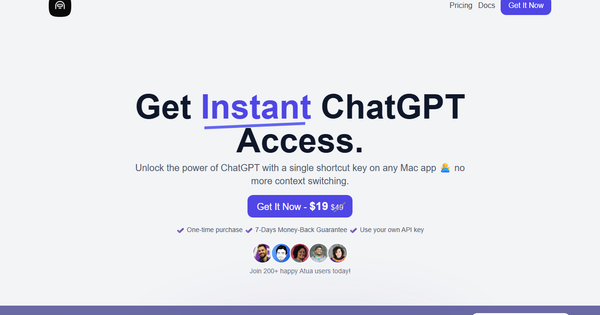
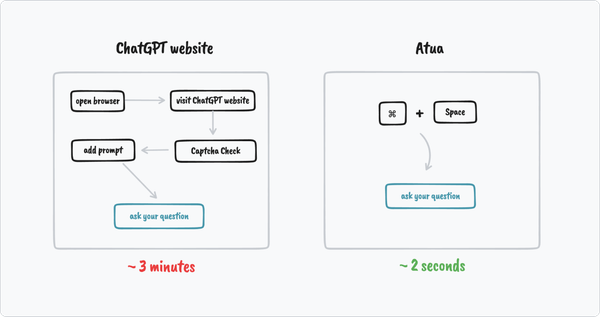
Atua is a macOS application that brings AI assistance directly into any app you're already using, eliminating the need to switch windows or copy-paste between tools. By selecting text, capturing screenshots or voice input, or triggering a global shortcut (default ⌥ Space), users can instantly run AI-powered commands powered by models from providers like OpenAI, Anthropic, Groq, and many others—including local options via Ollama or LM Studio.
Its primary use cases include text polishing, summarization, translation, content generation, code refactoring, email drafting, meeting note processing, and even automating actions across apps (such as adding to Calendar or Notion). It stands out for turning repetitive AI tasks into one-keystroke workflows that integrate live context from your screen, clipboard, or voice.
The target audience is primarily Mac users who value productivity and seamless workflows—developers, writers, marketers, designers, students, and professionals who interact with AI frequently but dislike context-switching. It appeals especially to those comfortable managing their own API keys and seeking a native, customizable Mac tool rather than browser-based ChatGPT interfaces.
Research for this review was conducted as of April 2026.
Key Features & Capabilities
Core functionality revolves around a floating command bar and customizable “commands”—predefined prompts that can reference live Mac context. Users create a command once (e.g., “Summarize selected text”) and reuse it everywhere with a hotkey, selection + trigger, or freeform query in the bar.
Standout features that differentiate Atua from competitors include:
- Rich context capture: Selected text, screenshots, OCR on screen content, voice transcription (processed locally), clipboard, and full window/app context.
- Action-capable commands: Beyond chat responses, commands can write results back into the original app, trigger macOS tools (Calendar, Reminders, Notes, Files, Shortcuts, Shell, HTTP requests), or connect to external MCP servers (e.g., GitHub, Postgres, Slack, filesystem).
- Broad model support: Bring-your-own API keys for OpenAI, Anthropic, Groq, Mistral, DeepSeek, xAI, Perplexity, and any OpenAI-compatible endpoint or local server. No vendor lock-in.
- Custom hotkeys and background execution: Assign shortcuts like ⌥P for “Polish” or run silently.
- Conversation management: Save and review previous interactions locally.
Limitations include Mac-only availability (no Windows/Linux versions as of research date), the need to obtain and pay for separate AI API usage (Atua itself has no built-in models or free tier), and reliance on third-party provider uptime. Advanced features like MCP servers require additional setup. No native mobile or cross-platform support.
User Experience
Atua offers a low learning curve for basic use: install the .dmg, enter an API key, and start with built-in example commands or the global ⌥ Space bar for quick queries. Creating custom commands is straightforward via a simple editor that supports prompt templates with context variables (e.g., {{selectedText}}).
The interface is clean and native-feeling—a minimal floating bar reminiscent of Spotlight—avoiding clutter while providing powerful options. Voice input works offline via local Mac transcription. Documentation is concise on the website with clear “how it works” steps; support is email-based ([email protected]). No extensive video tutorials were found, but the two-step workflow (create command → use anywhere) makes it intuitive for most Mac users.
Performance & Reliability
Users and testimonials consistently praise Atua’s speed: commands execute quickly with minimal latency when using fast providers like Groq, and context capture (screenshots/OCR) feels seamless. The app runs lightweight in the background and supports background execution to avoid interrupting workflow.
Known issues are minimal based on available feedback. Early user mentions (circa 2023) noted occasional model-specific setup hiccups (e.g., GPT-4 access), but these appear resolved with proper API configuration. No widespread complaints about crashes or unreliability surfaced in searches; the “as is” terms note potential compatibility variances across macOS versions. Privacy is strong—conversations stay local, and you control your API keys.
Pricing & Value
Atua uses a one-time purchase model: $29 lifetime license (with occasional promotional pricing around $19), including all features, unlimited commands, MCP support, free future updates, and a 7-day money-back guarantee. There are no subscriptions or tiers.
Value is excellent for heavy Mac AI users: you avoid recurring app fees and only pay variable API costs from providers. Compared to subscription-based alternatives or browser workflows, the lifetime access and deep macOS integration deliver strong ROI, especially for power users who create reusable command libraries. Team licensing is available by contacting support.
Practical Tutorial
No official video tutorials were located on the site, so here is a step-by-step walkthrough for a common task—creating and using a “Polish & Improve” command (based on the app’s documented workflow).
-
Install and set up: Download Atua from https://atua.app/ (Atua.dmg), drag to Applications, launch, and enter your API key(s) in settings (e.g., OpenAI or Groq).
-
Create the command: Open the command editor (via menu or bar). Name it “Polish”. Write the prompt: “Polish and improve the following text for clarity, grammar, and style while keeping the original tone: {{selectedText}}”. Set output to “Replace selection” or “Copy to clipboard”. Assign shortcut ⌥P. Save. (Optional: add voice context or screenshots if desired.)
-
Use it in any app: Open a document, email, or note. Select the text you want to improve. Press ⌥P (or your chosen hotkey). Atua captures the selection, sends it to your chosen model, and inserts the polished version back into the app automatically.
-
Try a variation: For freeform use, press ⌥ Space anywhere, type “/Polish” followed by pasted text, or dictate via voice. Review the saved conversation history in Atua’s sidebar for iterations.
Repeat for other commands like “Summarize” or “Translate to Spanish”. Once built, these become muscle memory across apps. For advanced automation, connect tools like “Add to Notes” in the command builder.
Final Verdict
Overall rating: 4.5/5 – A polished, powerful productivity booster that lives up to its promise of “AI at your fingertips.”
Who should use this tool: Mac users (OSX 10.12+) who frequently leverage AI for writing, coding, research, or automation and want frictionless integration without leaving their workflow. It’s ideal for those who value one-time payment and deep customization.
Who should avoid this tool: Non-Mac users, anyone uncomfortable managing API keys and usage costs, or those seeking a completely free/no-setup solution. Users happy with web-based ChatGPT or simpler clipboard tools may not need the extra power.
One-sentence recommendation: If you live in macOS apps and want AI superpowers one shortcut away, Atua is easily one of the smartest one-time investments you can make for daily productivity.