Audo AI Review: The Best One-Click AI Audio Noise Removal Tool
Overview & Purpose
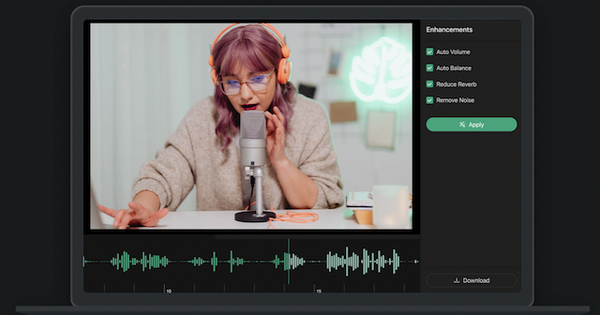
Audo AI specializes in AI-powered noise cancellation and audio enhancement tools designed to deliver clear, professional-quality speech recordings without requiring a controlled studio environment. Its primary products—Audo Studio (a browser-based web app), the Audo API (for developers), and Magic Mic (an open-source real-time application)—use advanced machine learning to automatically remove background noise, adjust volume levels, and (with dereverberation coming soon) reduce echoes.
Core use cases include cleaning podcast episodes, YouTube videos, online courses, voiceovers, and virtual meeting audio so that listeners focus on content rather than distractions like traffic, barking dogs, air conditioners, or neighbor sounds. It appeals especially to creators who record in imperfect spaces and developers building audio-enhanced apps or services.
The target audience spans content creators (podcasters, YouTubers, course makers), marketers producing video/audio assets, and developers integrating noise removal into products. It also serves remote professionals needing real-time clarity in calls via Magic Mic. As of April 2026, the tools emphasize simplicity and speed over complex manual editing suites like Adobe Audition or Audacity.
Key Features & Capabilities
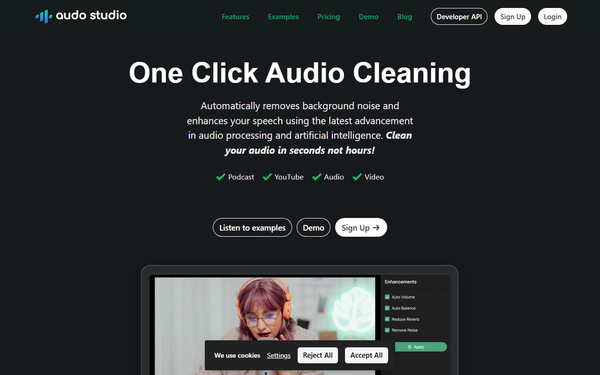
Audo Studio offers one-click processing: upload audio or video, and AI handles noise removal, auto volume normalization, and soon dereverberation. It processes files 10x faster than traditional software and works directly in the browser on Mac, Windows, or Linux. Standout differentiators include its beginner-friendly automation (no noise profiling required) and superior results on non-stationary noises compared to Audacity or Audition, as shown in Audo’s own side-by-side tests.
The Audo API provides simple HTTP endpoints (/upload, /remove-noise, status checks, download) for programmatic integration, enabling developers to embed noise cancellation into apps, voice memos, or platforms. It supports the same proprietary ML model for any-kind background noise suppression.
Magic Mic is an open-source real-time noise cancellation tool (PulseAudio-based, with Pipewire support in progress) that creates a virtual microphone. Users select their physical mic, enable denoising, and route clean audio to Zoom, Discord, or other apps—ideal for Linux users in virtual meetings.
Limitations include the Studio’s reliance on an internet connection, a still-pending full dereverberation feature, and potential artifacts or limited improvement on extremely complex/long files. The free tier restricts heavy use, and Magic Mic lacks the polished UI of commercial alternatives. No offline desktop app exists for Studio, and export format options are basic.

User Experience
Audo Studio boasts an exceptionally simple interface—upload, click “Enhance,” and download—making it accessible with virtually no learning curve. The browser-based design eliminates installation hassles and supports any operating system. Users praise its speed and “magical” one-click results, though some note it feels limited for power users wanting granular controls.
Documentation for the API is straightforward with clear endpoint examples and authentication via API key, though more code samples (beyond basic HTTP) would help beginners. Magic Mic installation involves downloading an AppImage and basic terminal commands for Linux users—functional but not as plug-and-play for non-technical audiences. Support resources include an FAQ, blog comparisons, and live demos; no extensive help center or chat support is prominently featured.
Overall, the experience prioritizes speed and simplicity for casual creators over professional audio engineers.
Performance & Reliability
Processing is lightning-fast—seconds for typical files—and reliable for common real-world noises, often outperforming Adobe Audition and Audacity in clarity and minimal distortion according to comparative tests. Testimonials highlight effective removal of music bleed, pet sounds, and traffic while preserving natural voice quality.
Known issues are relatively minor: occasional over-processing artifacts or whispering remnants in very challenging clips, inconsistent results on extremely long/complex files, and general AI limitations like slight robotic tones in poor source audio (a common complaint across enhancers). No widespread outages or major reliability complaints appear in recent reviews; 25,000+ users and 300,000+ hours processed suggest solid backend stability. Internet dependency for Studio/API is the primary practical constraint.
Pricing & Value
Audo Studio uses a freemium model:
- Starter: Free – 20 minutes/month of processing (noise removal + auto volume).
- Creator: $12/month (discounted from $20) – 600 minutes/month, all features, cancel anytime.
- Pay As You Go: $20 one-time for 600 extra minutes (50% off for Creator users).
The Audo API follows usage-based pricing: Standard plan at $0.05 per minute after 200 free minutes, with priority support and fast processing; custom enterprise plans offer volume discounts and on-premise options.
Magic Mic is free and open-source. Value is strong for light-to-moderate users needing quick results without learning DAWs—cheaper and simpler than Adobe subscriptions or iZotope RX for many creators. Heavy users or those requiring advanced features may find competitors (Krisp for real-time, Descript for editing suites) more cost-effective long-term. The generous free tier and pay-as-you-go flexibility enhance accessibility.
Practical Tutorial
Cleaning a Podcast Recording with Audo Studio (Most Common Task)
Here is a step-by-step walkthrough for a typical 30-minute podcast episode recorded in a noisy home office (as of April 2026):
-
Visit https://audo.ai/ or sign up/log in at the app dashboard (https://app.audostudio.com/). Use the free Starter plan for testing or upgrade for longer files.
-
Click “Upload” or drag your MP3/WAV file (supports common audio/video formats). For this example, upload a raw recording containing keyboard clicks, distant traffic, and occasional dog barks.
-
Once uploaded, click the single “Enhance” or “Clean Audio” button. AI automatically removes noise, normalizes volume, and prepares the file—no manual sliders or profiles needed.
-
Wait a few seconds (processing is near real-time for most files). Preview the before/after if available, or download the cleaned MP3 directly.
-
Import the enhanced file into your editor (e.g., Audacity, Premiere, or GarageBand) for final touches like music beds. Export your polished episode.
Live demo available at https://audo.ai/noise-removal for instant testing without signup. For developers, the API tutorial follows the docs: obtain API key, POST to /upload, then /remove-noise, poll status, and download—full code examples in the documentation. For Magic Mic on Linux: download AppImage from GitHub releases, run it, select your mic in the tray app, enable denoising, and set the virtual mic as input in Zoom/Discord.
Official comparison blog and demo provide excellent real-world examples.
Final Verdict
Overall rating: 4.5/5 – Excellent for its niche of effortless, high-quality noise removal, though not a full replacement for professional DAWs.
Content creators, podcasters, YouTubers, and developers seeking quick, reliable audio cleanup in imperfect recording environments should use Audo AI because of its unmatched simplicity, speed, and effectiveness on everyday noise. Avoid it if you need fully offline processing, advanced manual controls, or already have a comprehensive editing suite with similar AI features built-in.
One-sentence recommendation: Audo AI is the go-to one-click solution for anyone tired of background noise ruining their audio—ideal for creators who want studio-quality sound without the hassle.