Autolocalise Review: The Fastest AI Way to Globalize Your App

Overview & Purpose
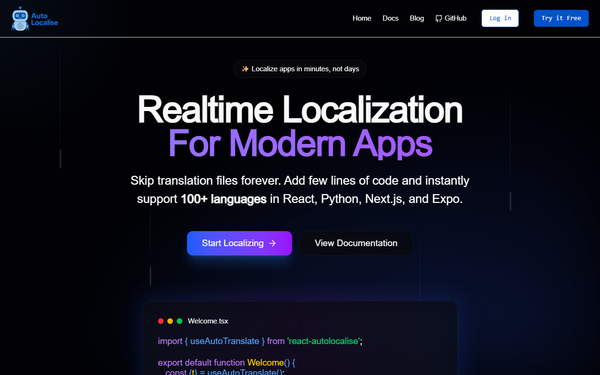
AutoLocalise is a realtime, AI-powered localization platform that lets developers add full internationalization support to web and mobile apps with just a few lines of code—no translation files, no complex i18n setups, and no redeploys required. It automatically extracts text strings during runtime, translates them on-the-fly into 100+ languages using context-aware AI, caches results for instant performance, and allows live edits that propagate instantly across all instances of your app. Primary use cases include quickly globalizing React, Next.js, React Native/Expo, or Python (Django/Flask/FastAPI) applications for new markets, enabling seamless language switching based on user locale, and maintaining consistent translations across multiple apps via shared projects. It also provides usage analytics to optimize global UX.
The target audience is primarily developers, product engineers, and small-to-mid-sized teams focused on rapid international expansion. It is not aimed at marketers, designers, or large enterprises that require heavy human oversight or advanced cultural consulting—its code-first SDK approach makes it ideal for indie devs and startups who want to ship multilingual features in minutes rather than weeks.
Key Features & Capabilities
Core functionality revolves around a lightweight SDK that wraps your UI text with a simple t() hook or component. The AI handles translation with contextual awareness and improves over time by learning from manual dashboard corrections. Supported integrations include React (16.8+), Next.js, React Native/Expo, and Python backends, with automatic text extraction, local caching, real-time updates, and shared translation projects across apps. Standout differentiators include the complete elimination of .json/.po files or i18next-style workflows, instant language addition without rebuilds, and character-efficient billing that only counts source text multiplied by target languages.
Additional capabilities cover basic interpolation, formatted text preservation (bold, colors, etc.), and analytics dashboards. Compared to traditional TMS platforms like Lokalise or Crowdin, AutoLocalise’s file-free, backend-driven model dramatically reduces setup time and ongoing maintenance.
Limitations include reliance on internet connectivity for first-time translation of new strings (subsequent loads use cache), character-based pricing that can scale for high-volume apps, and currently limited framework support (Vue.js and Flutter are planned but unavailable as of March 2026). It focuses primarily on text translation rather than deep cultural adaptation, image localization, or complex pluralization/RTL edge cases beyond basic support.
User Experience
The learning curve is exceptionally low—most developers report integration in under 10 minutes. The interface consists of a clean dashboard for viewing, editing, and overriding translations in real time, plus simple analytics. No steep configuration or file management is needed. Documentation lives primarily in the npm README and blog tutorials, which are concise and code-heavy with clear examples; support is via priority email on paid plans (no live chat mentioned). Overall, the experience feels modern and developer-centric, though beginners unfamiliar with React hooks may need a quick read of the provider setup.
Performance & Reliability
Translations load in milliseconds thanks to aggressive caching and CDN-like delivery. New strings translate near-instantly via AI, and updates propagate without app redeploys. As of March 2026, no widespread outages or major complaints appear in public forums; the platform emphasizes encrypted data handling and minimal bundle-size impact. Self-reported benchmarks in the company blog highlight significant speed and cost gains over file-based systems. The only common caveat is initial latency for uncached strings on poor connections, which is mitigated by the persist flag for static content.
Pricing & Value
- Free Plan: $0/month — 10,000 characters/month, 1 project, 100+ languages, live editing.
- Pro Plan: $9/month — 250,000 characters/month (extra blocks at ~$1 per 30k), unlimited private projects, additional editors at $2/month each, priority support.
Billing counts source characters × target languages, making it highly cost-effective for smaller apps. Compared to competitors (Crowdin/Lokalise often $100–$1,000+/month for similar scale), AutoLocalise delivers strong value for indie and growing teams, with real-world claims of 60–70% savings after switching. No enterprise custom plans are publicly listed—larger users would contact sales. The free tier is generous enough for testing or small projects.
Practical Tutorial
Official tutorials are available on the AutoLocalise blog (e.g., “How I Added 12 Languages to My Expo App in 10 Minutes”). Here is a complete, real-world walkthrough for the most common task—adding localization to a React or Next.js app—drawn directly from the official npm package documentation (tested workflow as of March 2026).
-
Install the package
npm install react-autolocalise # or yarn add react-autolocalise -
Wrap your app with the TranslationProvider (in
App.tsxor_app.tsxfor Next.js)import { TranslationProvider } from "react-autolocalise"; const App = () => { const config = { apiKey: "YOUR_API_KEY_FROM_DASHBOARD", // get free at dashboard.autolocalise.com sourceLocale: "en", targetLocale: "es", // or detect dynamically }; return ( <TranslationProvider config={config}> <YourApp /> </TranslationProvider> ); }; -
Use the translation hook in any component
import { useAutoTranslate } from "react-autolocalise"; const Welcome = () => { const { t } = useAutoTranslate(); return ( <div> <h1>{t("Welcome to our app!")}</h1> <p>{t("This text will be automatically translated and cached.")}</p> </div> ); }; -
Handle formatted text or interpolation
Use<FormattedText>for styled content or.replace()for variables. -
Test & go live
SwitchtargetLocaledynamically (e.g., via user settings ornavigator.language). New strings appear in your dashboard for review/override. Deploy—users instantly see their preferred language.
For Expo/React Native or Python, similar patterns apply with dedicated packages. Full migration guides from react-i18next are linked in the docs. Link to official tutorial: https://www.autolocalise.com/blog/expo-localization-tutorial-complete-2026 (or npm README).
Final Verdict
Overall rating: 4.5/5 — excellent for speed and simplicity, slightly docked for limited framework support and lack of deep enterprise features as of March 2026.
Developers and small product teams scaling apps quickly to international markets should use this tool because it removes localization friction entirely, slashes costs versus traditional TMS platforms, and delivers native-feeling experiences with minimal ongoing effort.
Enterprises needing heavy human translation review, complex cultural adaptations, or broad framework support (e.g., Vue/Flutter) should avoid it in favor of full-featured TMS like Lokalise or Phrase.
One-sentence recommendation: If you’re a developer tired of translation files and redeploys, AutoLocalise is the fastest, cheapest way to go truly global—start with the free tier today.