Autotab Review: The Ultimate No-Code AI Agent for Browser Automation
Overview & Purpose

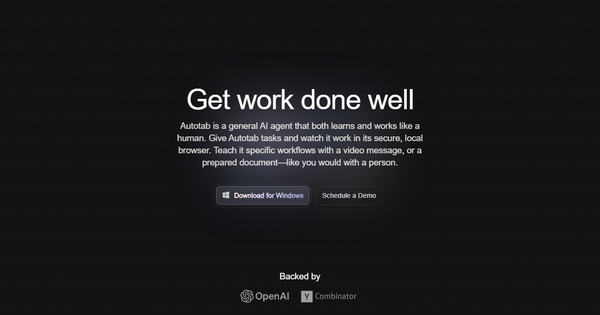
Autotab is a desktop application that functions as a general AI agent for browser automation. Users teach it specific workflows by demonstrating actions in its secure, local browser while providing explanations—similar to training a new human teammate via screen recording or document. Once trained, the agent executes tasks autonomously using mouse and keyboard interactions, scaling repetitive processes that previously required human effort.
Primary use cases include complex data collection (e.g., lead finding or report gathering), form filling and updating dynamic systems (such as CRMs or government portals), multi-app actions (e.g., sending messages, booking appointments, or triggering payments), and system migrations across tools like Salesforce, HubSpot, or Google Sheets. It runs in a dedicated browser where credentials remain on-device for security.
The tool targets non-technical domain experts in operations, marketing, sales, finance, and admin roles, as well as enterprises (including Fortune 500 companies) needing to scale without hiring or onboarding bottlenecks. Developers can also integrate via API for programmable workflows. This review reflects research conducted as of March 2026, when the product had evolved from an early Chrome extension (generating Selenium code) to a full agent platform with claimed enterprise deployments.
Key Features & Capabilities
Core functionality revolves around "Skills"—trainable automations composed of editable steps. Users record demonstrations, and the AI builds a step list with context-aware reasoning. A timeline-like "scrubber" allows navigation, verification, and editing of steps, while a "scratchpad" persists data across actions for complex reasoning (e.g., copying extracted info into forms).
Standout features include human-like teaching (no coding required), local execution in a secure browser (supporting enterprise auth), on-demand/scheduled/API triggering, file upload/download handling, and a focus on "hallucination-proof" reliability through verifiable steps. It claims self-healing for minor site changes and auditable, repeatable runs 24/7. Early versions generated editable Python/Selenium code from demos, adding transparency.
Differentiators from competitors (e.g., pure AI agents like Skyvern or Browser Use, or cloud infrastructure like Browserbase) include the hybrid record-and-explain model for auditable, predictable automations that run locally without cloud dependency or infrastructure management.
Limitations include the need for occasional re-recording on major UI changes (despite self-healing claims), potential AI mistakes in steps requiring manual verification/editing, and best suitability for repetitive rather than highly variable one-off tasks. It lacks built-in cloud scaling (runs on user hardware) and advanced vision-only adaptability seen in some newer agents.
User Experience
Autotab offers a low learning curve for its target users, feeling more like onboarding a colleague than scripting code. The desktop app interface is clean and intuitive, featuring a side panel scrubber for step navigation (resembling a video editor timeline) and scratchpad for data context. Recording sessions are straightforward: perform the task while narrating decisions.
Setup takes minutes via app download and skill creation. Documentation at docs.autotab.com is concise and practical, covering introduction, skills overview, running options, API quickstart, and manual features like Smart Click for dynamic elements. Supplementary YouTube demos (e.g., 1.0 launch videos) provide visual walkthroughs. Support resources include email ([email protected] or [email protected] for task evaluations) and community hints via founder posts, though public forums are limited. Overall, it's accessible for non-developers, with domain experts praising the "show-and-tell" approach, though sparse public feedback notes occasional interface sluggishness during complex runs.
Performance & Reliability
Autotab performs tasks with claimed superhuman reliability once trained, handling thousands of steps across complex apps and running 24/7 in the background on local hardware. Its secure, on-device execution ensures privacy and supports enterprise authentication without data leaving the machine. Speed is efficient for defined workflows, with autonomous replay and context retention via scratchpad.
Known issues from user reports include slowness on basic tasks and occasional failure to follow instructions precisely, leading to repetition or errors in early tests. Record-and-playback nature means major site redesigns may require skill updates (a common complaint in RPA tools). Public reviews are limited and mixed—one aggregated source rates it 1.0/5 citing slow responses, while concept discussions on Hacker News highlight strong potential for real-world reliability. Enterprise claims suggest robustness in production, but individual users may experience hardware-dependent scaling limits.
Pricing & Value
Autotab offers a free desktop app download with no credit card required to start experimenting and editing skills. Pricing shifts to usage-based for active runtime: approximately $1 per hour of agent execution time, with enterprise custom plans available via demo. Some sources reference tiered options (e.g., monthly subs including minutes) or pay-only-for-work model, making it cost-effective compared to hiring or traditional RPA tools for medium-to-high volume tasks.
Value proposition shines for teams automating repetitive browser work—potentially replacing BPO services or manual labor at scale—while providing auditable, secure automations without coding overhead. Compared to alternatives, it's more affordable for local runs than cloud-heavy competitors but may accumulate costs on long-running or parallel sessions. Free trial minutes and no upfront commitment enhance accessibility, though heavy users should budget for runtime.
Practical Tutorial
Official tutorials and quickstarts are available at docs.autotab.com (introduction and overview sections) and via founder YouTube videos (search "Autotab 1.0 demo" or walkthroughs like https://youtu.be/63co74JHy1k). Below is a step-by-step walkthrough for a common task: collecting leads from a public directory website (e.g., scraping company names and emails into a sheet). This mirrors real examples from use-case docs and can be completed in under 10 minutes initially.
- Download and install the free Desktop App from https://www.autotab.com/. Launch it and sign in (or start in demo mode).
- Create a new Skill via the dashboard or "New Skill" button. Name it (e.g., "Lead Collector").
- In the embedded Autotab browser, start recording: Navigate to the target site, perform actions (search for companies, click details, extract name/email/address), and verbally explain decisions (e.g., "If no email visible, skip to next result—only collect verified data"). Use the record button; the AI captures steps and context.
- Stop recording. Review the step list in the side-panel scrubber—edit any unclear steps, verify logic, and test data flow in the scratchpad (e.g., paste extracted info for CSV export).
- Save the Skill. Run it on-demand (play button), set a schedule, or trigger via API for integration. Monitor execution live or review recordings/logs. For file handling, the app auto-tracks downloads.
- Iterate: If sites change slightly, re-record affected steps or use Smart Click (drag-select area and describe) for robustness.
This creates a reusable, auditable agent. For variations like form filling, demonstrate login + data entry with reasoning (e.g., "Match field labels dynamically").
Final Verdict
Autotab earns a 4.2/5 rating for its innovative blend of no-code teaching and reliable execution in a secure local environment, backed by strong enterprise potential and ease for non-developers.
It is ideal for operations teams, marketers, sales professionals, and businesses scaling repetitive browser tasks without coding or hiring—offering privacy-focused automation that feels like a digital employee.
Avoid it if you prefer fully code-controlled scripts, purely prompt-based adaptive agents (less maintenance), low-volume/one-off work (due to runtime costs), or have minimal hardware resources for local runs.
One-sentence recommendation: If repetitive web workflows are bottlenecking your team, download Autotab and teach it your first task today—it's the closest thing to a reliable AI coworker without the integration hassle.