Avatar AI Review: Create Photorealistic Avatars and Videos
Overview & Purpose
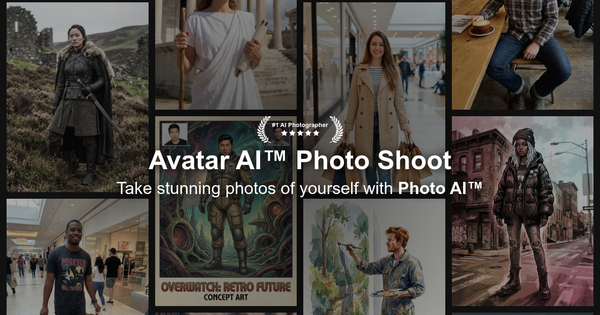
Avatar AI, accessible at https://avatarai.me/, is an AI-powered imaging platform that lets users upload their own photos to train a personalized AI model, then generate photorealistic avatars and images in a wide variety of styles. It expands cropped or square avatars into full 2:3 aspect ratio AI photographs (up to 4K resolution) and animates them into short AI videos featuring motion effects, text-to-speech, custom voice uploads, or motion capture from reference videos. Primary use cases include creating professional headshots for LinkedIn or resumes, social media profile pictures, dating app photos, creative or fantasy content, virtual product try-ons for e-commerce, and even AI influencer material or personalized gifts. The tool targets a broad audience of individual consumers, content creators, influencers, professionals (such as CEOs or freelancers needing polished portraits), and small businesses seeking affordable alternatives to traditional photoshoots—rather than developers or large-scale marketers, though it supports commercial licensing on paid plans.
Key Features & Capabilities
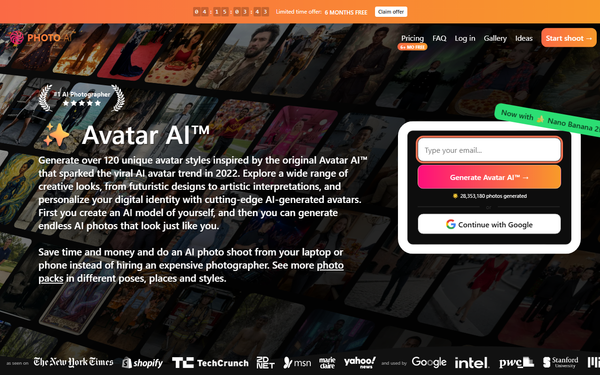
Core functionality revolves around training a custom AI model from 5–20 diverse user photos (different angles, lighting, expressions recommended), followed by on-demand generation of high-resolution images using custom prompts or pre-built style packs. Standout features include over 120 style options spanning professional (LinkedIn/CEO headshots), lifestyle (luxury, travel, old money), creative (cosplay, film noir, sci-fi), and themed packs; realistic “zoom out” expansion to full-sized 4K photos with generated backgrounds; video animation with 202 voice options for TTS, custom audio uploads, or motion capture; and integrated editing tools like magic edit (text-based changes), relight, clothes try-on, upscaler, background remover, and image combiner. It differentiates from competitors through high photorealism powered by fine-tuned models (including Hyper Realism variants), consistent likeness across generations once the model is trained, commercial-use rights on paid tiers, and a full suite of post-generation tools in one platform. Data privacy is emphasized, with user options to delete models/photos (permanent after set periods) and no selling of user data. Limitations include occasional AI artifacts or anatomy inconsistencies (common in generative tools), shorter video lengths (typically 5–10 seconds), quality and parallel generation caps on lower plans, and a strict no-refund policy once models are trained or significant generations occur. Missing features noted in comparisons include native iOS app support, advanced long-form video, or high-quality 3D model export.
User Experience
The platform offers a straightforward web-based interface with a low learning curve: users sign up via email or Google, upload photos through a simple flow, train the model, and access a clean gallery/sidebar for generation and editing. Hover actions, prompt fields, and one-click tools (upscale, make video, magic edit) make navigation intuitive even for non-technical users. Interface quality is modern and functional, focused on efficiency rather than flashy design. Documentation is primarily FAQ-driven on the site with example galleries and testimonials; support resources include email/ticket options and a billing portal via Stripe, though in-depth guides or community forums are limited compared to larger platforms. Overall, the experience feels accessible for casual users while scaling for power users on higher plans.
Performance & Reliability
Generation is efficient—model training takes around 5 minutes (faster on premium plans), with individual photos rendering in about 20 seconds and support for parallel processing (up to 16 images on Ultra). Video creation and edits are comparably quick relative to local AI setups. Reliability is strong for an indie tool, with ongoing improvements to likeness and photorealism via model fine-tuning. Known issues from user feedback include variability in output quality (some generations excel in likeness while others require remixing), minor artifacts in complex scenes or anatomy, and occasional slower processing during peak times. Common complaints center on expectations versus results (e.g., not every image perfect without editing) and refund restrictions, but widespread outages or major reliability problems are not prominently reported in 2026 reviews. Performance holds up well against competitors for speed and consistency once trained.
Pricing & Value
Avatar AI operates on a subscription model with no robust free tier beyond limited trials or auto-generated samples on paid plans. Plans include Starter ($19/month or $9 equivalent annually, 50 credits, basic quality), Pro ($49/month or $29 annually, 1,000 credits), Max ($99/month or $49 annually, 3,000 credits—most popular), and Ultra ($199/month or $99 annually, 10,000 credits) offering escalating quality, likeness, parallel generations, storage, and priority access. Credits cover photo/video generations and never expire (with some top-up flexibility). Annual billing provides significant savings. Value is compelling versus hiring a photographer or studio ($100s–$1,000s per shoot), especially with commercial licensing, extensive editing tools, and high output volume on mid-to-high tiers. Compared to one-time apps like Lensa or video-focused tools like Synthesia/D-ID, it offers strong versatility and ongoing model use at a mid-range price, though casual users may find entry-level costs high relative to occasional needs. No separate enterprise plan exists beyond Ultra scaling.
Practical Tutorial
A common task is creating a personalized professional headshot pack and animating one into a short talking video. Here is a step-by-step walkthrough based on the current platform flow (as of April 2026):
- Visit https://avatarai.me/ (or the linked Photo AI avatars section) and sign up/log in with email or Google.
- Navigate to “Create AI Model” and upload 5–20 clear, diverse photos of yourself (varied angles, expressions, lighting, no filters or group shots; JPG/PNG/WebP supported).
- Enter basic details (name, gender, age, ethnicity, eye color) and start training—the process takes ~5 minutes (faster on higher plans).
- Once trained, go to the generation interface. Select a style pack (e.g., “LinkedIn Headshots” or “CEO Portraits”) or enter a custom prompt like “professional studio headshot, neutral background, confident expression.”
- Generate images (costs credits; higher plans allow multiples in parallel). Review the gallery and use “Zoom Out” or expand tools to convert square/cropped avatars into full 2:3 4K photographs with realistic backgrounds.
- For animation: Select a generated photo, choose “Make Video,” add motion effects or upload a reference video for motion capture. Input a script (up to ~350 characters) or upload your own audio/voice for text-to-speech or direct voiceover. Generate the 5–10 second clip.
- Edit as needed (relight, upscale, magic edit), then download high-res files or share via link. Delete any unwanted data via the trash icon for privacy.
Results typically include 8+ variations per style; remix or regenerate low-likeness outputs. Official examples and galleries on the site serve as visual references; no dedicated external video tutorial was found, but the in-app flow is self-explanatory with tooltips.
Final Verdict
Overall rating: 4.5/5. Avatar AI excels for users seeking quick, high-quality personalized photorealistic avatars, full-sized photos, and animated videos without a physical photoshoot—particularly those valuing style variety, commercial rights, and a privacy-conscious indie platform. It is ideal for social media enthusiasts, professionals updating profiles, content creators, and small businesses. Avoid it if you need completely free one-off generations, zero-tolerance for occasional AI imperfections without editing, or advanced enterprise video production features beyond short clips. One-sentence recommendation: Avatar AI delivers impressive photorealistic results and creative flexibility in an easy-to-use package, making it a worthwhile investment for anyone wanting professional-grade AI avatars on demand.