Aviator Review: Automate Your SDLC and Scale Engineering Teams
Overview & Purpose

Aviator is an AI-powered development platform and SDLC automation tool designed to streamline software development workflows for engineering teams. It automates repetitive tasks such as code merging, intelligent code reviews, deployment management, and now repeatable AI coding processes through structured workflows. Primary use cases include managing high-volume pull requests in monorepos (handling thousands of changes daily without breaking builds), optimizing code review assignments with AI, handling dependent changes via stacked PRs, and orchestrating releases with automated rollbacks and cherry-picks. It supports both monorepo and microservice architectures while integrating seamlessly with existing toolchains, particularly GitHub.
The target audience is primarily software developers, engineering managers, and DevEx leaders at mid-to-large organizations—from startups to Fortune 500 companies—with complex codebases and high collaboration needs. It is especially valuable for teams of 15+ engineers dealing with frequent merges, semantic conflicts, or scaling AI-assisted coding. This review is based on research conducted as of March 2026.
Key Features & Capabilities
Core functionality revolves around five integrated modules:
- MergeQueue: Automated, fault-tolerant merging that protects main branches with parallel/dynamic queues, predictive batching, and flaky-test resilience.
- FlexReview: AI-driven reviewer suggestions and approval validation that replace static CODEOWNERS files, incorporating domain expertise, workload, and SLAs.
- Stacked PRs: CLI tool for breaking large changes into manageable, dependent PRs with automatic syncing and rebasing.
- Releases: Unified dashboard for deployments, rollbacks, cherry-picks, and changelogs across environments.
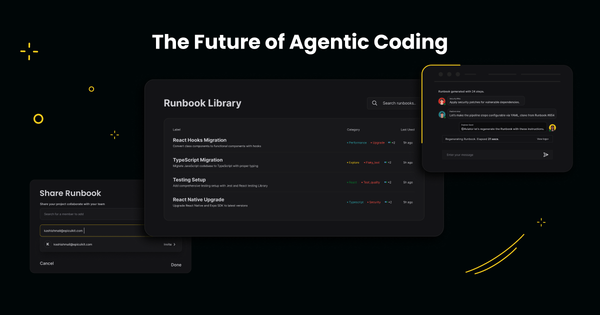
- Runbooks (new AI feature): Structured, context-aware agentic workflows that turn ad-hoc AI coding into repeatable team processes, capturing tribal knowledge.
Standout features differentiating Aviator from competitors (such as basic GitHub merge queues, Mergify, or Graphite) include its Google-inspired scale for monorepos, low-configuration “set-and-forget” operation, open-source Stacked PRs CLI, and evolving AI capabilities without vendor lock-in. It is CI-agnostic and SOC2 Type II certified, with enterprise options for on-premise deployment and SAML.
Limitations include GitHub-only native integration (no built-in support for GitLab or Bitbucket), a credit-based usage model for AI-heavy features like Runbooks (which may require monitoring and top-ups), and relatively sparse public third-party case studies compared to more established tools. Advanced customization for non-monorepo setups or fully open-source alternatives may feel constrained for some users.
User Experience
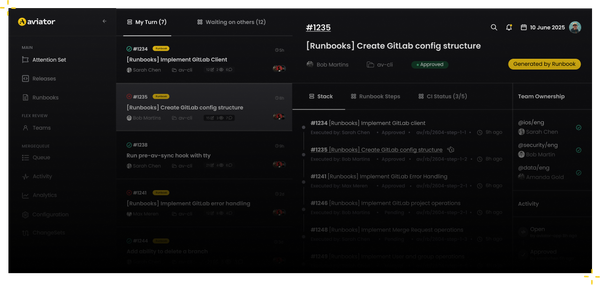
Aviator offers a low learning curve thanks to its seamless GitHub App installation and simple CLI setup (via Homebrew). Most users report an “invisible” experience—add a label or comment in GitHub, and automation handles the rest—minimizing context switching. The interface combines a clean dashboard, Chrome extension for live PR status, and native GitHub UI integration, making it intuitive for both junior and senior engineers.
Documentation at docs.aviator.co is clear and practical, with quickstarts for each module and API references, though some advanced configurations benefit from the enterprise Slack support channel. Overall, the learning curve is gentle for basic MergeQueue usage and moderate for full stacked workflows or Runbooks.

Performance & Reliability
The platform excels in speed and efficiency, particularly for large teams: MergeQueue reliably handles 10,000+ changes per day while keeping builds green through semantic conflict detection and parallel testing. Testimonials highlight dramatic reductions in merge conflicts, deployment frequency increases, and fewer production incidents.
No widespread known issues or common complaints surfaced in searches across review platforms, Reddit, or Product Hunt as of March 2026; users consistently praise reliability in monorepo environments. Enterprise features add fault tolerance and dedicated support, further enhancing uptime.

Pricing & Value
Aviator uses a credit-based freemium model:
- Hobby: Free (20k credits/month, suitable for small teams under 15 developers or light usage).
- Pro: $10/month (additional credits; scales affordably).
- Enterprise: Custom pricing with on-premise deployment, priority support, SAML, and bundled credits.
The open-source Stacked PRs CLI is completely free. Credits primarily power AI features like Runbooks and heavy automation.
Value is exceptional for scaling engineering organizations: the time saved on manual merging, reviewing, and releasing often justifies the modest cost compared to hiring extra platform engineers or using fragmented tools. Small teams may find the free tier sufficient, while larger ones gain enterprise-grade reliability at a fraction of custom-build costs.
Practical Tutorial
Aviator provides official quickstarts in its documentation. Below is a step-by-step walkthrough for a common task—managing dependent changes with Stacked PRs—based on the official CLI quickstart (ideal for breaking large features into reviewable chunks while integrating with MergeQueue). This uses real commands and assumes a GitHub repository.
- Install the CLI: Run
brew install aviator-co/tap/av(macOS/Linux) or download from the releases page for other platforms. - Configure GitHub authentication: Create a personal access token (classic) with
reposcope at github.com/settings/tokens, then runav configor edit~/.av/config.yamlwith your token. - Initialize in your repo: Navigate to the repository and run
av init. This sets up the local configuration. - Create the first topic branch: Use
av branch feature/base(orgit checkout -bfollowed byav commit). Make changes and commit. - Open the PR: Run
av pr—this creates a GitHub PR and links it in the stack. - Stack additional dependent changes: Run
av branch feature/nexton top of the previous branch, make changes, commit, thenav pr. View the stack withav tree. - Sync after merges: Once the base PR merges, run
av syncon dependent branches to rebase automatically and push updates. - Queue for merge: Add the “mergequeue” label (or use
/aviator mergecomment) to trigger Aviator’s MergeQueue for safe integration.
Full official guide and video demos are available at https://docs.aviator.co/aviator-cli/quickstart and the Aviator YouTube channel. This workflow typically reduces review time by 50%+ for interdependent features, per customer stories.
Final Verdict
Overall rating: 4.5/5
Aviator is best suited for mid-to-large engineering teams (15+ developers) working in GitHub-based monorepos or high-velocity environments who want to eliminate merge and review bottlenecks while scaling AI-assisted development. It shines for organizations prioritizing velocity without sacrificing quality.
Teams should avoid it if they use GitLab/Bitbucket exclusively, prefer completely free/open-source solutions without any usage metering, or operate very small/solo projects where native GitHub tools suffice.
Aviator transforms painful SDLC processes into reliable, automated flows—highly recommended for any scaling engineering organization seeking Google-level productivity.