Bahama AI Review: Build Custom No-Code AI Agents for Your Team
Overview & Purpose

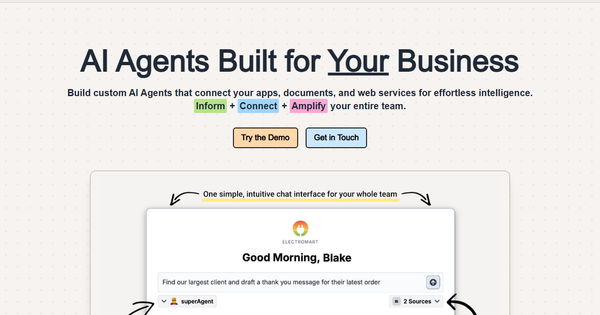
Bahama AI is a no-code platform that enables businesses to build custom AI agents acting as intelligent sidekicks for teams. These agents connect internal documents, company data, and third-party applications (such as CRM systems and project management tools) to deliver personalized, actionable insights through a simple chat interface. Primary use cases include automating document processing, providing instant data visibility across silos, supporting workflows in customer service, sales, finance, and operations, and generating content like reports or summaries on demand. It targets non-technical business users—particularly managers, sales teams, customer support staff, and operations leaders—who need quick access to organizational knowledge without relying on developers or data scientists. While marketers or designers could benefit indirectly through workflow automation, the core audience is enterprise and mid-sized teams seeking to amplify productivity and decision-making without AI expertise.
Key Features & Capabilities
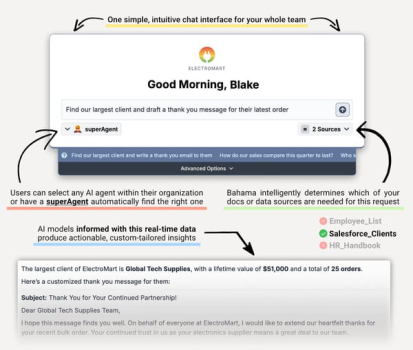
Core functionality revolves around no-code agent creation: administrators connect data sources and web services, then build agents that dynamically retrieve information, automate tasks, and respond via natural-language chat. Standout features include enterprise-grade security with granular permissions (users see only authorized data), instant integration with tools like Salesforce, Zendesk, and Google Docs, and rapid deployment—agents can go live in minutes rather than months. The familiar chat interface requires zero training, and agents handle both data lookups and content generation while maintaining full organizational control over privacy. These elements differentiate Bahama from general-purpose tools like ChatGPT (which lack secure internal data connections) or more developer-focused agent frameworks, emphasizing simplicity, security, and business-specific workflows over raw model power.
Limitations include the absence of predefined agents (all must be built manually), reliance on initial manual connections for data sources, and a lack of a standalone mobile app. Publicly documented integrations remain relatively focused rather than exhaustive, and advanced customization beyond no-code may require workarounds. No API details are prominently shared for deeper technical extensions.
User Experience
Setup is exceptionally intuitive with a minimal learning curve—managers can connect sources and deploy agents in minutes using visual no-code tools, making it accessible even for non-technical users. The interface centers on a clean, familiar chat window that feels like messaging a knowledgeable colleague, delivering relevant responses without complex prompts. Documentation appears limited on the public site, with no dedicated help center or video library easily discoverable; support is primarily ticket-based or through “Get in Touch” requests, supplemented by a free demo for guidance. Overall, the experience prioritizes speed and accessibility, though teams new to AI agents may initially need admin guidance for optimal permission setup.
Performance & Reliability
The platform is positioned for fast, efficient data retrieval and task execution, with agents surfacing insights from connected sources in real time through natural queries. No widespread known issues or common complaints appear in public reviews or forums as of the research date, likely due to the tool’s emerging status. Aggregator listings highlight consistent performance in controlled demos, with strong emphasis on reliable permission enforcement and secure handling of sensitive data. Early indicators suggest solid uptime for chat interactions, though real-world scalability feedback remains sparse given limited user reviews on major platforms.
Pricing & Value
Bahama uses a custom enterprise pricing model with no publicly listed fixed plans or free tier; costs are tailored to business size, number of agents, and integrations, requiring a quote via the site. A free demo is available for evaluation, but full access is paid only. This structure delivers strong value for organizations avoiding the expense of in-house AI development or complex integration projects, especially compared to building custom solutions or using less secure general AI tools. The quick ROI from minutes-long deployments and reduced reliance on IT teams makes it cost-effective for mid-to-large teams, though smaller businesses or those seeking freemium options may find the opaque, quote-only approach less accessible.
Practical Tutorial
Official public tutorials or in-depth documentation are not yet available on the site (research date: March 11, 2026), though a live demo can be tried directly at https://www.bahama.ai/. Below is a practical step-by-step walkthrough for a common task—creating and using a custom sales assistant—based on the platform’s described no-code workflow and demo capabilities.
-
Get Started: Visit https://www.bahama.ai/ and click “Try the Demo” or “Get in Touch” to access the dashboard (early access or account approval may apply). Log in as an admin.
-
Connect Data Sources: In the no-code connector section, authenticate and link your tools—e.g., select Salesforce for CRM data, Google Docs for reports, or Zendesk for support tickets. Set organization-wide permissions to control what each team member can query.
-
Build the Agent: Open the agent builder. Name it (e.g., “Sales Sidekick”), select capabilities like “data retrieval” and “report drafting,” and define triggers (e.g., pull pipeline data or summarize Q2 forecasts). Use simple dropdowns or prompts to configure responses—no coding required.
-
Deploy and Test: Assign the agent to specific users or teams with role-based permissions. Deploy instantly, then open the chat interface as a team member.
-
Use in Workflow (Real Example): Type a natural query like “What’s the status of my Q1 pipeline in Salesforce and draft a summary email?” The agent pulls live data, generates a formatted response, and suggests next actions—all while respecting your access rights.
For official guidance, start with the site demo; additional resources may appear post-beta.
Final Verdict
Overall rating: 4.2 out of 5. Bahama AI suits mid-sized to enterprise businesses and teams in sales, customer service, finance, or operations that want secure, integrated AI assistants without technical overhead or long implementation timelines—especially those already using compatible tools like Salesforce or Google Workspace. Avoid it if you need a free tier, mobile-first experience, extensive public user reviews before committing, or highly specialized developer-level customizations. Bahama AI offers a streamlined path to enterprise AI agents that genuinely amplify team efficiency for organizations ready to move beyond general chatbots.