Beepbooply Review: The Best Affordable AI Text to Speech Tool
Overview & Purpose
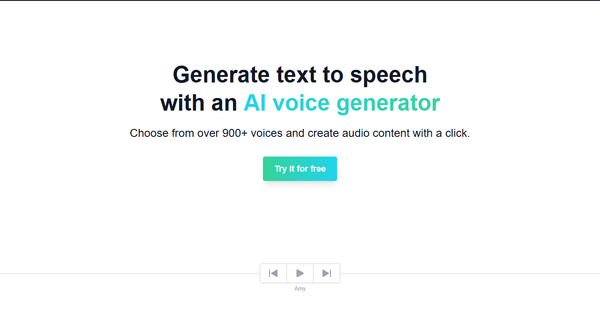
Beepbooply is a web-based AI text-to-speech (TTS) voice generator that converts written text into natural-sounding audio using realistic voices powered by Google, Microsoft, and Amazon. It enables users to produce high-quality voiceovers quickly without needing professional recording equipment or voice actors. Primary use cases include creating narration for YouTube videos, podcasts, audiobooks, educational materials, customer service scripts (such as IVR systems), multilingual content, and commercial ads.
The tool targets content creators, marketers, educators, small businesses, podcasters, and YouTubers who need fast, scalable audio production in multiple languages. It is particularly appealing to non-technical users seeking an accessible alternative to hiring talent or using complex desktop software, with both personal and commercial licensing options available on paid plans.
Research note: Information is current as of April 12, 2026.
Key Features & Capabilities
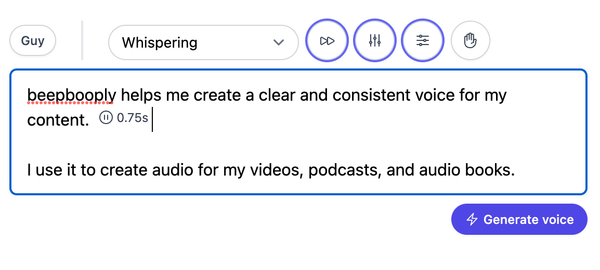
Core functionality centers on selecting from over 900 voices spanning 80+ languages and 120+ accents, inputting text, and generating downloadable audio files in seconds. Users can mix and match voices within projects, adjust prosody settings (pacing/speaking rate, pitch, volume), and apply voice-specific styles or roles for more nuanced output. Grammar, punctuation, and sentence structure influence natural pauses and rhythm. Projects can be saved and edited, with instant playback and downloads.
Standout features that differentiate it from many competitors include direct access to premium voices from major providers (Google, Microsoft, Amazon) at relatively affordable character-based pricing, unlimited downloads and projects on paid tiers, and a simple three-step workflow optimized for speed—ideal for generating hours of content rapidly. It supports broad multilingual capabilities, making it suitable for global audiences without additional tools.
Limitations include the absence of advanced features like custom voice cloning, no publicly documented API for developer integrations, and reliance on third-party voice engines (which may introduce occasional minor pronunciation quirks fixable via text tweaks). Free-tier restrictions are notable: downloads limited to basic voices, project caps, and automatic weekly deletion. Some nuance in emotional delivery or long-form consistency may fall short of dedicated human-like actors or more premium TTS platforms.
User Experience
Beepbooply offers an intuitive, low-learning-curve experience thanks to its fully web-based interface—no installation or technical expertise required. The process follows a clean three-step flow: choose a voice, input or paste text, and generate audio. Customization controls are straightforward, and projects auto-save for easy revisiting on paid plans. Users consistently praise the realistic output quality, quick generation (audio ready in seconds), and smooth download process.
Interface quality is simple and functional, focusing on voice selection filters (by language, provider, or accent) rather than flashy design. Independent evaluations rate ease of use highly at 4.60/5. Documentation is basic but practical, with blog articles covering setup and best practices; support is available via email ([email protected]) and social channels, though response times are not extensively reviewed due to limited public feedback. Overall, the tool suits beginners and casual users well, with minimal friction for common tasks.
Performance & Reliability
Generation is fast and efficient, with claims of producing hours of audio in seconds, aligning with user tests showing near-instant results and clear, lifelike pronunciations. Audio quality leverages cutting-edge models for natural speech patterns, performing reliably for short-to-medium projects across languages.
Known issues are minimal in available feedback. Common complaints center on free-tier limitations rather than core performance. Occasional minor pronunciation adjustments may be needed (addressed via punctuation or spelling tweaks), and very long-form content or highly emotional scripts can sometimes lack the depth of human recording. No widespread reliability outages or quality degradation reports surfaced in 2025–2026 reviews; dependency on third-party providers is the main potential variable.
Pricing & Value
Beepbooply uses a character-based freemium model:
- Free tier: 10,000 characters/month (~13 minutes or 2,000 words), basic voices only for downloads, 5-project limit, projects deleted weekly. A no-signup option at free.beepbooply.com offers 3,000 characters/day for basic voices.
- Starter: $7/month (or yearly with 20% savings) for 100,000 characters (~2.3 hours), full voices, unlimited downloads/projects, personal/commercial use.
- Plus: $25/month for 400,000 characters (~9 hours).
- Premium: $79/month for 1,600,000 characters (~36 hours).
All paid plans support unlimited downloads and projects.
Value is strong for users needing volume without premium add-ons: pricing undercuts many competitors while providing access to high-end voices, making it cost-effective for frequent creators or businesses. Compared to alternatives like ElevenLabs or Murf.ai, it offers broader voice variety at lower entry points for basic-to-medium use, though it lacks cloning or advanced editing suites. The free tier works well for testing or light personal projects.
Practical Tutorial
Official guidance is available in Beepbooply’s blog post “How to use an AI voice generator” and their YouTube tutorials (e.g., “How to use beepbooply for Youtube videos”). Below is a step-by-step walkthrough for a common task: creating a professional YouTube video voiceover in English with a neutral accent, using the free or Starter plan.
- Sign up or access the tool: Visit https://app.beepbooply.com/register (or use free.beepbooply.com for quick tests). Log in and create a new project.
- Select a voice: Browse or filter the 900+ options. For this example, choose an English voice from Google or Microsoft with a clear, professional tone (e.g., search “English US” or similar accent). Preview samples to confirm fit.
- Input your text: Paste or type your script (e.g., “Welcome to today’s video on AI tools. In this episode, we explore text-to-speech technology.”). Use punctuation for natural pauses—commas for short breaks, periods for full stops. Experiment with sentence length for rhythm.
- Customize settings: Adjust pacing (slower for emphasis), pitch (slightly lower for authority), volume, or speaking style if available for that voice. You can split long scripts into sections and mix voices (e.g., intro with one voice, main content with another).
- Generate audio: Click “Generate voice.” Wait a few seconds for processing. Listen to the preview, make tweaks if needed, then download the MP3/WAV file.
- Save and export: On paid plans, the project saves automatically for future edits. Download and import into your video editor (e.g., CapCut or Premiere).
Tip: For best results, read the generated audio aloud first and refine text for flow. This process typically takes under 5 minutes for a 2-minute script and works identically for podcasts or ads.
Final Verdict
Beepbooply earns a solid 4.3 out of 5 rating based on its combination of voice variety, ease of use, speed, and value-driven pricing.
Who should use it: Content creators, marketers, educators, and small businesses needing quick, multilingual voiceovers on a budget—especially those who value broad voice selection and commercial rights without complexity.
Who should avoid it: Advanced users requiring voice cloning, robust APIs, deep emotional expressiveness, or enterprise-level support and integrations; they may prefer more specialized platforms like ElevenLabs.
One-sentence recommendation: Beepbooply is an excellent, affordable entry point for anyone wanting instant access to hundreds of realistic AI voices across dozens of languages—start with the free tier and scale up for professional results.