BGBye Review: The Best Free AI Tool for Multi-Model Background Removal
Overview & Purpose
BGBye is a free, open-source AI-powered online tool that removes backgrounds from images (with basic video frame processing available). It leverages multiple cutting-edge open-source models simultaneously to generate results, allowing users to compare and select the optimal output for transparent PNGs or custom backgrounds. Primary use cases include creating graphics for e-commerce product photos, social media content, web design, print materials, and isolating subjects in portraits or landscapes (such as sky removal). It appeals to designers, marketers, content creators, and hobbyists who need quick, high-quality transparent assets without installing software. Developers can also self-host it via the open-source codebase for local or custom deployments. The tool emphasizes ease and flexibility over single-model solutions, targeting users frustrated by paywalls or inconsistent results from competitors.
Key Features & Capabilities
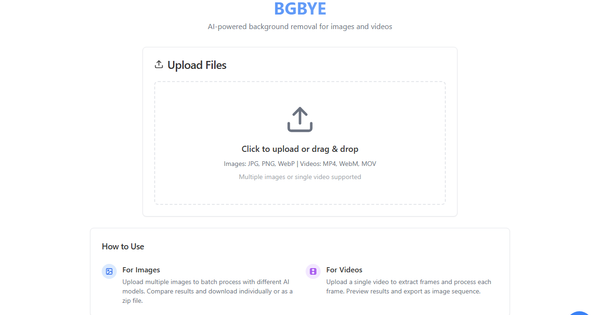
Core functionality centers on AI background removal: users upload images (or videos for frame-based processing), and the tool runs up to 10 different open-source models (including Birefnet, Inspyrenet, and various U²-Net variants) in parallel to produce varied results. Standout features include side-by-side comparison sliders, batch uploads with no stated limits, an option to change the background (transparent or solid color), and direct PNG/WebM downloads. The interface supports click-to-upload, drag-and-drop, or Ctrl-V paste for instant interaction. Video support extracts and processes frames (exported as sequences rather than native video files with transparency).
Differentiation comes from the multi-model approach—users can evaluate and pick the best mask for tricky elements like hair, fur, or complex edges—unlike single-algorithm tools such as remove.bg. Additional perks include a modern React-based UI with Material-UI components and self-hosting via GitHub for offline use on NVIDIA GPUs. Limitations include no native seamless video output (frame extraction only, with external conversion needed for GIFs or transparent video), occasional model-specific errors, and lack of advanced editing tools like manual refinement brushes. File size handling is browser-limited, and complex images may require multiple model retries.
User Experience
BGBye boasts an extremely low learning curve—most users can achieve results in under a minute with zero account creation or tutorials required. The clean, intuitive interface features a central drop zone, real-time progress indicators, and interactive comparison sliders for model outputs, making it accessible even for non-technical users. Quality feels modern and responsive on desktop browsers (HTML5-based). Documentation is minimal: no dedicated help center or official guides exist beyond the GitHub README for local setup. Community support comes via itch.io comments and Reddit threads, where the developer actively responds to issues. Overall, the experience is delightful for casual use but can frustrate during server hiccups.
Performance & Reliability
Processing is generally fast for standard images when the server is responsive (often seconds per model batch), thanks to optimized Python/FastAPI backend. Efficiency shines on complex subjects where multiple models provide fallback options. However, reliability is a noted weakness: the indie-hosted web version experiences frequent downtime, 500 errors, and slowdowns due to high traffic on the developer's personal hardware. Users report occasional blank results or model failures (e.g., with Inspyrenet). Local self-hosted versions perform reliably with a suitable GPU (6GB+ VRAM recommended). Common complaints center on server instability rather than output quality; no major accuracy scandals or data privacy issues surfaced in reviews. As of March 2026 research, uptime has improved with updates but remains inconsistent for heavy users.
Pricing & Value
BGBye operates on a completely free model for the web app—no tiers, tokens, quotas, ads, or signups. The downloadable offline version on itch.io follows a "name your own price" system (default $0), granting access to the dist.zip for local experimentation. Self-hosting via GitHub is fully free and open-source. Compared to paid alternatives like remove.bg (credit-based) or Adobe Express (subscription), BGBye delivers superior value through multi-model flexibility and zero cost, especially for high-volume or experimental use. The only "cost" is potential wait times during peak server load, making it an outstanding choice for budget-conscious creators while still competitive in quality.
Practical Tutorial
A step-by-step guide for the common task of removing a background from a product photo (based on the live interface and community YouTube demos; official tutorials are absent, but see the 60-second review video linked below for visuals):
- Visit the tool at https://bgbye.fyrean.com/ or the revamped beta at https://bgbye.io/.
- Upload your image: drag and drop a JPG/PNG file into the central area, click to browse, or paste directly with Ctrl-V.
- Wait for automatic processing—the tool runs all 10 AI models in parallel and displays previews (typically 10–30 seconds).
- Compare results using the built-in sliders or thumbnails; zoom to inspect edges (e.g., hair or fine details).
- Select the best mask, then optionally choose a new background color or keep transparent.
- Click download to save as a transparent PNG (or ZIP for batch/multi-frame exports). For videos, upload similarly and download processed frames for external assembly.
Example: Removing the background from a white-background smartphone photo yields clean cutouts suitable for e-commerce mockups. For a video walkthrough, watch "Remove Background From Image Using BGBye | For Free" on YouTube or "60 Second Tool Review: Background Remover BGBye." Local self-hosting follows the GitHub README steps for GPU-accelerated repeats.
Final Verdict
Overall rating: 4.3/5 – Excellent concept and free access earn high marks, tempered by hosting reliability.
This tool is ideal for designers, marketers, e-commerce sellers, and casual creators who want flexible, multi-AI results without spending money and don't mind occasional retries. Avoid it if you require guaranteed uptime, native video transparency, or enterprise-level support—opt for paid services instead. One-sentence recommendation: BGBye is a standout free powerhouse for anyone seeking the best background removal results by comparing multiple AIs side-by-side—just bookmark it and try during off-peak hours.