BigJPG Review: The Best AI Tool for Anime and Image Upscaling

Overview & Purpose
BigJPG is an AI-powered super-resolution image enlarger that utilizes Deep Convolutional Neural Networks (DCNN) to upscale images while intelligently reducing noise and serration, preserving or even enhancing original details, colors, and edges without the blurring or pixelation common in traditional enlargement tools. Its primary purpose is lossless image upscaling, enabling users to enlarge low-resolution images up to 16x their original size for higher-quality outputs suitable for digital display, printing, web optimization, or creative projects. Key use cases include enhancing anime-style artwork and illustrations (where it excels at maintaining crisp lines and vibrant colors), restoring or improving regular photos, preparing assets for marketing materials, and upscaling AI-generated art or old scanned images.
The tool targets a broad audience of digital artists, anime enthusiasts, graphic designers, illustrators, content creators, and marketers who need quick, high-quality enlargements without advanced photo editing skills. It also appeals to developers via its API for integration into workflows. While effective for both anime/illustrations and photos, it is particularly praised in reviews for its specialization in line-art and cartoonish styles rather than photorealistic professional editing.
Key Features & Capabilities
Core functionality revolves around uploading an image, selecting content type (Photo or Illustration/Artwork), choosing an enlargement ratio (2x, 4x, up to 16x on paid plans), and applying noise reduction levels (None, Low, Medium, High, or Highest). The AI then processes the image using specialized neural networks optimized for lines, colors, and edge preservation, producing sharper results with minimal artifacts compared to tools like Photoshop.
Standout features include strong performance on anime and illustrations (near-perfect detail retention with no visible "glitter" or doubling), support for regular photos, offline enlarging (when logged in), batch/parallel processing on paid plans, an API for automation, image history access, and server switching (China default or US for faster downloads). It also offers a desktop app (Windows/Mac) and mobile app for convenience. Privacy is solid, with uploaded and enlarged images automatically deleted after 3 days.
Limitations include strict free-tier restrictions (e.g., smaller file sizes and lower max ratios), no additional editing tools like color correction or retouching, dependency on internet connectivity for most operations, and potential variability in speed due to server traffic. It lacks advanced controls found in desktop software like Topaz Gigapixel AI, making it less ideal for highly customized professional photo workflows.
User Experience
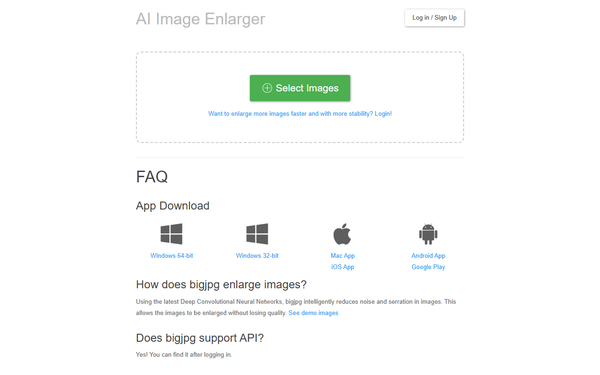
BigJPG boasts an exceptionally low learning curve thanks to its straightforward web-based interface: simply drag-and-drop images or select files, configure basic options in a clean popup, and start processing. The UI is intuitive and minimalistic, though some users note it feels dated or basic compared to modern design tools.
Navigation is simple with clear buttons for upload, settings, download all, and history (available after login). Documentation is adequate via an on-site FAQ covering common questions like failure troubleshooting, speed estimates, and server selection. Support resources include email contact (via admin responses in reviews) and community feedback on platforms like Trustpilot and Reddit. Overall, it's accessible for beginners while offering enough for power users via paid features and the API.
Performance & Reliability
Processing speed is efficient on paid plans with dedicated high-performance servers, often completing enlargements quickly even for larger files; free users may experience queues, longer wait times, or occasional failures during peak usage, though actual processing is usually faster than estimated. Quality output is consistently high for anime and illustrations, with excellent noise reduction and detail preservation; photo results are solid but can sometimes introduce minor artifacts on complex real-world images.
Known issues include network-dependent failures (retry recommended), slower downloads from the default China server (switchable to US), and rare subscription glitches reported in user reviews. Desktop app usage has drawn occasional antivirus flags in past discussions, suggesting web use for caution. Reliability is generally strong for logged-in users with offline support, and images remain accessible in history.
Pricing & Value
BigJPG follows a freemium model. The free plan allows 20 images per month, with limits of 5MB file size (3000x3000px max) and up to 4x enlargement—sufficient for occasional personal use but restrictive for frequent needs. Paid plans unlock 50MB uploads, 16x enlargement, faster speeds, batch processing, offline enlarging, and higher monthly quotas via one-time purchases for set periods: Basic (~$6 for 2 months with 500 images/month), Standard (~$12 for 6 months with 1000 images/month), and Premium (~$22 for 12 months with 2000 images/month).
Value is strong for its niche, especially for anime artists or illustrators needing high-quality results without subscription commitments—far more affordable than premium desktop alternatives like Topaz while delivering comparable or superior results in its specialty. Free tier provides a low-risk entry point, and paid upgrades offer excellent ROI for regular users compared to per-image competitors. Enterprise or high-volume options aren't prominently featured but can be explored via API.
Practical Tutorial
BigJPG provides a simple, effective workflow for common tasks like enlarging an anime illustration. Here's a step-by-step tutorial for upscaling a low-resolution anime image (e.g., a 500x500px character artwork to 4x or higher for print or web use), based on the official process and verified in multiple guides as of April 2026.
-
Visit the site and prepare: Go to https://bigjpg.com/. For best results and features like offline processing, create a free account and log in.
-
Upload your image: Drag and drop your image file (or click to select) into the upload area. Free users are limited to 5MB/3000x3000px; paid allows larger files. You can upload multiple images on paid plans.
-
Configure settings: Once uploaded, a configuration window appears. Select "Illustration" or "Artwork" mode for anime (or "Photo" for realistic images). Choose your enlargement ratio (e.g., 4x for free; up to 16x paid). Adjust noise reduction (recommend "Medium" or "High" for clean lines without over-smoothing details).
-
Start processing: Click "Start" or "OK." The tool will display an estimated remaining time. Keep the browser open if not logged in, or close it for offline processing if logged in.
-
Download results: Upon completion, view the enlarged image preview. Click "Download" for individual files or "Download All" for batches. Results are also saved in your history for later access (auto-deletes after 3 days).
For real-world example: Upscaling a pixelated 256x256 anime icon often yields a crisp 1024x1024 version with sharp outlines and preserved colors in under a minute on paid plans. Official FAQ and demo images on the site illustrate before/after results. For video walkthroughs, search YouTube for "BigJPG tutorial" (e.g., drag-drop demos from 2025-2026).
Final Verdict
Overall rating: 4.5/5. BigJPG delivers exceptional value and quality in its core niche of anime and illustration upscaling, with a dead-simple interface and affordable paid upgrades that outperform free alternatives for most creative tasks.
Who should use this tool: Digital artists, anime fans, illustrators, and casual designers seeking fast, high-fidelity enlargements without complex software—especially those on a budget or needing occasional batch processing.
Who should avoid this tool: Professional photographers requiring advanced photo-specific edits, heavy free-tier users frustrated by strict quotas, or anyone preferring fully offline desktop tools with extensive customization.
One-sentence recommendation: If you're working with anime, illustrations, or need reliable AI upscaling without hassle, BigJPG is a standout choice worth trying for free today.