Bit AI Review: The Ultimate AI-Powered Document & Wiki Tool

Overview & Purpose

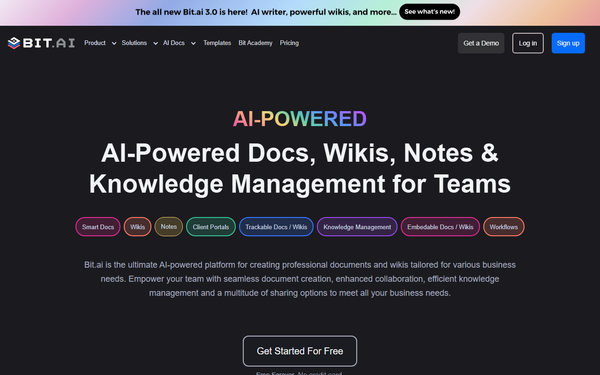
Bit.ai is an AI-powered document and wiki collaboration platform that enables teams to create interactive, smart documents, knowledge bases, and wikis. It combines a rich editor with real-time collaboration, embeddable media from over 100 apps, document tracking, and client portals to make knowledge sharing more dynamic and measurable than traditional tools like Google Docs or Notion. Primary use cases include building project proposals, SOPs, training manuals, technical documentation, meeting notes, content marketing assets, and client deliverables. It excels at turning static files into "living documents" where embedded content (videos, spreadsheets, designs) updates automatically.
The tool targets cross-functional teams rather than solo users or highly specialized roles. Ideal audiences include marketers (for proposals and campaigns), product and tech teams (for specs and code docs with syntax highlighting), sales (client portals and trackable pitches), designers (Figma embeds), HR and management (SOPs and training), educators, and startups. It suits globally distributed organizations needing secure collaboration with external guests, contractors, or clients.
Key Features & Capabilities
Core functionality centers on a smart editor that supports text, headings, lists, tables, code blocks (with syntax highlighting for dozens of languages), math equations (LaTeX), and rich embeds. Users can stack images, videos, PDFs, forms, charts, and live content from integrations like Figma, Google Sheets, Typeform, Vimeo, and more—updates sync in real time. Wikis convert any document into a hierarchical knowledge base with subpages and smart navigation. Real-time co-editing, @mentions, comments, version history, and folder/workspaces organization round out the basics.
Standout features include the AI Genius writing assistant (generates outlines, templates, research summaries, translations, and 200+ prompt-based content with auto-formatting), trackable sharing links with engagement analytics (views, time spent), invite-only client portals/data rooms (up to 50 guests with edit/comment/read-only permissions on Business plan), lead-capture forms, password protection, expiration dates, and embeddable docs/wikis on websites. Smart search across all assets and unlimited workspaces on paid plans differentiate it from competitors.
Limitations include a restricted free tier (only 5 members and 10 documents per user), AI Genius available only as a paid add-on with word limits, and fewer advanced formatting/font options for heavy branding needs. No native mobile apps (web is responsive but not ideal for on-the-go editing). Guest access and bulk imports require paid plans. Some users note occasional large-file glitches, though these are not widespread.

User Experience
Bit.ai offers an intuitive, modern interface with a slash command menu (/ for widgets), clean themes, and auto-formatting that minimizes the learning curve—most users are productive within minutes. Real-time collaboration feels seamless, similar to Google Docs but with richer media. Documentation is excellent via the comprehensive Help Center (hundreds of articles on documents, wikis, AI, integrations, and security) plus video tutorials on YouTube and an Academy section. Support includes chat/email (phone on higher plans) and responsive updates.
Reviews highlight the ease of templates and embeds as major wins, though limited customization options frustrate teams needing pixel-perfect branding. Overall, the platform earns praise for simplicity while scaling to complex team workflows.

Performance & Reliability
Documents load quickly, real-time syncing works smoothly even across distributed teams, and embeds update reliably. Version history and search perform well with large workspaces. Known issues are minor: occasional lag with very heavy embeds or complex wikis, and some users report formatting inconsistencies on export. No widespread downtime or major reliability complaints appear in recent reviews; the platform is generally stable and fast for daily use.

Pricing & Value
Bit.ai offers a generous free plan ($0 for up to 5 members, 10 documents per user, 500 GB asset library, basic features, and 20K AI words). Paid plans start at Pro (~$8 per user/month billed annually, unlimited documents/members, bulk import, full version history) and Business (~$15 per user/month, enhanced guest portals and permissions). Annual billing saves 25%. AI Genius add-on costs $10 per 100K words/month (scalable to 1M words organization-wide). Non-profits, education, and startups qualify for discounts.
Value is strong for teams needing interactive, trackable docs—cheaper than many enterprise wikis while offering more media richness than Notion or Confluence for similar use cases. Free tier suits small tests; paid tiers deliver clear ROI through time saved on collaboration and knowledge organization. Compared to alternatives, it shines in embed depth and analytics but lags in mobile or heavy design flexibility.
Practical Tutorial
Creating and Sharing a Team Wiki for Project Documentation (common task; based on official guidance as of March 2026).
- Sign up for a free account at bit.ai and create a new workspace.
- Click "New Document." Use the AI Genius assistant (type /ai or access via sidebar on paid plans) to generate an outline: prompt "Create a structured SOP template for our onboarding process including sections for tools, steps, and checklists."
- Build content: Type normally for text; use slash menu (/) to add tables, code blocks, math, or embeds (paste Figma link, Google Sheet, or video URL for live previews).
- Convert to wiki: Click the wiki icon in the top-left corner to enable subpage hierarchy. Add nested pages via the sidebar (e.g., "Tools" > subpage "Slack Setup").
- Organize: Drag pages into folders or use smart search to link related docs.
- Share: Generate a live trackable link or create a client portal (Business plan). Set permissions (view-only for guests), add password/expiration, and enable analytics to monitor engagement.
- Collaborate: Invite teammates/guests; they can edit in real time or comment.
This takes 10–15 minutes for a basic wiki. Full official video walkthrough: YouTube "How to Create a Wiki" by Bit.ai (Jan 2026). Detailed articles: https://help.bit.ai.
Final Verdict
Overall rating: 4.3/5
Bit.ai is best for teams that need visually rich, interactive, and trackable documents/wikis to replace scattered Google Docs or static Confluence pages—especially marketing, product, sales, and knowledge-heavy organizations seeking AI-assisted productivity without Notion's steeper learning curve. Avoid it if you require deep mobile apps, extensive font/branding customization, or database-heavy features beyond documents.
One-sentence recommendation: Bit.ai delivers standout interactive documentation and collaboration for growing teams at an accessible price—worth trying the free tier today.