Bit Flows Review: The Ultimate Zapier Alternative for WordPress
Overview & Purpose
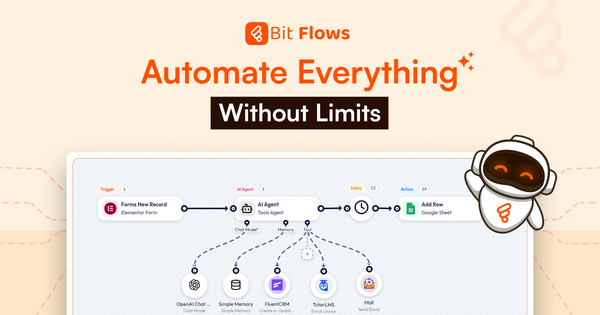
Bit Flows is a self-hosted WordPress automation plugin that functions as a no-code Zapier or n8n alternative running directly on your site. It lets users build visual, multi-step workflows to connect WordPress with over 300 external platforms—including CRMs, email marketing services, e-commerce systems, Google Sheets, and AI tools like OpenAI, Gemini, and Claude—without writing code or relying on cloud subscriptions.
Primary use cases include automating lead capture (form submissions to CRM or Sheets), e-commerce order processing, customer notifications, data syncing between plugins and SaaS apps, content generation via AI, and bulk tasks like review follow-ups or membership management. It targets WordPress site owners, digital marketers, e-commerce operators, agencies, educators, SaaS providers, and non-technical users who want full data control, unlimited executions, and elimination of repetitive manual work.
Key Features & Capabilities
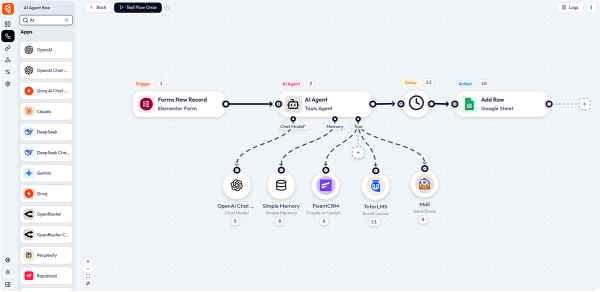
The core functionality revolves around an intuitive drag-and-drop visual canvas for creating complex workflows with triggers, actions, and smart tools. Standout features include advanced conditional logic for dynamic routing, Router for branching paths, Iterator and Repeater for handling lists or bulk operations, Delay for scheduling, instant webhooks, JSON parser, text formatter, real-time logging, and re-execution of failed steps. It supports custom app building, AI-powered actions for content creation or decision-making, and seamless integration with popular WordPress plugins (WooCommerce, Contact Form 7, Elementor, Gravity Forms, Tutor LMS) plus external services like HubSpot, Mailchimp, Shopify, Asana, and more.
What differentiates it from competitors is the fully self-hosted model: unlimited workflows, steps, tasks, and executions with no per-task fees, combined with asynchronous background processing for optimal performance and complete data privacy. All core tools (Router, Iterator, etc.) are included in every paid plan without tier restrictions.
Limitations include a free version restricted to just 9 triggers and 20 actions (pro unlocks 300+), some advanced parsers (email, PDF, custom PHP) still marked “coming soon” as of March 2026, and potential resource demands on shared hosting for extremely high-volume or real-time workflows (mitigated by built-in queues and recommended delays).
User Experience
Bit Flows offers an exceptionally intuitive interface with a clean, modern visual builder that feels natural even for beginners familiar with basic WordPress tools. The learning curve is low for simple flows and manageable for complex logic thanks to helpful on-screen mapping, drag-and-drop connections, and real-time previews. Users consistently praise its “sleek and well-designed” feel compared to bloated alternatives.
Documentation is solid, with a user guide at bit-flows.com/users-guide/, blog articles, and an extensive library of video tutorials on the official site and YouTube channel. Support is responsive via ticket, live chat, and a dedicated Facebook group, with near-universal praise in reviews for quick resolutions. Overall, it earns high marks for accessibility without sacrificing power.

Performance & Reliability
Workflows run asynchronously in the background using a queue system, ensuring zero impact on site speed or frontend performance—even with complex multi-step automations. Built-in auto-retries, failure alerts, detailed logs, and server-load pausing make it highly reliable on most hosting environments. Users report consistent operation with no slowdowns, and the plugin handles shared hosting well when best practices (e.g., off-peak scheduling) are followed.
Common complaints are minimal and mostly relate to early-adopter bugs that have been resolved through frequent updates. The only recurring note is that extremely high-volume sites may need optimized hosting or cloud cron for best results—nothing unique to Bit Flows but inherent to self-hosted tools.
Pricing & Value
Bit Flows follows a freemium model: the free version available on WordPress.org provides basic functionality for testing. Pro plans offer lifetime one-time payments (no recurring fees) with all features unlocked and unlimited everything. Current pricing (New Year Deal 2026) includes Starter Lifetime at approximately $189 (1 site), Plus at $299 (5 sites), and higher-tier Developer/Agency options, with generous bundles and annual alternatives starting around $119/year. A 14-day no-questions-asked money-back guarantee applies.
The value proposition is outstanding compared to cloud tools like Zapier or Make (which charge per task and require ongoing subscriptions). Agencies and growing sites particularly benefit from lifetime access, full feature parity across plans, and elimination of usage limits—delivering massive long-term savings and data sovereignty.
Practical Tutorial
Official tutorials and demos are readily available at https://bit-flows.com/tutorials/ and the Bit Apps YouTube playlist. Here is a complete step-by-step walkthrough for a common task: automatically add new Contact Form 7 submissions to a Google Sheet and send a Slack notification (based on official patterns and popular YouTube examples such as those from WPTuts and InfluenceWP).
- Install and activate Bit Flows (free version works for this basic flow; upgrade for more integrations).
- Go to Bit Flows → Create New Workflow and name it (e.g., “Form to Sheets + Slack”).
- Add Trigger: Search and select “Contact Form 7 – Form Submitted,” choose your specific form, and map the fields you want to capture (name, email, message, etc.).
- Add Action: Search “Google Sheets” → Connect your Google account (OAuth) → Choose “Append Row” → Select or create your spreadsheet and map form fields to columns.
- (Optional advanced step) Insert a Router tool after the Sheets action. Create two paths: one for all submissions, another with conditional logic (e.g., if message contains “urgent,” route to Slack).
- Add Slack Action: Connect Slack workspace → Choose “Send Channel Message” → Customize the message with dynamic data from the form (e.g., “New lead from {{name}}: {{message}}”).
- Click Test Flow (use the built-in tester or submit a real form). Review logs for any mapping issues.
- Save, activate the workflow, and monitor executions in the dashboard.
The entire setup takes under 10 minutes. For variations (AI-generated responses, WooCommerce orders, etc.), see the official tutorial videos linked on the site.
Final Verdict
Bit Flows earns a strong 4.7 out of 5 rating. It excels for WordPress users, marketers, agencies, and business owners who want powerful, unlimited automation with complete control, lifetime ownership, and AI smarts—all at a fraction of SaaS costs. It shines when you value data privacy and scalability within your existing WordPress ecosystem.
Avoid it if you need fully managed cloud infrastructure, ultra-niche enterprise integrations not yet supported, or prefer zero server responsibility (in which case pure SaaS tools may suit better).
Highly recommended: switch to Bit Flows today and replace expensive monthly automations with a one-time investment that grows with your site.