BlackInk AI Review: The Ultimate AI Tattoo Design Generator
Overview & Purpose
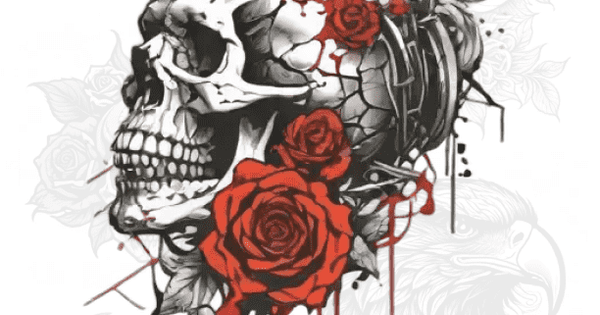
BlackInk AI (https://blackink.ai/) is a specialized AI-powered tattoo design generator that enables users to create custom, unique tattoo designs in seconds from text prompts. It addresses the common frustration of spending months scrolling Pinterest or consulting artists for inspiration by producing tattoo-ready visuals tailored to personal ideas, styles, body placements, and preferences. The tool focuses on "flash tattoo" concepts—quick, one-off designs rather than full custom artwork—while offering features like stencil conversion and body visualization to bridge the gap between digital idea and real ink.
Primary use cases include brainstorming personal tattoos, visualizing designs on specific body parts (e.g., sleeve, forearm, rib), generating cover-up ideas, creating stencils for artists, and exploring styles like blackwork, Japanese, tribal, or realistic. It is not positioned as a replacement for professional tattoo artists but as a pre-ink ideation tool to reduce decision anxiety.
The target audience is primarily tattoo enthusiasts, first-timers, and collectors seeking personalized inspiration. It also appeals to tattoo artists for rapid client concepting or flash sheet development, though the FAQ emphasizes personal use and recommends professional cleanup. General AI art users or designers may find it too niche, while marketers or non-tattoo creatives have limited applications.
Research conducted as of April 14, 2026.
Key Features & Capabilities
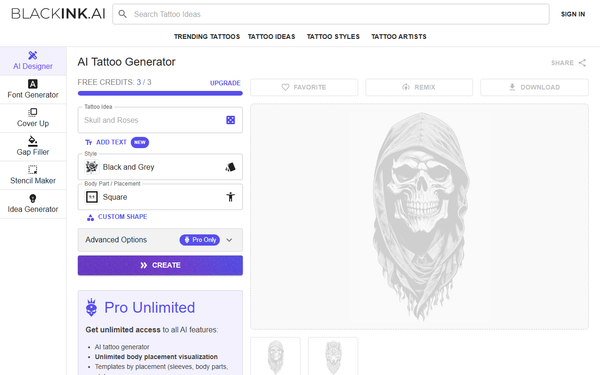
Core functionality revolves around text-to-tattoo generation: users input a "Tattoo Idea" prompt, optionally add text, select from dozens of tattoo-specific styles, choose body part/placement, apply custom shapes, set detail/complexity levels (simple, medium, complex), and add modifiers. The AI produces multiple variations (typically 4 images per generation) in seconds, with options to remix, favorite, share, or download.
Standout features differentiating it from general AI art tools (like Midjourney or DALL-E) and other tattoo generators include:
- Tattoo-optimized outputs tuned for clean linework, high contrast, and stencil readability.
- Unlimited body placement visualization and templates by placement (Pro only).
- One-click image-to-stencil converter for turning photos or existing art into tattoo-ready stencils.
- Controls for line weight, colors, and complexity tailored to skin application.
- Private/public toggling and high-resolution downloads (2048x2048px).
- Over 100 languages supported (English recommended for best results).
Limitations include the experimental nature of AI outputs (e.g., occasional weird shapes, poor symmetry, or prompt misinterpretations like generating crabs instead of stylized lobsters), no resale or commercial redistribution of designs without permission, and designs on the free tier being public and potentially deleted after 30 days. It lacks advanced editing tools or collaboration features found in broader design software.
User Experience
BlackInk AI boasts an intuitive, low-learning-curve interface ideal for non-technical users. The web app (with iOS companion) features a clean dashboard with straightforward form fields for prompts and options, plus sections for trending tattoos, ideas, and "My Collection." Generation happens with one click, and results include remix/favorite/download buttons. Users report it feels more focused and less overwhelming than general AI platforms.
Interface quality is modern and mobile-friendly, with visual previews and body placement overlays in Pro. The learning curve is minimal—most users generate their first design in under a minute. Documentation includes a comprehensive FAQ covering usage tips, limitations, and account management. Support is email-based ([email protected]), with the founder occasionally responding on Reddit. No extensive video tutorials are hosted officially, but community YouTube demos abound.
Performance & Reliability
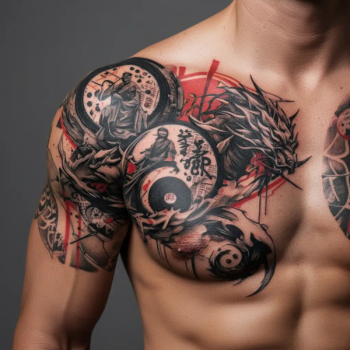
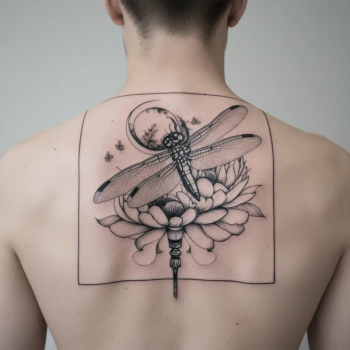
Designs generate in approximately 10–30 seconds, with efficient handling of unlimited Pro generations. Outputs are consistently tattoo-styled: bold, high-contrast, and stencil-friendly, outperforming generic AI for ink translation.
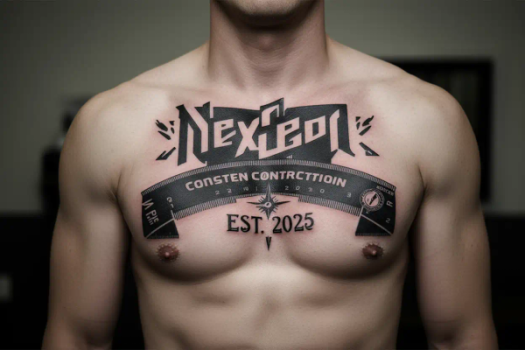
User feedback is generally positive for speed and ideation value, with testimonials praising it as "one of the best art AI" tools and noting real tattoos inspired by outputs. However, common complaints include prompt inconsistencies (AI not perfectly matching complex or specific requests), free-tier limitations leading to quick exhaustion, and occasional App Store reports of billing surprises or difficulty refining prompts after initial generation. No widespread downtime or major reliability outages reported as of April 2026. The FAQ openly acknowledges experimental quirks like asymmetry, advising professional artist review.
Pricing & Value
BlackInk AI offers a generous free tier with 3 credits (each generating 2–4 images). The Pro Unlimited plan unlocks everything:
- $15.00 billed monthly
- $39.99 billed quarterly
- $72.00 billed annually (best value at ~$0.19/day)
Pro includes unlimited generations, all styles/tools, body visualizations, stencil converter, 4x super-resolution downloads, private storage, and a 100% money-back guarantee (up to 25 generations). Free designs are public and time-limited; no high-res or advanced features. iOS in-app options vary slightly (e.g., weekly plans around $4.99–$6.99).
Value is strong for serious tattoo planners: it provides peace-of-mind previews far cheaper than custom artist sketches and more targeted than general AI subscriptions. Compared to alternatives, its tattoo-specific focus justifies the cost for dedicated users, though casual experimenters may find the free tier too restrictive and Pro pricing a barrier.
Practical Tutorial
BlackInk AI provides an accessible step-by-step workflow for a common task: generating and refining a custom forearm tattoo design (no official video tutorial on-site, but community demos on YouTube mirror this process).
- Visit https://blackink.ai/ and sign up/login (Google or email) to access 3 free credits.
- In the generator dashboard, enter your idea in the "Tattoo Idea" field (e.g., "realistic phoenix rising from ashes with subtle flames").
- Optionally add text (e.g., a name or quote) via the "Add Text" field.
- Select a style (e.g., "realistic," "blackwork," or "Japanese") from the dropdown.
- Choose body part/placement (e.g., "forearm" or "left sleeve") for visualization.
- Set custom shape if desired, detail/complexity (start with "medium"), and any modifiers (e.g., "high contrast, bold lines").
- Click "Create"—wait 10–30 seconds for 4 variations.
- Review results: favorite keepers, remix promising ones with tweaks, toggle private, or download (low-res free; high-res Pro).
- For Pro users: Use image-to-stencil on a favorite, visualize on body templates, or upscale to 4x resolution.
- Export and consult a tattoo artist for final adjustments/symmetry checks.
Example outcome: Prompting a "minimalist mountain range with geometric elements" often yields clean, stencil-ready blackwork suitable for a calf placement. Explore /tattoo-ideas for trending inspiration.
Final Verdict
Overall rating: 4.2/5 – A highly specialized, fast, and user-friendly tool that excels at its narrow mission but is held back by typical AI limitations and tiered access.
Who should use this tool: Tattoo enthusiasts, first-timers, and artists needing quick, personalized flash concepts and stencils to visualize and refine ideas before committing to permanent ink—especially those who value tattoo-specific controls over general AI versatility.
Who should avoid this tool: Casual browsers seeking unlimited free experimentation, users demanding pixel-perfect control without artist input, or anyone uncomfortable with subscription models and occasional prompt inaccuracies.
One-sentence recommendation: BlackInk AI is an outstanding ideation partner for anyone serious about custom tattoos, delivering specialized designs in seconds that genuinely reduce pre-ink anxiety when paired with professional execution.