Body Scan By Zing Review: AI-Powered Body Composition Analysis
Overview & Purpose

Body Scan by Zing is an AI-powered body composition analysis tool integrated into the Zing Coach fitness app. It allows users to take two full-body selfies with their smartphone camera, which the AI analyzes to estimate body fat percentage, lean mass percentage, basal metabolic rate (BMR), and other metrics. This data generates a personalized fitness program, video-guided workouts, and macronutrient plans specifying ideal intake for proteins, carbs, and fats, while enabling progress tracking over time. Primary use cases include kickstarting a fitness journey, monitoring body recomposition, tailoring nutrition and training without gym visits, and providing privacy-focused insights comparable to clinical scans.
The target audience consists of fitness enthusiasts—beginners to advanced athletes—who seek convenient, at-home body tracking and AI personalization. It appeals especially to busy individuals wanting affordable alternatives to expensive lab scans or trainers, rather than developers, marketers, or designers.
Key Features & Capabilities
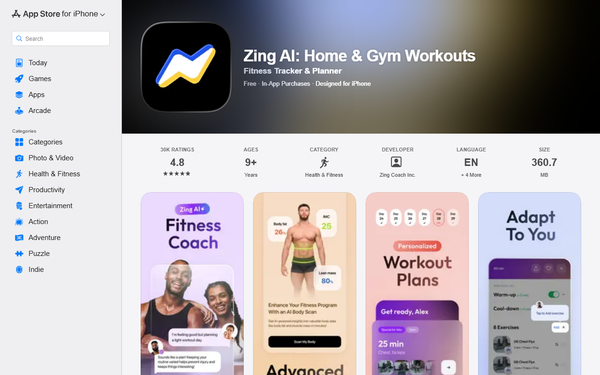
Core functionality revolves around the AI scan producing a comprehensive report that breaks down body composition (essential fat, normal fat, unbeneficial fat, lean mass), health indices like Fat Mass Index (FMI) and Lean Mass Index (LMI), BMR, daily calorie goals, and a goal-specific action plan. The report integrates directly into the app for customized video workouts (strength, HIIT, recovery with real-time form feedback via Zing Vision technology) and dynamic plan adjustments based on user data.
Standout features that differentiate it from competitors include Zing Vision AI trained on thousands of clinical-grade DEXA scans for claimed accuracy rivaling professional equipment, automatic photo deletion for enhanced privacy, progress graphs for long-term tracking, and seamless AI coach chat for interpreting results or refining nutrition/workouts. This home-based, equipment-free approach stands out for convenience and integration into a full fitness ecosystem.
Limitations include dependency on ideal photo conditions (lighting, pose, clothing), making it an estimate rather than a medical diagnostic tool. Full benefits require the app's premium subscription, and it lacks advanced 3D modeling or built-in food logging. Missing features noted in user feedback include deeper family sharing or exportable raw data for external analysis.
User Experience
Ease of use is high with a minimal learning curve: users simply follow on-screen prompts in the app for photo capture. The interface is clean and modern, featuring intuitive tabs for analytics, customizable workouts, progress visuals, and AI insights that feel engaging and motivational.
Documentation and support resources are solid, including detailed Zendesk articles, in-app AI coach guidance, email support at [email protected], and community elements like Facebook groups. App Store users frequently praise the streamlined experience, though some report occasional navigation frustrations with workout customization.
Performance & Reliability
Scan processing is fast and efficient—results appear nearly instantly after photo submission, with low resource demands on modern smartphones. The tool reliably supports trend tracking and motivation, adapting plans in real time based on fatigue, progress, or Apple Health integration.
Known issues include occasional app glitches (e.g., health sync errors or repetitive workout suggestions) and photo-dependent accuracy variations. User complaints on platforms like Trustpilot center more on billing/support than the scan itself, while App Store ratings remain strong at 4.8/5 from over 30,000 reviews. Independent comparisons (e.g., versus InBody scans) show it performs well for home trends but should be taken as an estimate rather than lab-perfect.
Pricing & Value
The Body Scan Report is available as a one-time purchase (approximately $19.99, varying by region and confirmed via in-app details). The base Zing Coach app is free with limited features, while full access—including unlimited personalized programs, video workouts, and advanced tracking—requires a Premium subscription (options include ~$18.99–$19.99 monthly, 3-month plans around $29.99, or annual at ~$59.99).
Value proposition is strong compared to alternatives: a single professional DEXA scan often costs $50–$150, plus trainer fees for interpretation, while competitors like basic smart scales or other AI apps lack this level of integrated macro planning and form-checking workouts. It delivers high ROI for consistent users through ongoing personalization, though the combined scan-plus-subscription cost may feel steep for casual explorers without trials or promotions.
Practical Tutorial
Here is a step-by-step walkthrough for performing a Body Scan and applying the results to generate a personalized fitness and nutrition plan (based on official guidance as of March 2026; real-world example: a user tracking monthly changes might see lean mass increase by 2–3% after consistent training, prompting the AI to adjust protein targets upward).
- Download the Zing Coach app from the Apple App Store or Google Play and log in (free to start; consider the trial for full preview).
- Prepare your setup: Wear tight-fitting clothes, stand 6–8 feet from the camera in front of a neutral, clutter-free background with bright, even lighting (no harsh shadows).
- Navigate to the Analytics tab (bottom right graph icon).
- Scroll to Body Scan and tap “Scan My Body.”
- Follow on-screen instructions: Align for a front-facing photo (feet together, arms slightly out at 45°, body fully in frame), then a side profile photo. The app auto-captures when properly positioned.
- Review the instant report: Analyze body fat/lean mass breakdowns, BMR, personalized macronutrient targets (e.g., higher carbs for energy if goal is performance), calorie goals, and AI coach insights/recommendations.
- Apply results: Chat with the AI coach for workout/nutrition tweaks, generate video-guided sessions tailored to your metrics, and set reminders to rescan monthly for progress graphs (view by month, 6 months, or year).
For the latest official tutorial, visit the Zing Coach Help Center article on Body Scan. Users report this process takes under 5 minutes and directly fuels actionable plans, such as shifting macros toward more protein for muscle gain goals.
Final Verdict
Overall rating: 4.5 out of 5.
This tool suits motivated fitness users seeking convenient, private, data-driven insights and personalized programs without leaving home—especially those comparing favorably to costly clinical scans. Avoid it if you need medically certified precision (opt for professional DEXA/InBody instead), dislike photo-based methods, or prefer entirely free solutions without subscriptions.
Body Scan by Zing delivers impressive at-home accuracy and integration for anyone committed to tracking and optimizing their fitness journey with AI support.