Booltool Review: The Ultimate All-in-One AI Content Toolkit

Overview & Purpose
Booltool is an AI-powered, browser-based all-in-one content creation toolkit designed to help users edit and enhance images, videos, and text without requiring downloads, advanced software skills, or complex workflows. It combines AI-driven photo editing, copywriting assistance, and basic video tools into a single web platform, enabling quick creation of professional-looking visuals and content. Primary use cases include removing backgrounds from product photos or portraits, erasing unwanted objects or watermarks, enhancing image quality, applying effects and animations, rewriting text with an AI paraphraser, generating engaging "sugar comments," creating photo stories, and improving video quality.
The tool targets online shop owners (e-commerce sellers needing fast product visuals), content creators, digital marketers, and graphic designers who want efficient, no-fuss solutions for social media posts, ads, emails, or website assets. It positions itself as a lightweight alternative to tools like Photoshop, Adobe Express, or Canva for everyday AI-assisted tasks. Research conducted as of April 2026 shows it appeals especially to non-experts seeking speed over deep customization.

Key Features & Capabilities
Core functionality revolves around three main categories:
- Image Tools: AI background remover (for portraits and products), object eraser (highlight and remove flaws/watermarks with smart inpainting), background blur (adjustable intensity), image enhancer/upscaler, photo filters and effects, animation effects, resizer, and compressor.
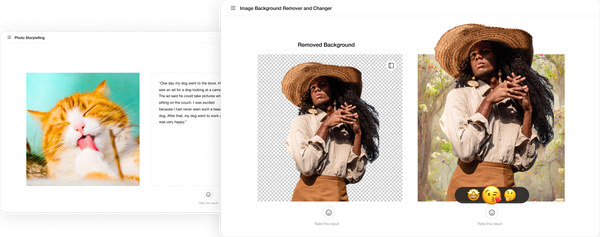
- Copywriting Tools: AI Paraphraser for rewriting text, Sugar Comments (AI-generated positive/engaging comments), and Photo Storytelling (adding narrative captions or stories to images).
- Video Tools: Video enhancer and video background remover (with limits based on plan).
Standout features include fully browser-based operation (no installation), unlimited access to many core image and text tools in paid tiers, and the convenience of handling everything in one tab—differentiating it from single-purpose AI tools or heavy desktop software. Automatic AI processing handles subject detection, inpainting, and enhancements quickly, with some manual adjustment options for backgrounds.
Limitations include a credit-based consumption model (not all features are truly unlimited in the freemium version), occasional inconsistent AI results (e.g., faded colors or suboptimal storytelling), lack of advanced manual controls or layers like professional editors, no undo/redo functionality in some workflows, and limited video processing time in lower tiers. Bulk editing can feel clunky, often requiring re-uploads for sequential changes.
User Experience
Booltool offers a clean, intuitive interface that emphasizes simplicity—users upload media directly in the browser and select tools with minimal clicks. The learning curve is very low; most reviewers describe it as "lightweight and easy to use" even for beginners, with fast onboarding compared to traditional editors. The UI features a straightforward dashboard with categorized tools, though some note the editing panel can feel small or cramped on smaller screens.
Documentation is basic (limited official guides or help center found), relying more on in-app tooltips and community YouTube demos. Customer support receives mixed feedback—responsive in some cases but unresponsive or slow according to AppSumo users. Overall, the experience prioritizes speed and accessibility over polished enterprise-level resources.
Performance & Reliability
Edits process quickly for most image tasks (background removal and enhancements often complete in seconds), making it feel responsive and efficient for everyday use. Video tools and complex animations can be slower and more hardware-dependent. Reliability is generally solid for core AI functions like object removal and enhancers, with high praise for restoring old or low-quality photos.
Known issues from user reviews include occasional bugs (especially in bulk operations or new features), workflow friction (re-uploads needed for multi-step edits), and variable output quality (e.g., some effects not applying correctly or AI-generated elements looking artificial). No widespread outages reported, but the credit system and fair-use policies can interrupt heavy sessions. Common complaints center on these glitches rather than core unreliability.
Pricing & Value
Booltool follows a freemium credit-based model: new users receive 50 free credits upon signup, after which credits are consumed per task (e.g., one image edit may cost 1+ credits depending on complexity). Users can purchase additional credits or upgrade to paid plans (starting around $9–10/month for Pro access with higher/unlimited limits on many tools). A higher Ultra tier adds expanded video capabilities. Lifetime deals are available via AppSumo (Tier 1/Pro for most image/text tools; Tier 2/Ultra adds 60 minutes/month video enhancement), providing strong value for one-time buyers.
Value is high for light-to-moderate users needing quick AI edits—cheaper and simpler than subscribing to Adobe or maintaining multiple tools. Heavy users or those requiring pro-level precision may find recurring credit costs add up, though lifetime options mitigate this. Compared to competitors, it excels in all-in-one convenience and browser accessibility at a lower entry point.
Practical Tutorial
A common task is removing and replacing the background on a product photo (e.g., for e-commerce listings). Here's a step-by-step walkthrough based on typical user flows and demo videos (as of April 2026; exact UI may vary slightly):
- Visit https://booltool.boolv.tech/home, sign up for a free account (Google/Email), and claim your 50 free credits.
- From the dashboard or tools menu, navigate to Image Tools > Background Remover (or Portrait Background Remover for people-focused shots).
- Upload your image (drag-and-drop or browse; supports common formats like JPG/PNG).
- The AI automatically detects and removes the background—wait a few seconds for processing. Review the result; use manual brush tools if edges need refinement.
- Optionally, upload a new background image, generate one with AI, or leave it transparent. Adjust blur or positioning as needed.
- Preview, then download the edited file (PNG for transparency). Credits are deducted based on the action.
For enhancements, simply select Image Enhancer after upload for automatic quality boosts. Official or community tutorials are available on YouTube (search "Booltool review" for visual demos, such as background removal or object eraser walkthroughs). Practice with free credits first to test credit consumption.
Final Verdict
Overall rating: 4.3/5 – A solid, convenient AI toolkit that delivers on speed and simplicity for common content tasks.
Who should use this tool: Online shop owners, marketers, creators, and designers who want fast, browser-based AI help for product visuals, social content, or quick text enhancements without learning complex software—especially those grabbing lifetime deals for long-term value.
Who should avoid this tool: Professional graphic designers needing pixel-level control, undo/redo, layers, or advanced video editing; or heavy users frustrated by credit costs, occasional bugs, and limited support.
One-sentence recommendation: Booltool is an excellent no-frills AI sidekick for quick visual and copy tweaks if you value ease and speed over pro-grade precision.