Boords Review: The Ultimate AI-Powered Storyboard Creator
Overview & Purpose

Boords is a web-based, AI-powered storyboard creation platform designed specifically for professional pre-production workflows in video, animation, advertising, and film. It transforms scripts, briefs, or text prompts into complete storyboards by automatically generating consistent visual frames, syncing them with dialogue and shot descriptions, and enabling real-time collaboration and client feedback. Primary use cases include planning commercials, short films, motion graphics, marketing videos, and animatics, where teams need to visualize ideas quickly, iterate on versions, and secure approvals without email chains or drawing expertise.
The target audience is creative professionals such as filmmakers, motion designers, producers, creative directors, and teams at studios and agencies. It is also suitable for marketers and content creators who produce video assets but lack traditional illustration skills. While not aimed at software developers or purely technical users, it supports any narrative-driven project requiring visual planning.
Key Features & Capabilities
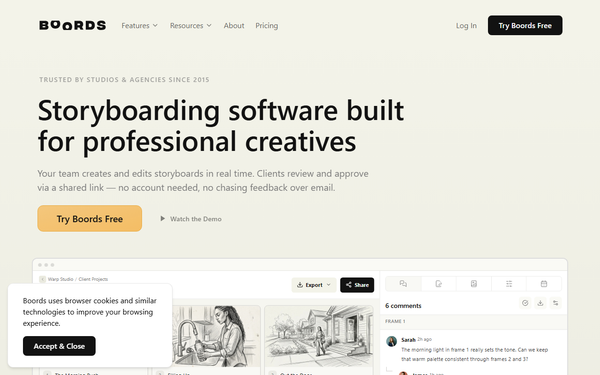
Core functionality revolves around an end-to-end storyboard builder: upload or generate a script, let AI break it into frames with matching visuals and text, then refine via drag-and-drop. Standout AI features include a script-to-storyboard converter (paste any screenplay or brief and receive structured frames instantly), text-to-image generation with prompt-based editing, and a Character Cast system that maintains visual consistency across scenes using reference images or built characters. Users can choose from multiple styles (Sketch, Realistic, Vector, Photographic, and more), add camera movement indicators, audio notes, and custom fields for shot lists. Collaboration tools shine with secure shareable links (clients review without accounts), frame-specific commenting, versioning history, real-time team editing, and automatic animatic exports (MP4 with timing and sound). Exports cover PDF, images, presentation decks, and production sheets.
Differentiators from competitors (such as Storyboard That or Canva) include professional-grade client approval workflows, unlimited guest commenting, built-in animatic creation, and AI that prioritizes character and style consistency without requiring manual redrawing. It focuses purely on pre-production, avoiding post-production bloat.
Limitations include reliance on prompt quality for optimal AI results (images can vary in consistency or artistic fidelity without strong references), a web-only interface with no native desktop or offline app, capped AI image generations on lower plans, and no advanced 3D modeling or deep cinematic simulation tools. It does not replace hand-drawing software for artists who prefer traditional methods or integrate directly with scheduling/production management systems.

User Experience
Boords boasts an exceptionally intuitive interface with a clean, modern drag-and-drop canvas that requires minimal onboarding—even beginners can create their first board in minutes. The learning curve is low thanks to guided AI flows and pre-built templates; real-time collaboration feels seamless with live updates and contextual comments. Interface quality is high: responsive across browsers, with helpful tooltips, keyboard shortcuts, and visual previews for styles and camera moves.
Documentation is solid through an extensive blog with step-by-step guides, template libraries, and how-to articles, plus in-app tooltips and a help center. Support includes responsive email/ticket assistance (praised in reviews) and community resources; no live chat or phone is highlighted as standard. Users consistently describe it as “painless” and a workflow game-changer compared to traditional methods.
Performance & Reliability
AI image generation is fast—typically seconds per frame—and the platform handles real-time team editing without noticeable lag on standard internet connections. Animatic exports and version history perform reliably, with cloud storage ensuring accessibility. As of March 2026 research, there are few widespread complaints; occasional user notes mention AI output variability on complex multi-character scenes or prompt sensitivity, but these are mitigated by reference uploads and iteration tools. Reliability is strong for professional use, backed by 11+ years of operation and millions of storyboards created, with no major outages reported in recent reviews. Minor gripes include occasional browser refresh needs for heavy boards, but overall performance earns consistent praise for speed and stability.
Pricing & Value
Boords follows a freemium model: start completely free (no credit card required) with essential tools, limited storyboards (typically 2), frame caps, and basic exports (some sources note watermarks on very low tiers). Paid plans begin with Standard at $49/month (or equivalent annual with ~20% savings): includes 1 user (+$15 per additional), 1,000 AI images/month, version control, animatics, password protection, and full exports. The Workflow plan at $99/month adds unlimited AI images, customizable templates, advanced team controls (project-based access, 2FA, custom subdomain), and priority features. Enterprise scaling is available via added users or custom quotes. All plans include a 30-day money-back guarantee.
Value is excellent for teams: the AI acceleration and collaboration tools save hours versus manual methods or alternatives like Celtx or LTX Studio, often paying for themselves on a single project through faster client approvals and fewer revisions. Free tier suits solo experimentation or very small tests; paid tiers justify cost for agencies needing unlimited output and pro features. Compared to free tools (e.g., Canva), Boords offers superior consistency, versioning, and client workflows.
Practical Tutorial
Boords provides official guides, including a comprehensive “How to Storyboard” resource and AI-specific walkthroughs. Here is a step-by-step tutorial for a common task—generating and refining an AI storyboard from a script—for a 30-second coffee ad example. (Real example adapted from official flows; try it yourself at the free signup.)
-
Sign up and create a new project: Go to app.boords.com/signup (free, no credit card). Name your project “Morning Brew Coffee Ad” and select video format (16:9 recommended).
-
Add your script or brief: In the editor, click “Add Script” and paste a simple script:
Frame 1: Wide shot – Steaming coffee cup on windowsill, morning light.
Frame 2: Close-up – Hands pouring milk, text overlay “Start your day right.”
Frame 3: Medium shot – Happy person sipping, logo reveal.
AI automatically breaks it into frames with synced descriptions and dialogue placeholders. -
Generate images with AI: Select each frame and click the AI image button. Use prompts like “realistic photo of steaming coffee cup on wooden windowsill, warm morning sunlight, cinematic lighting” or upload reference photos for the brand’s coffee mug. Choose style (e.g., Realistic or Photographic). Build a “Cast” for consistent characters by generating the person once and reusing across frames. Generate in seconds; regenerate or tweak prompts as needed.
-
Refine and enhance: Drag frames to reorder. Add notes (“Camera: slow pan left”), sound cues, or camera movement arrows (built-in icons for zoom/pan). Customize text fields for shot type, duration, and action. Preview the animatic instantly to check timing.
-
Collaborate and export: Click “Share” to generate a secure link (add password or team-only access). Invite clients for frame-specific comments. Once approved, export as PDF for print, MP4 animatic with audio, or shot list for production.
This process typically takes 10–15 minutes versus hours manually. For full official tutorials, see https://boords.com/how-to-storyboard and https://boords.com/ai-storyboard-generator.
Final Verdict
Boords earns a strong 4.5 out of 5 stars. It excels for creative teams in video production, animation studios, advertising agencies, and motion design who want professional, client-ready storyboards without drawing skills or endless revisions—its AI speed, character consistency, and frictionless collaboration deliver outstanding efficiency and polish. Avoid it if you prefer traditional hand-drawing, need offline access, advanced 3D animation tools, or operate on an extremely tight solo budget where free alternatives suffice for basic needs. Highly recommended for any professional who values rapid iteration and team alignment in pre-production.