BrainSoup Review: Build Your Own Private AI Agent Workforce
Overview & Purpose

BrainSoup is a native Windows desktop application that lets users build, customize, and orchestrate a team of specialized AI agents to collaborate on tasks and projects through natural-language conversations. Powered by Large Language Models (LLMs) and Microsoft’s Semantic Kernel framework, it turns a simple messaging-style interface into a personal AI workforce capable of research, analysis, automation, content creation, and more. Primary use cases include automating routine workflows, managing complex multi-step projects, real-time data processing, marketing campaign execution, research synthesis, and business intelligence gathering— all while keeping data local and private.
The tool targets a broad audience: software developers, marketers, digital project managers, content strategists, startup founders, and even computer-science students or non-technical professionals. Its low-code, conversational approach makes it accessible to anyone who can describe tasks in plain English, while still offering scripting extensibility for power users. Research conducted as of March 2026.

Key Features & Capabilities
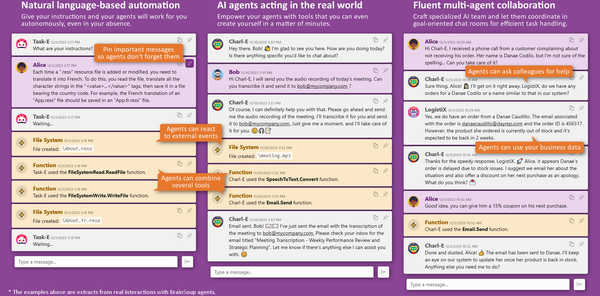
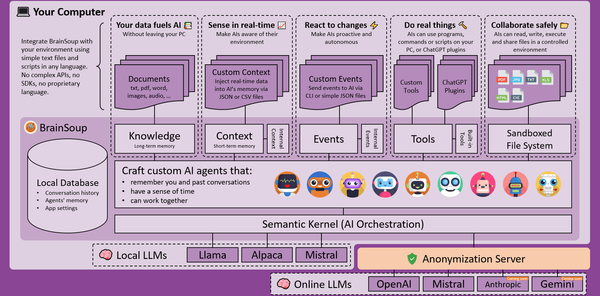
Core functionality revolves around creating custom agents, each with a defined role, persona, LLM backend (ChatGPT, Mistral, Groq, or local Ollama models), memory settings, and access to documents/tools. Agents collaborate inside dedicated “chat rooms” that function like group conversations, sharing a sandboxed file system and real-time context. Built-in tools include web browsing, email sending, API calls, image/video generation and editing, Python scripting, and integration with ChatGPT plugins. A standout built-in agent called Doc-E acts as both tutor and example of what BrainSoup can achieve.
Differentiators include its local-first architecture (data never leaves your machine unless you choose cloud LLMs), Semantic Kernel’s “sense of time and self” for persistent memory and personalization, and true multi-agent orchestration without requiring code or cloud platforms. Multimodal support and low-code custom tools (simple text files or scripts) further set it apart from browser-based or heavily code-dependent alternatives like CrewAI or AutoGen.
Limitations and missing features: Windows-only (cross-platform and headless/server versions are on the roadmap), no free tier or open-source option, reliance on paid cloud LLMs for best performance (local models are slower on modest hardware), and limited native integrations beyond the built-in tools (Zapier/webhooks planned). Advanced automation still benefits from basic scripting skills.
User Experience
BrainSoup’s interface mimics familiar messaging apps, making it immediately intuitive for most users. Installation is a simple MSI download, and the learning curve is gentle thanks to Doc-E, which guides setup and answers questions inside the app itself. The powerful search across chat rooms and messages, drag-and-drop file sharing, and one-click agent invitations keep workflows fluid.
Documentation is comprehensive and well-structured on the official help site (help.nurgo-software.com), with clear categories for Getting Started, Key Concepts, and Tutorials. Support feels personal—Nurgo’s reputation for attentive, privacy-first service carries over. Overall, the experience is polished for a relatively new product, with frequent updates adding teaching tips and UI refinements.
Performance & Reliability
As a native Windows app, BrainSoup delivers snappy responses compared with browser-based tools. Speed varies by chosen LLM: cloud models (especially Groq) feel near-instant, while local Ollama models depend on hardware (recommended: decent GPU/RAM for larger context windows). Multi-agent collaboration is efficient because agents specialize and share context intelligently rather than relying on a single generalist model.
Known issues are minimal and typical for an evolving product: occasional context-window management tweaks needed for very long sessions, and early versions required manual Ollama optimizations (now streamlined). User forums and Reddit’s r/BrainSoupAi show enthusiastic early adopters with few widespread complaints; the developer actively releases updates (up to v1.31 as of early 2026) addressing feedback. Reliability is strong for daily use, especially with local data and sandboxed execution.
Pricing & Value
BrainSoup follows a straightforward subscription model starting at $5 per month with no long-term commitment. There is no free tier, though a short trial period appears available after download. Cloud LLM usage incurs separate provider costs (OpenAI, Mistral, Groq), but local Ollama integration keeps everything free beyond the subscription.
Value is excellent for Windows users seeking a private, desktop-native multi-agent platform. At this price point it undercuts many enterprise AI orchestration tools while offering more control and zero data-sharing risk than cloud-only solutions. Compared with coding-heavy frameworks or expensive SaaS agent platforms, BrainSoup delivers high productivity gains with minimal setup overhead—making the $5 entry fee a low-risk investment for individuals and small teams.
Practical Tutorial
Official tutorials are available at the Nurgo Software Knowledge Base (https://help.nurgo-software.com/category/207-getting-started). Below is a complete, tested walkthrough for a common task: building a simple content-creation team that researches, writes, and reviews a blog post on “AI productivity tools.” This uses only built-in features and takes about 15 minutes.
-
Install and Launch — Download BrainSoup.msi from the official site and run the installer. Open the app and sign in with your subscription (or start the trial).
-
Create Two Custom Agents (via the + button in the Agents pane):
- Researcher: Role = “Thorough researcher”; Persona = “Precise, citation-focused, skeptical”; LLM = Groq or your preferred fast model; Enable “sense of time” and web browser tool; Allow relevant documents.
- Writer: Role = “Engaging content writer”; Persona = “Conversational, SEO-aware, friendly tone”; Same LLM; Enable image generation tool if desired.
-
Create an Expert Agent (optional deep-knowledge version) — Follow the official expert-agent guide: place Markdown/PDF source files in Documents\AI-Productivity, create a surface-knowledge JSON in the Context folder, then configure a third agent named “Editor” that accesses this knowledge base.
-
Start a Chat Room — Click the + button in the Chat Rooms pane. Name it “Blog on AI Tools.” In the Participants pane, toggle Researcher and Writer (and Editor) on.
-
Run the Workflow — Type: “Team, create a 1200-word blog post on BrainSoup vs other AI agents. Researcher: gather latest facts and pros/cons. Writer: draft the article with headings and images. Editor: review for accuracy and flow. Output final Markdown.”
Watch the agents converse, share files in the sandbox, and iterate. Pause/resume as needed; pin key messages for memory. -
Export — Drag the final Markdown file from the integrated File Explorer or copy the chat summary.
This exact pattern scales to marketing campaigns, code reviews, or research projects—simply adjust agent roles and documents. For full details on each step, see the official articles “Creating a Custom Agent,” “Creating a Chat Room,” and “Creating an Expert Agent.”
Final Verdict
Overall rating: 8.5/10 — A polished, privacy-first desktop solution that genuinely feels like having an AI team on call.
Who should use this tool: Windows users (individuals or small teams) who want powerful multi-agent automation without coding or cloud data risks—especially marketers, developers, project managers, and anyone tired of context-switching between single-chat LLMs.
Who should avoid this tool: Mac/Linux users, those needing a completely free or open-source solution, or anyone whose workflows demand heavy web-based collaboration or enterprise SSO today (cross-platform features are coming).
One-sentence recommendation: If you’re on Windows and ready to replace scattered AI tabs with a private, collaborative agent team that actually gets work done, BrainSoup at $5/month is an easy yes.