Bravo Studio Review: Turn Figma Designs into Native Apps Fast
Overview & Purpose

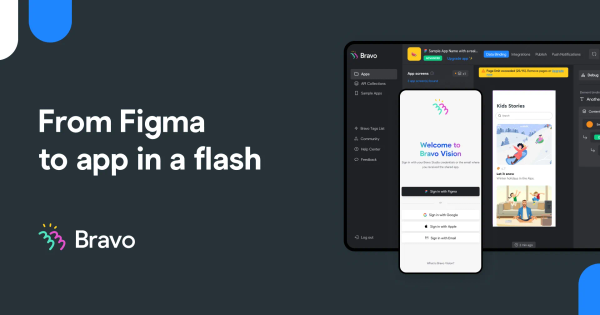
Bravo Studio is a no-code platform that transforms Figma (and Adobe XD) designs into fully functional native mobile apps for iOS and Android. By importing designs and applying simple "Bravo Tags" to elements, users can add interactivity, data binding, navigation, and backend connections without writing code. It is accelerated by AI for generating backends and custom Web Components, enabling rapid prototyping to production-ready apps.
Primary use cases include building MVPs for startups, converting design prototypes into testable apps for user feedback, creating content-driven or data-backed apps (e.g., fitness trackers, meditation tools, real estate listings), and iterating quickly for founders or teams prioritizing design fidelity and speed-to-market. It shines in scenarios where pixel-perfect UI from Figma is essential and traditional development would be too slow or expensive.
Target audience includes designers, product managers, founders, creators, and non-technical entrepreneurs who are proficient in Figma but lack coding skills. It is less suited for traditional developers who prefer full code control, though teams can use it collaboratively.
Key Features & Capabilities
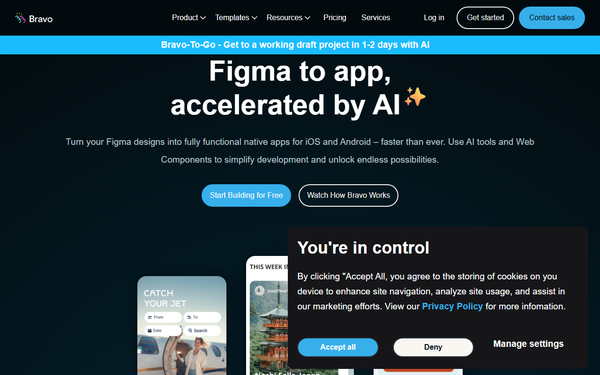
Core functionality revolves around seamless Figma-to-native conversion: users share a Figma file link, import it into Bravo Studio, and the platform automatically generates native screens. Functionality is added via Bravo Tags (text labels in Figma layer names) for elements like lists, forms, buttons, maps, charts, and API calls. It supports full REST API integration (GET, POST, etc.) with any backend, including no-code tools like Airtable, Xano, or Supabase.
Standout features include:
- Direct updates from Figma without full app store resubmissions for faster iteration.
- AI-powered backend generation and Web Components for custom HTML/JS/CSS functionality.
- Native components for iOS and Android (no webviews for core UI).
- Integrations with Stripe, OneSignal push notifications, RevenueCat in-app purchases, Google Analytics, and more.
- Bravo Vision app for real-time previewing on physical devices.
- Versioning (in higher plans) and multi-language support.
Differentiators from competitors (e.g., FlutterFlow, Adalo) are its strict design-first approach with near-perfect fidelity to Figma prototypes and minimal learning curve for designers. It avoids rebuilding UIs visually and focuses on tagging for logic.
Limitations include a maximum number of screens per project (15 on free, 30 on Solo, up to 100 with add-ons), reliance on external backends for complex data logic, and occasional challenges importing highly complex or non-optimized Figma files. It is not ideal for apps requiring heavy custom native code or advanced animations beyond Figma capabilities. Some users note it lags behind modern Figma layout updates.
User Experience
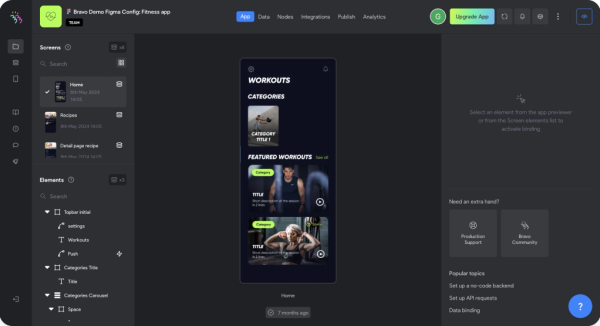
Bravo Studio offers an intuitive experience for Figma users, with a low barrier once designs are prepared. The interface is clean and web-based, centered around project management and API configuration rather than a complex builder. The learning curve is gentle for designers familiar with Figma but involves mastering Bravo Tags and data binding, which can take a few hours via tutorials.
Interface quality is straightforward and focused—no overwhelming drag-and-drop canvas since design happens in Figma. Previewing via the free Bravo Vision mobile app provides instant native feel. Documentation is comprehensive and well-structured at docs.bravostudio.app, with step-by-step guides, a community forum, AI assistant (for paid plans), email support (tiered by plan), and expert hiring options. Tutorials in the Academy cover everything from basics to publishing.
Overall, users praise the speed and design control; some Reddit feedback highlights it as "great for a design-first experience" but notes occasional friction with tags or integrations.
Performance & Reliability
As a native app builder, Bravo Studio delivers strong performance with smooth, device-optimized apps that feel professional on both iOS and Android. Iteration is fast—changes in Figma sync quickly, and API calls are efficient when using well-structured backends.
Known issues are minor and mostly tied to plan limitations or setup: users report occasional import glitches with complex Figma files, screen count caps forcing upgrades, and dependency on third-party backend stability. Common complaints from reviews include hitting walls on very advanced features (leading some to switch tools like FlutterFlow) and initial setup time for API authentication. However, no widespread reliability complaints; apps publish reliably to stores and receive positive feedback for MVP speed.
Pricing & Value
Bravo Studio offers transparent, scalable pricing (as of April 2026):
- Starter: Free – Unlimited apps, 15 screens/project, previews only, community support.
- Solo: €19/month (€16/month annually) – 30 screens, full publishing to app stores, all Bravo Tags, API support, 1-1 email support.
- Solo + Advanced/Business add-ons: €89–€199 per app/month for more screens (80–100), branding removal, versioning, in-app purchases, advanced analytics.
- Team plans: From €40/seat/month (min. 10 seats) with collaboration, priority support, and add-ons.
Annual billing includes 2 months free. Enterprise/custom options and professional services available via sales.
Value is excellent for design-centric MVPs: users get native apps at a fraction of development costs (often cited as 10x cheaper). Free tier allows full exploration; paid plans unlock publication and scale affordably compared to hiring developers or using heavier no-code platforms. Limitations like screen caps are clear trade-offs for the design fidelity and speed.
Practical Tutorial
Bravo Studio provides extensive official tutorials and an Academy section. Here is a step-by-step walkthrough for a common task—creating and publishing your first functional app from a Figma design (e.g., a simple real estate listing app with data from Airtable or Xano). This is synthesized from official docs and tutorials.
-
Prepare your Figma design: Create or open a Figma file with app screens. Use frames for each screen. Add Bravo Tags to layers (e.g., rename a list component to
#LISTfor dynamic data, or#BUTTON:NAVIGATE:/screen2for navigation). Ensure the file is shareable with "Anyone with the link can view." -
Create a project in Bravo Studio: Sign up/log in at projects.bravostudio.app. Click "Create new app," paste the Figma share link, and select "Connect Bravorized Figma file." Bravo auto-imports and converts screens to native.
-
Add data binding and APIs: In the project dashboard, set up a backend (e.g., create a simple Xano or Airtable collection). Add API requests (GET for lists, POST for forms). Bind data to tagged elements—e.g., map JSON fields to text layers or images.
-
Configure functionality: Use additional tags for actions like forms, authentication, or conditional visibility. Test logic in the builder.
-
Preview on device: Download the free Bravo Vision app (iOS/Android). Scan the QR code from your Bravo project to see the live, interactive native app on your phone.
-
Iterate and test: Update designs in Figma, re-sync in Bravo, and preview instantly. Use versioning (paid plans) for A/B testing.
-
Publish: Once ready, generate builds in Bravo and submit to Apple App Store and Google Play (guidance provided). Remove branding and add advanced features via plan upgrades.
For full official walkthroughs, see the Bravo Academy tutorials or YouTube videos like "Figma to Mobile App in Minutes." A beginner Figma template is available in the Figma Community for practice.
Final Verdict
Overall rating: 4.5/5. Bravo Studio delivers exceptional value for its niche with strong design-to-app speed and native quality.
Who should use this tool: Designers, founders, and non-technical teams who live in Figma and want to launch polished, functional mobile MVPs or content apps quickly and cost-effectively without hiring developers.
Who should avoid this tool: Developers needing deep custom code, teams building highly complex apps with intricate logic beyond APIs/tags, or those without Figma experience (the tool's core strength becomes a limitation).
One-sentence recommendation: If your priority is turning beautiful Figma designs into real native apps faster than traditional development, Bravo Studio is an outstanding, designer-friendly choice worth starting with today.