Bricabrac AI Review: Build Functional Web Apps in Minutes
Overview & Purpose
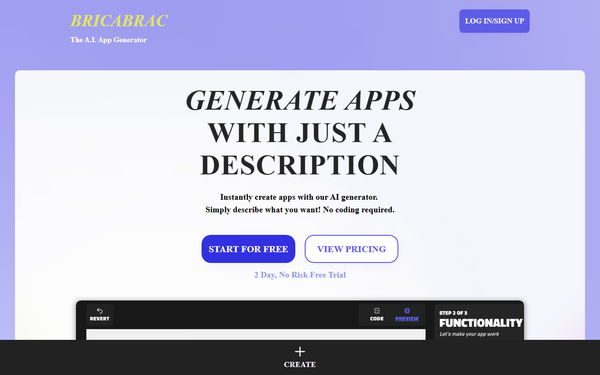
Bricabrac AI is an AI-powered web app generator that enables users to create fully functional, responsive web applications from simple text descriptions in under 10 minutes, with no coding required. Users describe their desired app—such as features, layout, and functionality—and the AI (leveraging GPT-4 technology) automatically generates a complete app, including a clean user interface and backend logic. It then provides a no-code design editor for refinements, free web hosting, and full code export for ownership and further customization.
Primary use cases include rapid prototyping of custom web tools, simple games, internal business dashboards, lead trackers, task managers, and MVPs for entrepreneurs or small teams. It excels at turning ideas into launch-ready web apps quickly, ideal for validating concepts without developer resources.
The target audience encompasses non-technical users like entrepreneurs, small business owners, marketers, designers, freelancers, and product managers who need fast, affordable app creation. Developers may also use it for quick starts or boilerplates. It is less suited for enterprise-scale or highly complex applications requiring advanced integrations.
This review reflects research conducted as of April 10, 2026, drawing from the official site descriptions, AI tool directories, and available user feedback.
Key Features & Capabilities
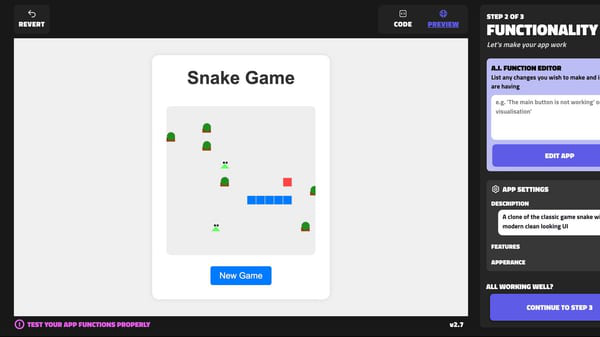
Core functionality revolves around text-to-app generation: input a natural language prompt, and the AI produces a responsive web app with HTML, JavaScript, and CSS. Users can then iterate by describing additional features (e.g., "add user authentication" or "include a dashboard chart"), which the AI integrates automatically. A no-code drag-and-drop editor allows visual tweaks to UI elements without writing code, while direct code editing is available for those with technical skills.
Standout features differentiating it from competitors include full code ownership and export (no vendor lock-in), complimentary web app hosting, and the ability to share apps via an upcoming gallery for remixing by others. The 2-day free trial and free plan make it accessible for experimentation.
Limitations and missing features (noted as in beta or planned): lack of support for external libraries (e.g., NPM packages or Tailwind CSS), automatic image/asset handling, user data storage and authentication, templates or app gallery showcase, and native mobile app generation. AI-generated code quality can vary, often requiring manual refinement for complex logic or edge cases, and highly intricate apps may not achieve perfect results from prompts alone.
User Experience
Bricabrac AI boasts a low learning curve, making it highly accessible for beginners. The interface is described as clean, intuitive, and visually appealing, with a straightforward workflow from prompt entry to generation and editing. Non-coders can rely on the no-code editor or text-based adjustments, while optional code access provides flexibility.
Documentation appears basic but sufficient, with FAQ sections and help resources focused on prompt crafting and editor usage. Support is primarily self-service, though the free trial encourages hands-on exploration. User feedback highlights ease for quick builds, though some note that prompt quality significantly impacts output accuracy.
Performance & Reliability
Generation is fast—typically completing in minutes—aligning with its "10 minutes or less" promise, making it efficient for rapid iteration. Free hosting ensures immediate deployment and testing without additional setup.
Known issues stem largely from its beta status: variable AI output quality (e.g., incomplete features in complex demos like Spotify clones), occasional need for multiple prompt refinements, and limitations in handling advanced functionalities. Real-user complaints are sparse due to limited independent reviews, but directory summaries and video tests indicate reliability for simple to moderate apps, with potential frustrations for production-level demands. No widespread outages or major reliability complaints were noted in available sources.
Pricing & Value
Bricabrac offers a tiered subscription model with a generous free plan and a 2-day no-risk trial. The free tier includes up to 6 app generations per month, free hosting, and code export. The Power Plan, priced at $68 per month, provides 102 AI generations (roughly 17 full apps), unlimited hosting, unlimited exports, and anytime cancellation.
Value is strong for its audience: creating an app via traditional development can cost $15,000+ and take weeks, while Bricabrac delivers prototypes affordably and quickly. It outperforms basic no-code builders in AI automation and code ownership but may not compete with full low-code platforms for scalability. The free trial minimizes risk.
Practical Tutorial
A step-by-step tutorial for a common task—building a simple task management app—is outlined below, based on the standard workflow from official descriptions and demo analyses. For visual guidance, see the YouTube tutorial "Build an App in Minutes without Coding" which demonstrates a similar process with a Spotify clone example.
-
Sign Up and Start: Visit https://bricabrac.ai/ and create a free account to access the 2-day trial (or free plan). No credit card is required initially.
-
Describe Your App: In the AI generator interface, enter a clear text prompt, e.g., "Create a modern task management web app with user login, todo lists, add/edit/delete tasks, due dates, priority levels, categories, and local storage for persistence. Make it responsive with a clean dashboard UI using blue and white colors."
-
Generate the App: Submit the prompt. The AI processes it (usually under 2 minutes) and outputs a fully functional, responsive web app with UI and basic logic.
-
Customize with No-Code Editor: Use the drag-and-drop editor to adjust layouts, colors, buttons, or text. Alternatively, describe changes like "Make the header larger and add a dark mode toggle," and let the AI update it.
-
Add or Refine Features: Iteratively prompt for enhancements, e.g., "Add task search and notifications." Test the app in preview mode.
-
Test, Host, and Export: Preview functionality, then publish to free web hosting for a live URL. Share via the gallery (if available) or export the full code for local editing/hosting elsewhere.
This process typically takes 5–15 minutes for a basic app. Results improve with specific, detailed prompts. For more examples, official FAQs or community demos provide additional walkthroughs.
Final Verdict
Bricabrac AI earns a solid 4 out of 5 stars. It shines as an accessible, time-saving tool for non-coders needing quick web app prototypes with ownership and hosting included.
Who should use it: Entrepreneurs, marketers, designers, and small business owners seeking fast, low-cost MVPs or internal tools without hiring developers—especially for simple to moderately complex web apps.
Who should avoid it: Teams requiring production-ready apps with advanced features like user authentication, external integrations, or native mobile support, or those needing pixel-perfect custom code (beta limitations may frustrate advanced users).
One-sentence recommendation: Bricabrac AI is an excellent choice for anyone wanting to turn app ideas into live web apps in minutes with full code control—perfect for rapid innovation, but best supplemented with manual tweaks for complex needs.