BypassGPT Review: Can This AI Humanizer Truly Bypass Detectors?
Overview & Purpose
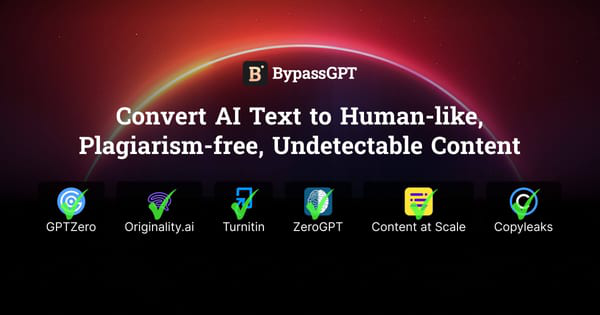
BypassGPT is an AI humanizer and bypasser that rewrites AI-generated text to make it appear human-written, undetectable by popular AI detectors, and free of plagiarism or errors. Its primary goal is to help users convert content from tools like ChatGPT, Claude, or Gemini into natural-sounding text that passes checks from detectors such as GPTZero, ZeroGPT, Originality.ai, Turnitin, Winston AI, Copyleaks, Writer, Content at Scale, and Sapling. This supports maintaining authenticity online while leveraging AI for speed.
Key use cases include humanizing student essays and assignments to comply with academic policies, producing SEO-optimized blog posts and website copy that avoid search engine penalties for AI content, crafting marketing materials that boost engagement without triggering spam filters, and enabling agencies or webmasters to scale high-quality output quickly. The tool also emphasizes error correction, keyword integration for better rankings, and preservation of brand voice.
Target audience spans students needing undetectable academic work, bloggers and content creators focused on volume and SEO, webmasters building sites, and marketing agencies or businesses seeking authentic online presence without disclosing AI use. It is not aimed at developers or designers but at anyone producing text-heavy content.
Key Features & Capabilities
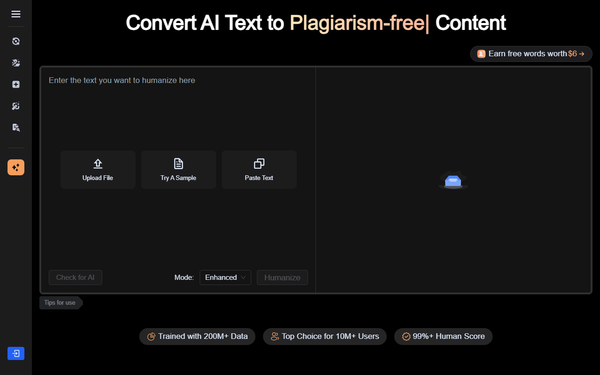
Core functionality revolves around a simple paste-and-process workflow: users input AI-generated text (via paste, file upload, or sample), select a mode, and receive rewritten output claimed to score 99%+ human and 100% undetectable. It includes a built-in AI detector for verification and a plagiarism remover in some views. The advanced model, trained on over 200 million AI and human texts, identifies patterns from models like GPT-3.5/4, Claude, and Gemini to add human-like idiosyncrasies.
Standout features include multilingual support for over 50 languages (English through Yorùbá, Hindi, and more), multiple processing modes (Fast, Creative, Enhanced, or Humanize variants), automatic grammar/syntax/spelling fixes, SEO-friendly keyword enrichment, spam filter bypass, and 100% originality guarantees. It claims to outperform basic paraphrasers by mimicking natural writing styles deeply.
Limitations include no integrations with other tools (e.g., no API or direct CMS plugins mentioned), potential over-sanitization that flattens personality or tone, and inconsistent performance against evolving detectors like post-2025 Turnitin updates. Free tier restrictions severely limit testing, and advanced academic or high-stakes use may still require manual editing. No enterprise custom options or team features are prominently advertised.
User Experience
BypassGPT boasts an extremely low learning curve—most users can start in under a minute via the intuitive three-step process: paste text, click to humanize, and copy output. The interface centers on a clean input box with Upload File, Paste Text, Try a Sample, and Check for AI buttons, plus mode selectors (e.g., Enhanced or Humanize) and language options. Output appears instantly below for easy review and re-processing.
Interface quality is functional and mobile-friendly but draws criticism for visually unappealing colors, cluttered sidebars, and generic design that feels dated compared to sleeker competitors. No steep documentation is needed; built-in tooltips and a prominent FAQ cover basics. Support resources shine with a dedicated hub of guides (e.g., “How to Humanize AI Text,” “How to Bypass AI Detection”) and responsive customer service praised in many reviews for prompt, helpful replies—though refund and cancellation experiences vary.
Performance & Reliability
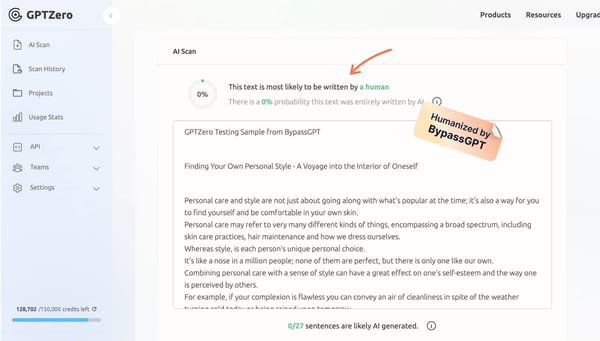
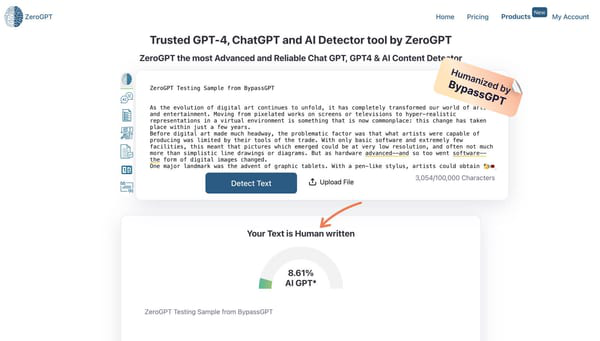
Processing is fast—typically seconds to moments later even for several hundred words—making it efficient for daily workflows. Reliability claims are strong on paper (100% human scores, bypass of listed detectors), and many users report success with basic tools like GPTZero or ZeroGPT, plus improved readability and natural flow in Enhanced mode.
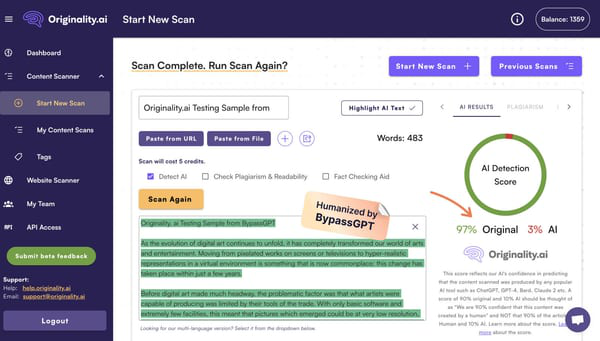
However, real-world feedback reveals inconsistencies. Post-2025 detector updates (especially Turnitin) often flag output, and some reviews note clunky or overly corporate-sounding results that require heavy re-editing. Common complaints include limited free-tier word caps causing frustration, occasional accuracy drops, and reports of over-sanitized text losing original intent. Trustpilot ratings hover around 3.4/5 across hundreds of reviews, with praise for speed but frustration over reliability in strict environments. No major outages reported, but performance varies by input quality and chosen mode.
Pricing & Value
BypassGPT offers a very limited free plan (150 words/month total, ~80–125 words per request) for basic testing. Paid tiers start with Basic at approximately $12/month (or lower annually) for 5,000 words, Pro around $35/month for 30,000 words, and Unlimited at ~$39/month with no caps (pricing shown in local currency equivalents like JPY on the site; yearly plans save up to 51%). Per-request limits scale with plans (e.g., 500 words on Basic). A 3-day money-back guarantee exists, but user reports on refunds are mixed. No dedicated enterprise tier is listed.
Value is strong for light users or budget-conscious students/bloggers needing quick fixes, especially versus pricier alternatives like Undetectable AI (starting higher with guarantees). However, heavy users may find word quotas restrictive, and inconsistent bypass performance reduces long-term ROI compared to tools with stronger detector guarantees or unlimited free checks. It competes well on affordability and multilingual breadth but lags in premium polish.
Practical Tutorial
Official resources provide clear guidance, including dedicated articles like “How to Humanize AI Text” and “How to Make AI Text Undetectable.” Here is a step-by-step walkthrough for the most common task—humanizing a ChatGPT-generated blog post—based on the live interface and official instructions (tested conceptually as of March 2026; visit https://www.bypassgpt.ai/how-to/humanize-ai-text for video-style demos and more).
-
Prepare and Access: Go to https://www.bypassgpt.ai/ (or directly to the Bypass AI tab). No account required for free trial, though signing up unlocks word credits.
-
Input Content: Paste your AI-generated text into the central box (or upload a .txt/.doc file). Example input (simulated from typical ChatGPT output): “Artificial intelligence is transforming the way businesses operate by automating repetitive tasks and providing data-driven insights.”
-
Select Options: Choose a mode—“Enhanced” for natural flow or “Humanize” for maximum undetectability. Select language if non-English. Click “Check for AI” first if desired to confirm original score (often 90%+ AI).
-
Process: Hit the prominent “Humanize” or “Bypass” button. Wait seconds for processing.
-
Review and Refine: Output appears instantly—e.g., rewritten version: “Artificial intelligence is changing how companies work every day, taking over the boring stuff and helping leaders make smarter choices based on real numbers.” Check the integrated detector score (aim for 0–1% AI). Edit manually if needed for voice, then copy or re-process.
-
Verify Externally: Paste into external detectors like Originality.ai or Turnitin for confirmation. Download or export as needed.
For best results, keep inputs under per-request limits and combine with manual touches (e.g., add personal anecdotes). Official hub at https://www.bypassgpt.ai/hub offers 10+ similar guides and before/after tables showing BypassGPT reducing AI scores to near zero.
Final Verdict
Overall rating: 3.5/5. BypassGPT excels as an affordable, fast entry-level humanizer for casual or budget users but falls short of premium reliability in 2026’s evolving detection landscape.
Students, bloggers, and small marketers on tight budgets should use it when quick, multilingual rewrites for basic detectors suffice and manual polishing is acceptable—its training depth and built-in tools deliver solid value here. Avoid it for high-stakes academic submissions, enterprise branding, or environments relying on Turnitin/Originality.ai post-2025, where inconsistencies, limited free tier, and occasional tone flattening create too much risk.
Try the free tier first—if it consistently hits 100% human scores on your workflow, it’s a smart, low-cost addition; otherwise, explore alternatives with stronger guarantees.