Cades Dev Review: Build Apps and Websites Using AI Prompts
Overview & Purpose

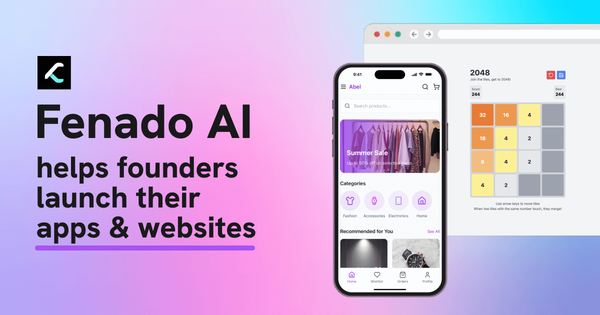
Cades.dev, which has transitioned to and is now primarily accessible via Fenado AI (fenado.ai), is an AI-powered no-code platform that enables users to transform natural language descriptions into fully functional mobile apps and websites in minutes. Users chat with AI agents to design screens, generate interactive prototypes, iterate on feedback, and convert approved prototypes into production-ready applications complete with backend support and publishing assistance to app stores or web hosting. Primary use cases include rapid MVP development for startups, quick prototyping for stakeholder validation, educational projects, and launching simple to moderately complex apps without hiring developers or writing code.
The target audience consists primarily of non-technical founders, entrepreneurs, startups building MVPs, designers converting concepts to interactive products, educators teaching app development, and small businesses seeking fast launches. It appeals less to professional developers needing granular code control, focusing instead on speed and accessibility for idea validation and deployment. The platform leverages the experience of founders who built India’s largest news app (Inshorts), combining AI efficiency with human expertise and production-grade infrastructure. Research conducted as of March 2026.
Key Features & Capabilities
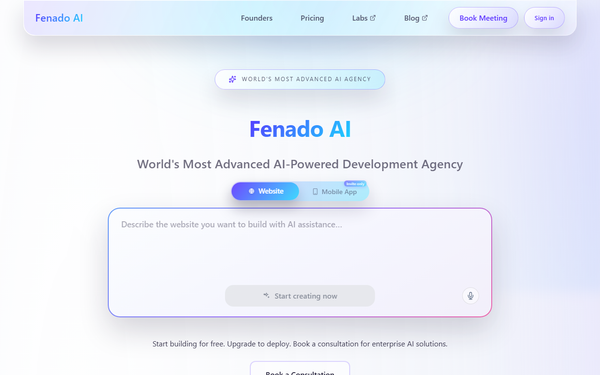
Core functionality revolves around a conversational AI interface: describe your app or website, and the AI generates screens, logic, and prototypes instantly. Key capabilities include real-time chat-based screen design and editing, one-click interactive prototype creation and sharing, automated conversion from prototype to production code, custom backend and API integration (on higher plans), and assisted publishing to Google Play, App Store, or web with hosting. Standout features include the “prototype-first” workflow for rapid feedback loops, hybrid AI-plus-human support for scaling, and the ability to build any type of app or website purely through text prompts—differentiating it from traditional no-code tools like Bubble or Adalo by emphasizing conversational simplicity and agency-level quality control without requiring visual drag-and-drop builders.
Limitations include reliance on AI iterations for complex logic or custom integrations (which may not always be pixel-perfect on first pass), archived older features such as the full Cloud IDE (indicating a shift to a more streamlined experience), and the fact that fully interactive production apps with advanced security or enterprise features require paid Business plans. Free-tier users are restricted to one mobile app and one website prototype, with no unlimited testing or deployment.

User Experience
The interface is modern, clean, and highly intuitive, centered on a simple chat window where changes appear live—resulting in an exceptionally low learning curve even for complete beginners. Users report quick onboarding and immediate productivity, with prototypes shareable via link for real-time collaboration. Documentation includes a comprehensive FAQ, step-by-step guides in the docs portal, and archived video tutorials, supplemented by community support via Discord and WhatsApp (aiming for 24-hour responses). Higher-tier plans add priority support and dedicated account managers. Overall, the experience feels conversational and empowering rather than technical, though some users note occasional need for prompt refinement to achieve desired results.

Performance & Reliability
Generation of prototypes is exceptionally fast—often completing in minutes—with efficient handling of design iterations and basic functionality. The platform’s backend is described as production-grade, supporting scalable apps. Known issues are minimal in public discourse; early user feedback highlights strong speed but occasional AI output inconsistencies (e.g., non-fully interactive elements or needing tweaks for edge cases). No widespread complaints about downtime or major bugs appear in available reviews as of March 2026, though the tool’s relative novelty means long-term reliability data is still emerging. Performance shines for MVPs and prototypes but may require human oversight (via Business plans) for mission-critical applications.
Pricing & Value
Pricing follows a freemium model: a Free plan allows one mobile app and one website prototype indefinitely for exploration. Premium/self-serve deployment options start around $20/month (historical Pro tier references), while full production capabilities move to Business plans—Business Plus at approximately $1,999/month (or $1,799 yearly) offering unlimited projects, 100 hours of monthly tech support, custom APIs/backend, and dedicated management; Business Express at $9,999/month (or $8,999 yearly) adds 720 support hours, a dedicated engineering team, custom integrations, and enterprise security. Exact figures should be confirmed on fenado.ai/pricing as they may vary.
Value is strong for non-technical users avoiding developer salaries (potentially saving tens of thousands), especially for rapid MVPs. Compared to alternatives like custom development agencies or other AI builders, it offers faster time-to-market at competitive entry pricing, though enterprise plans represent a premium investment for ongoing support. Free tier provides excellent testing ground before committing.
Practical Tutorial
Official tutorials are available on YouTube (e.g., “Fenado AI Tutorial: Create Development-Ready App Prototypes in Minutes”). Here is a step-by-step walkthrough for a common task—building a simple task management mobile app—based on the platform’s documented process (as of March 2026):
-
Visit https://fenado.ai/ (or the original https://cades.dev/, which redirects) and sign up for the free account—no credit card required.
-
Click “Start New Project” and enter a chat prompt: “Build a mobile task manager app with user login, task list view, add/edit/delete tasks, due dates, and dark mode support.”
-
Interact via chat: The AI generates initial screens. Refine instantly by typing follow-ups like “Add a calendar integration for due dates” or “Make the UI use blue accents and add push notification previews.” Changes reflect live.
-
Once satisfied, click to generate an interactive prototype. Test flows yourself, then share the link with teammates for feedback.
-
Iterate based on comments until the prototype is approved.
-
Upgrade to a paid plan (Premium or Business) to convert the prototype into a production app. Request custom backend if needed (e.g., real database sync), then publish— the platform assists with Google Play/App Store submission or web deployment.
This entire process typically takes 10–30 minutes for a basic app. For a visual demo of a similar banking prototype, watch the official tutorial video linked above.
Final Verdict
Overall rating: 4.3 out of 5. This tool excels for non-technical founders and startups who need to validate and launch ideas quickly without code or large teams—ideal for MVPs, prototypes, and simple production apps thanks to its conversational speed and hybrid support. Avoid it if you require deep custom development, full code ownership from day one, or have highly complex enterprise requirements without budget for Business plans, as AI output can still need refinement and advanced features carry premium pricing. One-sentence recommendation: If you have an app idea and want to go from chat to launch in minutes without hiring developers, Cades.dev (Fenado AI) is a powerful, accessible choice worth starting with for free today.